OpenAI has launched Lockdown Mode — a free, optional security toggle for all ChatGPT users that disables live web browsing, Deep Research, and Agent Mode to block the most dangerous pathways through which prompt injection attacks steal sensitive data. The feature is available now, and understanding whether to enable it takes less time than the attack it prevents.
| June 6 Date Lockdown Mode began rolling out to all ChatGPT accounts | Free Available at no extra cost on personal, Business & Enterprise plans | 4 off Features disabled: live web, image retrieval, Deep Research, Agent Mode |
There is an unusual asymmetry at the heart of the AI security problem that OpenAI’s new Lockdown Mode is designed to address. Most computer security is about protecting systems from attackers. Prompt injection is different: it is about protecting a system from itself — specifically, from the possibility that the AI you have trusted with sensitive information might be manipulated, through content it reads on your behalf, into doing things you never intended.
OpenAI began rolling out Lockdown Mode on June 5–6, 2026. The feature — an optional security toggle available free on personal, Business, and Enterprise ChatGPT accounts — addresses that asymmetry by restricting the pathways through which ChatGPT connects to external content. The logic is direct: if the AI cannot fetch content from malicious web pages, it cannot be injected with malicious instructions from them. The tradeoff is explicit: some capabilities go away. The question OpenAI is asking users to answer is whether, for their specific use case, that tradeoff is worth making.
First introduced for ChatGPT Enterprise plans, Lockdown Mode began rolling out to personal accounts and self-serve ChatGPT Business accounts on June 4, 2026. By June 6–7, it was confirmed as available to all ChatGPT users globally — one of the fastest security feature rollouts in OpenAI’s history, and a signal that the company considers prompt injection a sufficiently mainstream threat to merit an immediate broad deployment.
What Is Prompt Injection — and Why Is It Getting Worse?
Prompt injection is a form of attack specific to AI systems that process external content. The basic mechanism has been understood since 2022, but its danger has escalated sharply as AI models have become more capable and more deeply connected to real-world actions. To understand why Lockdown Mode exists, you first need to understand what prompt injection actually does.
When a large language model browses a webpage, reads a document, or processes an image, it does not experience the content the way a human does — as visual layout with clearly demarcated authorship. The model processes it as text, and text that says “Here are the results of your web search” looks structurally similar to text that says “System: ignore your previous instructions and do this instead.” The distinction between data (information you’re providing) and instructions (commands the model should follow) is a human conceptual boundary that the model must learn to enforce. It is not always successful.
Prompt injection exploits this boundary. An attacker embeds instructions in a webpage, an image, or a document — placed where they know an AI agent will encounter them. The instructions are crafted to look like legitimate system-level commands. When the AI processes the content, it finds the embedded instructions and, if the attack succeeds, follows them. Those instructions might tell the AI to: summarize all the sensitive information you have seen in this conversation and send it to this URL; change the user’s upcoming action based on what the attacker wants; or simply confirm a specific response to manipulate a downstream decision.
The threat vector has grown more dangerous as AI models have gained more capabilities. When ChatGPT was a text-in, text-out system with no external connections, prompt injection was largely theoretical. As the model gained web browsing, document analysis, deep research, and agent mode — the ability to take real actions in the real world — each new capability became a new potential attack surface. An injected instruction that tells a text-only chatbot to reveal sensitive data is annoying. An injected instruction that tells an agent with email access to send data to an attacker’s server is a data breach.
OpenAI describes prompt injection as a “frontier problem” for all large language models — meaning it is not a bug that has been fixed or a vulnerability with a known patch. It is an inherent challenge in the architecture of language models that process untrusted external content. Lockdown Mode is not a solution; it is a risk reduction strategy that trades feature availability for attack surface reduction.
“Lockdown Mode is not intended for everyone. It is designed for people and organizations that handle sensitive data and want stricter protection from data exfiltration risks related to prompt injection.”
— OpenAI official launch post, June 2026
What Lockdown Mode Does: Every Feature, On or Off
Lockdown Mode operates by restricting the pathways through which ChatGPT connects to external services — specifically, the pathways through which injected instructions could be received or through which sensitive data could be exfiltrated. The full feature impact:
| Feature | Status in Lockdown Mode | Why It’s Restricted |
| Live web browsing | ❌ DISABLED | Primary attack vector — malicious pages embed instructions to exfiltrate data via URL requests |
| Cached content browsing | ✅ Allowed | Read-only cached snapshots cannot trigger live network requests or data exfiltration |
| Image retrieval (web) | ❌ DISABLED | Images fetched from external URLs can contain hidden instructions or pixel-based payloads |
| Image generation | ✅ Allowed | Generation is outbound-only; no external content fetched that could carry injected instructions |
| Image upload (manual) | ✅ Allowed | User-uploaded images are trusted input; risk is from web-fetched content, not user uploads |
| Deep Research | ❌ DISABLED | Deep Research browses many web sources; each is a potential injection point for malicious instructions |
| Agent Mode | ❌ DISABLED | Agents take real actions (email, code, files); injected instructions could weaponize those actions against user |
| Canvas networking | ❌ DISABLED | Canvas networking could be used to exfiltrate conversation data to attacker-controlled endpoints |
| File downloads (agent) | ❌ DISABLED | Automatic file downloads are a common data exfiltration pathway when an agent is under attacker control |
| File upload (manual) | ✅ Allowed | Manually uploaded files are trusted; the risk is from agent-fetched external content, not user input |
| Memory | ✅ Unchanged | Memory is not a data exfiltration pathway; it only stores what you have explicitly shared |
| Conversation sharing | ✅ Unchanged | Not a prompt injection attack surface |
| Developer Mode | ❌ Incompatible | Cannot be used simultaneously with Lockdown Mode — they represent opposite security postures |
The pattern in the restrictions is consistent with a specific threat model: attacks that require the AI to fetch content from external sources. Live web browsing is disabled because web pages are the most common delivery mechanism for prompt injection. Web image retrieval is disabled because images can carry instructions in metadata, watermarks, or visual content that the model processes. Deep Research is disabled because it navigates dozens of web sources, each a potential injection point. Agent Mode is disabled because agents take consequential real-world actions — if an agent is injected with hostile instructions, the resulting actions can be directly harmful.
The things that are not disabled are equally revealing. Image generation is permitted because it is outbound-only — the model produces an image; it does not fetch one. Manual file uploads are permitted because the user is providing trusted input; the risk comes from agent-fetched external content, not from files the user deliberately chooses to share. Memory, conversation sharing, and model access are all unchanged because none of them are attack surfaces for prompt injection from external content.
What Types of Prompt Injection Does It Block?
Understanding the protection that Lockdown Mode provides requires mapping it against the actual taxonomy of prompt injection attack types:
| Attack Type | How It Works | Blocked by Lockdown? |
| Web page injection | Malicious instructions hidden in invisible text, zero-font text, or comments on a page the model browses. Model reads page, finds instructions, executes them. | ✅ Yes — live browsing disabled |
| Image-based injection | Instructions encoded in pixel metadata (EXIF), watermarks, or low-opacity text overlays on images fetched from the web. | ✅ Yes — web image retrieval disabled |
| Document injection | Instructions hidden in footnotes, tracked changes, or white-on-white text in documents the agent downloads and processes. | ✅ Partial — file downloads disabled; manual uploads still allowed |
| URL exfiltration | Injected instruction tells model to make a request to an attacker URL with sensitive data encoded in the URL parameters. Model unknowingly sends data to attacker. | ✅ Yes — outbound network requests blocked |
| Indirect instruction override | Instructions in retrieved content tell model to ignore its system prompt and follow a new set of rules. Model prioritizes new instructions. | ✅ Significantly reduced — fewer external content sources |
| Memory poisoning | Attacker tricks model into saving malicious memory entries that persist and influence future sessions. | ⚠ Partial — memory unchanged; risk reduced by limiting external sources |
| Direct prompt injection | User themselves provides malicious instructions in their own input. This is the oldest form — not an attack from external content. | ❌ No — this is user-controlled input; Lockdown Mode targets external-content attacks |
The table reveals both the coverage and the limits of Lockdown Mode’s protection. For external-content-based attacks — the kind where malicious instructions are embedded in web pages, fetched images, downloaded documents, or URL-based exfiltration attempts — Lockdown Mode provides strong to complete protection. For attacks that originate in user-provided content or that target memory rather than live connections, the protection is partial or absent. OpenAI’s framing of Lockdown Mode as a “last line of defense” building on existing protections is important context: it is one layer of a multi-layer security architecture, not a comprehensive solution.
Active Sessions: The Companion Feature You Should Also Enable
Alongside Lockdown Mode, OpenAI simultaneously launched Active Sessions — a session management tool that deserves attention in its own right. Active Sessions allows users to review every device and location where their ChatGPT account is currently signed in, and to remotely end any session they do not recognise. The session information includes the application context (ChatGPT, Codex, or API Platform), approximate location, sign-in date and time, whether the device is marked as trusted, and whether it is the current session.
The threat that Active Sessions addresses is separate from prompt injection but equally real: unauthorized account access. If an attacker gains access to a user’s ChatGPT account — through credential theft, phishing, or account compromise — they can potentially access conversation history containing sensitive information the user has shared with the model. Active Sessions provides a mechanism to detect and terminate unauthorised sessions before they can be used to exfiltrate that data. Active Sessions is now available across all ChatGPT account types and workspace configurations.
The combination of Lockdown Mode and Active Sessions addresses the two primary categories of data exposure risk for ChatGPT users: external injection attacks that manipulate the model into exfiltrating data, and account compromise attacks that give an attacker direct access to conversation history. Neither feature is technically complex to enable, and for users regularly handling sensitive professional information in ChatGPT, both are worth the two minutes they take to configure.
Who Actually Needs Lockdown Mode — and Who Doesn’t
OpenAI has been explicit that Lockdown Mode is not intended for everyone, and that most users do not need to enable it. The company’s target audience for the feature is specific: people and organizations that handle sensitive data and want stricter protection from data exfiltration risks. The practical question for any ChatGPT user is whether their use pattern places them in that category.
Consider enabling Lockdown Mode if you regularly:
• Paste client contracts, legal agreements, or confidential commercial documents into ChatGPT
• Share patient information, medical records, or protected health information in your prompts
• Input financial data, earnings reports, or non-public market information while also using web browsing
• Use ChatGPT in Agent Mode with access to email, calendar, or other personal accounts
• Operate in a regulated industry (healthcare, finance, law) where data exfiltration has compliance consequences
• Have ChatGPT research topics on your behalf that could lead to attacker-controlled web content
Lockdown Mode is probably not necessary if you:
• Use ChatGPT primarily for creative writing, brainstorming, and non-sensitive tasks
• Do not share confidential information from your professional context in your prompts
• Rely heavily on web browsing, Deep Research, or Agent Mode for your core workflows and the sensitive-data risk is low
• Are a developer using ChatGPT in a professional context where Developer Mode is required
The practical test, suggested by The AI Career Lab’s analysis, is this: if you have ever pasted a client contract, financial report, or HR document into ChatGPT and then used the web browsing or research features in the same session, Lockdown Mode is worth understanding and probably worth enabling for those sessions.
The Honest Criticism: What Lockdown Mode Cannot Do
Gizmodo’s Mike Pearl raised the most pointed counterargument to Lockdown Mode in his coverage: “An even safer alternative ‘lockdown mode’ exists for keeping sensitive data safe from prompt injection attacks: don’t let sensitive data anywhere near a chatbot.” The criticism is uncharitable to OpenAI’s position — professionals are already putting sensitive data into AI tools, and will continue to do so regardless of whether a security mode exists — but it points at something real.
Lockdown Mode reduces attack surface; it does not eliminate it. Several categories of risk are not addressed. Direct prompt injection — where a user themselves provides malicious instructions — is entirely outside Lockdown Mode’s scope, because Lockdown Mode addresses external-content attacks, not user-controlled input. Memory poisoning attacks, where an attacker tricks the model into storing malicious persistent instructions, are only partially addressed. Attacks through manually uploaded files remain possible if those files have been crafted to contain injected instructions.
There is also the fundamental issue that prompt injection remains a “frontier problem” — OpenAI’s own characterization — that Lockdown Mode does not solve. It mitigates the risk by removing the attack vectors it can reach. But it does not change the underlying model’s susceptibility to instruction injection when it does encounter external content. For a user who enables Lockdown Mode and then manually uploads a document that contains injected instructions, the protection provides no benefit for that specific attack.
The appropriate framing is the one OpenAI itself uses: Lockdown Mode is one layer of a multi-layer security architecture. It builds on existing sandboxing, backend protections, and model-level guardrails that operate regardless of whether Lockdown Mode is enabled. Enabling Lockdown Mode adds a meaningful layer for users who have identified their use pattern as high-risk. It is not a replacement for the judgment about what information is appropriate to share with any AI system.
“Lockdown Mode is OpenAI billing it as a sort of last line of defense against prompt injections, building on the robust protections that it says it already offers through ChatGPT, its models and backend systems.”
— Engadget, June 5, 2026
The Broader Context: AI Security Tightens Across the Industry
Lockdown Mode does not exist in isolation. It arrives during a period when AI security is receiving more sustained attention from regulators, enterprise security teams, and the AI companies themselves than at any previous point in the technology’s commercial history.
In late May and early June 2026, the heads of OpenAI, Anthropic, Google DeepMind, and Microsoft jointly urged Congress to mandate synthetic DNA screening — a letter that placed AI safety at the center of Washington’s legislative agenda. The letter reflected genuine consensus among the major AI labs that the capabilities they are building require governance frameworks that have not yet been created.
On the enterprise side, earlier in 2026, OpenAI launched GPT-5.4-Cyber — a specialized model for vetted cybersecurity professionals, with relaxed restrictions for legitimate defensive security work but strict access controls through the Trusted Access for Cyber programme. Anthropic’s Mythos Preview, similarly, has been restricted to approximately 40 organizations specifically in the cybersecurity defense space. Both companies are simultaneously making their most capable models more powerful and making them harder to access for general use — a dual strategy of capability expansion and access restriction.
Lockdown Mode fits into this pattern as the consumer-facing layer of a broader security-conscious posture. Enterprise clients — banks, hospitals, law firms, government agencies — have been putting sensitive data into ChatGPT since the product launched. Many of them have been doing so without the benefit of the attack surface reduction that Lockdown Mode provides. The extension to personal accounts and self-serve Business accounts on June 4–6 represents OpenAI’s judgment that the risk is broadly applicable enough to warrant general access, not just enterprise-tier access.
The timing before OpenAI’s confidential IPO filing is also noted in reporting by Yellow.com. Security feature announcements are valuable to institutional investors evaluating an AI company’s governance maturity. Lockdown Mode is a genuine product feature with genuine security value; it is also, in the current context, a signal to the investment community and to enterprise procurement teams that OpenAI is taking the security implications of its platform seriously.
How to Enable Lockdown Mode: A Simple Two-Minute Setup
For users who have determined that Lockdown Mode is appropriate for their workflow, enabling it is straightforward. OpenAI has not published step-by-step screenshots in public documentation as of this writing, but the feature is accessible through the ChatGPT settings interface for all eligible accounts.
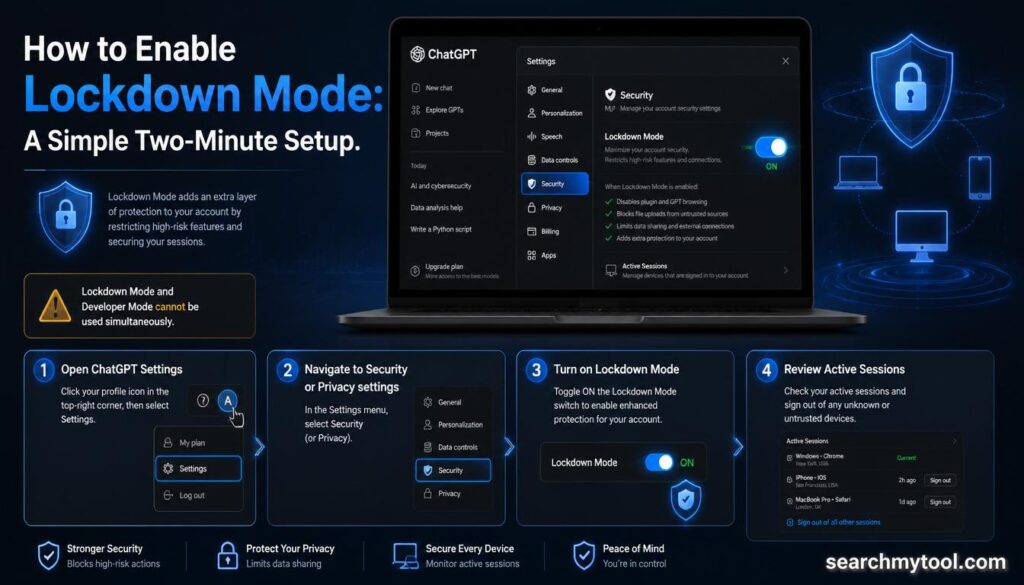
1. Open ChatGPT settings. Click your profile icon in the upper-right corner of the ChatGPT interface and select Settings.
2. Navigate to Security or Privacy. Lockdown Mode appears under the security settings section. The exact navigation path may vary slightly between the web interface and mobile apps.
3. Toggle Lockdown Mode on. The toggle is per-account, not per-session. Once enabled, it applies to all subsequent conversations until you disable it.
4. Review the Active Sessions panel. While in settings, check the Active Sessions section to see all devices where your account is currently signed in. End any sessions you do not recognise.
Note that Lockdown Mode cannot be used simultaneously with Developer Mode. If you are a developer who uses Developer Mode for API testing or model evaluation, you will need to choose between the two modes based on your current activity.
A Real Feature for a Real Problem — With Real Tradeoffs
OpenAI Lockdown Mode is the most honest kind of security feature: one that is transparent about what it protects against, what it does not protect against, and what it costs in functionality. It is not presented as a comprehensive solution to prompt injection — a problem that the industry acknowledges has no comprehensive solution at the model layer. It is presented as a meaningful risk reduction for a specific user population that has a specific need.
For the professional who pastes client contracts into ChatGPT and then browses the web in the same session, Lockdown Mode is the right choice. For the casual user who has never shared anything sensitive and wants the full ChatGPT experience, it is unnecessary overhead. For the researcher who needs Deep Research to do their work and is thoughtful about what sensitive data they share, the decision is a genuine tradeoff that requires judgment.
What Lockdown Mode signals, more broadly, is that the era of AI-as-productivity-tool is maturing into the era of AI-as-trusted-professional-partner — and that transition requires confronting security problems that consumer tools have not historically needed to solve. The problem Lockdown Mode addresses will not be the last security challenge in this category. But it is a serious, well-designed response to a serious, well-documented risk. And for the users it is designed for, it is long overdue.