Detailed Assessment & Score

Overall Rating
9.1 Excellent
Core Performance Metrics
Ease of Use 8.6/10
Features 9.3/10
AI Quality 8.7/10
Value 9.0/10
Key Facts & Details
Free Plan Available Yes
API Integration Support Yes
Official Mobile App No
Browser Extension Support No
Best Suited For
Enterprise developers needing custom script execution (JS, C#) Operations teams coordinating high-volume data integrations Firms requiring on-premise workflow deployment for data privacy
System Integrations
PostgreSQL MySQL REST API Python JavaScript C#

About PROCESIO

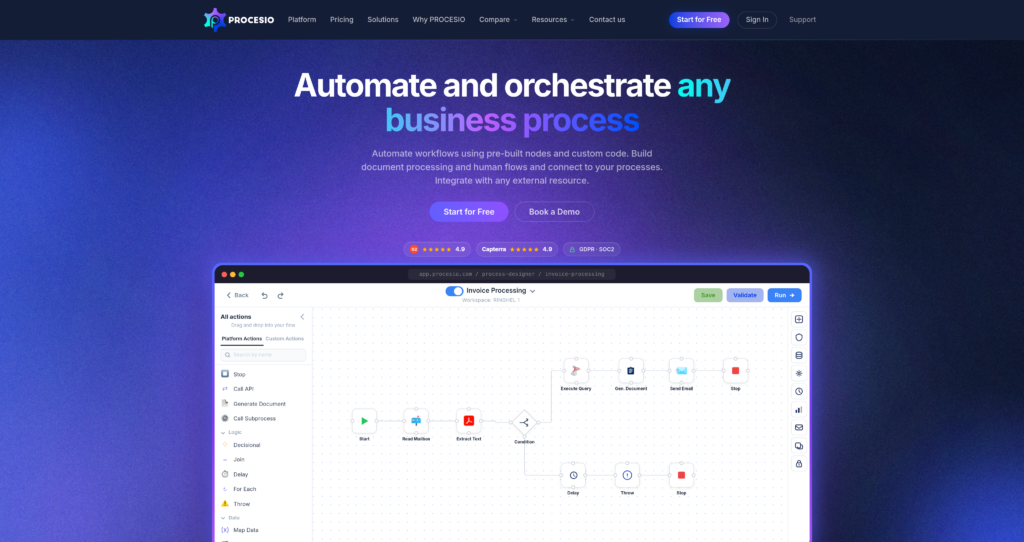
PROCESIO is a high-performance visual workflow engine built for enterprise automation, data integration, and document processing. It combines a drag-and-drop no-code builder with low-code and full-code script environments (supporting Python, JavaScript, and C#). This enables technical teams to automate complex backend logic that exceeds the capability of standard zero-code platforms.

The platform features a visual canvas containing over 200 pre-built nodes, out-of-the-box document generators, and human-in-the-loop task routing. It is designed to scale and can be deployed as a cloud SaaS or hosted on-premise. Readers comparing developer workflow engines can also explore Retool, n8n, and check out similar tools in our AI automation tools category.


Key Features

Tri-Tier Execution Logic : Switch fluidly between visual no-code nodes, low-code script widgets, and raw code execution containers.

High-Performance Runtime : Process massive datasets, parallel API payloads, and database migrations with low latency.

Custom Code Integrations : Natively write, test, and run Python, JavaScript, and C# code blocks directly inside visual flow branches.

Human-in-the-Loop Routing : Insert manual approval gateways or user data-entry forms into automated background tasks.

Document Generation Core : Auto-generates structured invoices, PDF contracts, and receipts from incoming database values.

Flexible Cloud & On-Premise : Available as a secure cloud service or deployed directly on-premise inside local data networks.

Detailed Process Debugger : Real-time mapping and step-by-step variable inspection to locate errors in active pipelines.

No Per-Connector Fees : Scale connections and run integrations freely without facing licensing cost increases per application.

Pros

✔ Developer-friendly setup supports custom scripting within standard visual branches.

✔ On-premise deployment options ensure high security for corporate and banking data.

✔ Document creator handles high-volume PDF and invoice generation efficiently.

✔ High-concurrency runtime processes complex parallel database loops with low latency.

✔ Eliminates connector gatekeeping, allowing builders to scale app connections freely.

✔ Free community tier provides a practical playground for testing custom code nodes.

✔ Highly detailed debugger tracks variable modifications at every single step.

Cons

✖ Steeper learning curve for non-technical users compared to simple zero-code builders.

✖ Pricing is usage-based and can become complex to estimate for scaling applications.

✖ App ecosystem has fewer pre-built visual templates than legacy platforms.

✖ Mobile editor interface is not supported; building requires a desktop screen.

✖ Custom on-premise installation setup requires server admin expertise.

✖ Free plan carries limited monthly processing hours and execution threads.

Plans & Pricing

PlanTypePriceUsage LimitInclusions
CommunityFreemiumFreeLimited monthly processing hoursVisual builder access, Python/JS nodes, basic API connections, and standard cloud sync.
ProfessionalSubscriptionUsage-based (Starts around €100/mo)Reserved execution threadsExpanded processing hours, high concurrency, custom C# scripts, document generation tools, and priority support.
EnterpriseCustomContact SalesCustom execution nodesOn-premise deployment license, custom server configurations, advanced compliance logging, dedicated account manager, and custom SLAs.

Source: PROCESIO pricing. Verify current processing hour rates, execution limits, and on-premise setup options on the official website.

FAQs

Q1: Can I write custom code in PROCESIO?+

Yes. PROCESIO allows you to write and run Python, JavaScript, and C# code scripts directly within visual workflow steps to handle custom logic.

Q2: Can I host PROCESIO on my own servers?+

Yes, the Enterprise tier offers a secure on-premise deployment option for organizations needing local server execution for data privacy compliance.

Q3: Is there a free version?+

Yes, PROCESIO offers a Community free plan that allows you to access the visual editor and build basic script workflows with monthly processing time caps.

Q4: Does PROCESIO charge per app connection?+

No. PROCESIO charges based on reserved execution threads and processing times rather than per-connector fees, allowing you to connect as many tools as you need.

Q5: What is the Human-in-the-Loop feature?+

This feature allows you to insert approval milestones or human data-entry forms into automatic data workflows, pausing the loop until reviewed.

User Ratings & Reviews

0
Based on 0 User Reviews
5 Star
(0)
4 Star
(0)
3 Star
(0)
2 Star
(0)
1 Star
(0)

Leave a Reply

Comparison Matrix
Key Features
PROCESIO Icon PROCESIO Active
shadcn/ui Icon shadcn/ui
v0 Icon v0
Zapier Icon Zapier
Review Score 9.1/10 9.8/10 9.6/10 9.5/10
Pricing Model Freemium / Monthly Subscription / Custom Processing Time Free / Open Source Freemium / Usage-Based / Enterprise $19.99 /mo
Free Plan ✔ Yes ✔ Yes ✔ Yes ✖ No
Starting Cost Freemium Free Freemium Freemium
Details Page Active Page Compare Compare Compare

Similar Alternatives to PROCESIO

shadcn/ui Logo

shadcn/ui

0 user reviews
9.8
Free / Open Source Free

shadcn/ui is an open-source component collection for building customizable React design systems with Tailwind CSS, Radix UI patterns, charts, blocks, and copyable source code.

v0 Logo

v0

0 user reviews
9.6
Freemium / Usage-Based / Enterprise Freemium

v0 by Vercel is an AI app builder for generating, editing, integrating, and deploying full-stack websites and applications from natural-language prompts.

Zapier Logo

Zapier

0 user reviews
9.5
$19.99 /mo Freemium

Zapier is a popular no-code automation platform that connects apps and automates workflows with simple triggers and actions.

Framer AI Logo

Framer AI

0 user reviews
9.4
Freemium Freemium

Framer AI helps users generate responsive website layouts, translate sites, use AI plugins, and launch modern no-code websites with hosting, CMS, SEO, analytics, and localization.

Together AI Logo

Together AI

0 user reviews
9.4
Usage-Based / Enterprise Premium

Together AI is an AI-native cloud for running, fine-tuning, evaluating, and deploying open models with serverless APIs, dedicated inference, and GPU clusters.

Cursor Logo

Cursor

1 user review
9.4
Free / Subscription / Team / Enterprise Freemium

Cursor is an AI coding agent and AI-native code editor for writing, editing, reviewing, and shipping software across desktop, CLI, cloud agents, automations, and team workflows.

N8N  Automation Logo

N8N Automation

0 user reviews
9.4
Freemium Free

n8n is a flexible, open-source automation platform that lets you build powerful workflows between apps, APIs, and databases visually.

Make Automation Logo

Make Automation

0 user reviews
9.4
Free + Paid Subscription Freemium

Make is a visual no-code automation and integration platform that connects apps, builds workflows, and automates complex business processes.