Lovart.ai

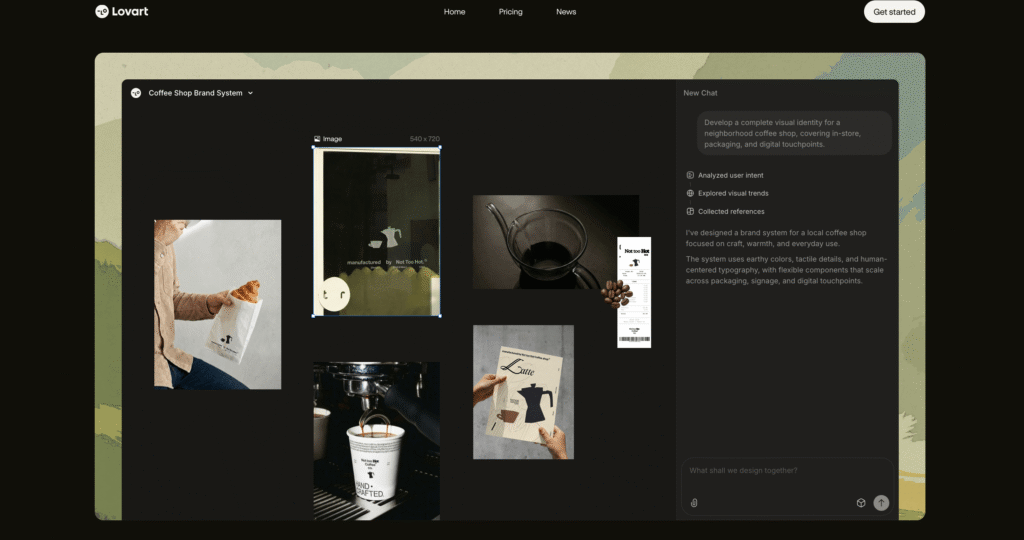
Lovart.ai is an AI Design Agent that creates complete brand identities through conversational prompts, using MCoT reasoning technology to analyze context and generate logos, guidelines, and marketing materials.

Pricing: Subscription (Premium)
8.1 Score
Lovart-The-World-s-First-AI-Design-Agent-Automated-Graphic-Design-Platform

Detailed Assessment & Score

Overall Rating
8.1 Very Good
Core Performance Metrics
Ease of Use 8.4/10
Features 7.8/10
AI Quality 8.5/10
Value 7.5/10
Key Facts & Details
Free Plan Available No
API Integration Support No
Official Mobile App No
Browser Extension Support No
Best Suited For
Creating cohesive brand identities Designing logos and social media templates Small businesses needing agency-quality design
System Integrations
Web browser SVG/PDF/PNG Exports

About Lovart.ai

Lovart.ai is an AI-powered platform positioned as an automated “Design Agent” that helps businesses build professional brand identities and visual marketing assets. Instead of functioning as a simple image generator that requires complex prompts, it acts more like a creative director. Users can provide a business description or strategic intent, and the agent uses a proprietary reasoning engine called MCoT (Mind Chain of Thought) to analyze the brand requirements before generating any assets.

The platform focuses on creating cohesive brand systems rather than disconnected images. It can generate complete branding kits, including logos, color guides, typography choices, and production-ready social media templates. With its Infinite Canvas workspace and Touch Edit capabilities, users can easily refine specific layers or text elements without needing to regenerate the entire design, making it a highly practical tool for small business owners and creators.

Key Features

MCoT Reasoning Engine : Breaks down complex design projects into manageable steps and ensures generated assets adhere to professional design principles.

Complete Brand Kits : Generates cohesive logos, color palettes, and typography guidelines from a single conversational prompt.

Infinite Canvas Workspace : Provides a flexible “ChatCanvas” interface where users can visually organize and edit multiple design assets side-by-side.

Touch Edit Capabilities : Allows users to refine specific layers, adjust text, or tweak layout elements without regenerating the entire image.

Production-Ready Exports : Supports multi-format exports including SVG, PNG, and PDF, ensuring assets are ready for immediate professional use.

Brand Memory : Stores your style preferences and brand identity information to maintain consistency across all future design generations.

Pros

✔ Creates complete, cohesive brand identities rather than one-off images.

✔ MCoT reasoning ensures designs follow actual graphic design principles.

✔ Infinite Canvas makes it very easy to iterate on and organize assets.

✔ Ability to edit specific layers saves a massive amount of time.

✔ Excellent vector and high-resolution export options for professional use.

✔ Greatly reduces the need for expensive design agency retainers.

Cons

✖ Has received numerous negative user reviews regarding subscription and billing practices.

✖ Free trial access is extremely limited and insufficient for full brand projects.

✖ No native mobile application available for on-the-go editing.

✖ Customer support responsiveness has been a common pain point for users.

✖ High credit usage for complex vector or 3D mockup generations.

✖ The interface can feel a bit overwhelming for users used to simple generators.

Plans & Pricing

PlanTypePriceUsage LimitInclusions
StarterSubscription~$16 – $19/mo~2,000 creditsAccess to basic MCoT generation, standard resolution exports, and canvas editor. ⚠️ (Verify on official website)
BasicSubscription~$27 – $32/mo~3,500 creditsIncreased credits, access to Brand Kit storage, and vector SVG exports. ⚠️ (Verify on official website)
ProSubscription~$45 – $79/mo~11,000 creditsHigh volume generation, priority processing speed, and advanced mockup tools. ⚠️ (Verify on official website)
UltimateSubscription~$99 – $169/mo~27,000 creditsMaximum credits for agency use, full commercial rights, and premium support. ⚠️ (Verify on official website)

FAQs

Q1: What is MCoT in Lovart.ai?+

MCoT stands for Mind Chain of Thought. It is a proprietary reasoning engine that analyzes your brand intent and breaks down complex design tasks into manageable steps before generating images.

Q2: Can I export vector files?+

Yes, Lovart.ai supports production-ready exports, including SVG formats for logos and scalable graphics, depending on your subscription tier.

Q3: Is there a free version of Lovart.ai?+

There is a very limited free trial or daily credit allowance (often around 30 credits) to test the interface, but a paid subscription is required for serious design work.

Q4: Can I edit text within generated logos?+

Yes, the platform features “Touch Edit” capabilities on its Infinite Canvas, allowing you to select and modify specific text or layers without regenerating the whole image.

Q5: Is Lovart.ai safe to subscribe to?+

While the technology is capable, users should be aware that the platform has received negative reviews regarding difficult cancellation processes and unexpected billing. Proceed with caution.

User Ratings & Reviews

0
Based on 0 User Reviews
5 Star
(0)
4 Star
(0)
3 Star
(0)
2 Star
(0)
1 Star
(0)

Leave a Reply

Comparison Matrix
Key Features
Lovart.ai Icon Lovart.ai Active
shadcn/ui Icon shadcn/ui
FIGMA Icon FIGMA
v0 Icon v0
Review Score 8.1/10 9.8/10 9.8/10 9.6/10
Pricing Model Subscription Free / Open Source $0-60/month Freemium / Usage-Based / Enterprise
Free Plan ✖ No ✔ Yes ✔ Yes ✔ Yes
Starting Cost Premium Free Freemium Freemium
Details Page Active Page Compare Compare Compare

Similar Alternatives to Lovart.ai

shadcn/ui Logo

shadcn/ui

0 user reviews
9.8
Free / Open Source Free

shadcn/ui is an open-source component collection for building customizable React design systems with Tailwind CSS, Radix UI patterns, charts, blocks, and copyable source code.

FIGMA Logo

FIGMA

0 user reviews
9.8
$0-60/month Freemium

Figma is the industry-standard collaborative design platform that becomes AI-powered through 100+ plugins for wireframing, copywriting, asset generation, accessibility checking, and code export.

v0 Logo

v0

0 user reviews
9.6
Freemium / Usage-Based / Enterprise Freemium

v0 by Vercel is an AI app builder for generating, editing, integrating, and deploying full-stack websites and applications from natural-language prompts.

Canva Logo

Canva

0 user reviews
9.5
Freemium / Subscription Freemium

Canva is an online design and visual communication platform for creating presentations, social posts, videos, documents, websites, brand assets, and AI-powered marketing content.

Framer AI Logo

Framer AI

0 user reviews
9.4
Freemium Freemium

Framer AI helps users generate responsive website layouts, translate sites, use AI plugins, and launch modern no-code websites with hosting, CMS, SEO, analytics, and localization.

Spline Logo

Spline

0 user reviews
9.3
Freemium / Subscription / Enterprise Freemium

Spline is a browser-based 3D design platform for creating interactive websites, apps, animations, 3D scenes, real-time experiences, and AI-assisted 3D assets.

Beautiful.ai Logo

Beautiful.ai

0 user reviews
9.2
Subscription / Enterprise Premium

Beautiful.ai is an AI-powered presentation platform that uses smart templates to auto-format, align, and clean up slide designs in real-time.

sketch Logo

sketch

0 user reviews
9.2
Free 30-day trial, Pro plans from $12/editor/month, or $120 one-time license Freemium

Sketch is a vector graphics editor and prototyping platform built natively for macOS, helping designers collaborate in real time and export handoff assets.