Detailed Assessment & Score

Overall Rating
9.4 Excellent
Core Performance Metrics
Ease of Use 9.0/10
Features 9.6/10
AI Quality 9.4/10
Value 8.8/10
Key Facts & Details
Free Plan Available Yes
API Integration Support Yes
Official Mobile App Yes
Browser Extension Support No
Best Suited For
Software developers Engineering teams AI coding workflows Code reviews Large codebases Teams using agentic development
System Integrations
GitHub Slack Cursor CLI Cursor Mobile MCP servers Skills Hooks Cloud agents Bugbot Team marketplace SAML/OIDC SSO SCIM on Enterprise

About Cursor

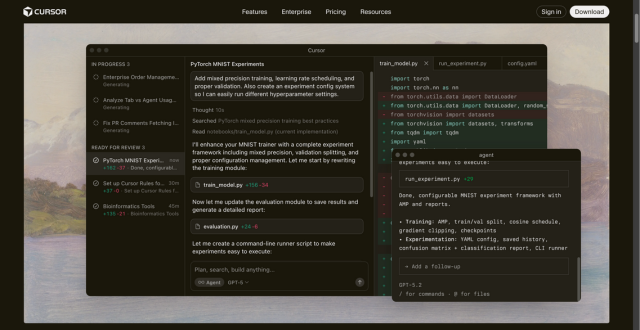
Cursor is an AI coding agent and AI-native code editor built for developers and engineering teams that want to write, edit, review, and ship software faster. It combines a desktop coding environment, AI agents, Tab completions, Composer-style editing, cloud agents, Cursor CLI, mobile access, automations, code review, and team controls into one developer workflow.

Cursor is especially relevant for searches like AI code editor, AI coding assistant, AI coding agent, Cursor IDE, VS Code AI editor, AI pair programmer, code review AI, agentic development tool, and AI developer productivity platform. Developers can use it to ask questions about a codebase, generate code, refactor files, run multi-step tasks, hand off work to agents, review pull requests, and keep coding context close to the repository.

For teams comparing Sourcegraph Cody, Amazon Q Developer, Replit, or Google AI Studio, Cursor stands out because it is centered on day-to-day coding inside the editor while also expanding into CLI, cloud agents, Slack collaboration, GitHub review workflows, MCP, skills, hooks, and enterprise governance.


Key Features

AI-native code editor : Cursor provides an editor-first coding experience where AI can understand files, generate code, edit across the project, and help developers move faster.

Agentic development : Cursor agents can take on coding tasks, inspect files, make changes, test work, and prepare results for developer review.

Cloud agents : Paid plans include access to cloud agents that can work on tasks in separate environments while developers focus on decisions and review.

Tab completions : Cursor Tab predicts edits and completions in context, helping with routine implementation, refactors, and repetitive code changes.

Cursor CLI : Cursor can run from the terminal, making it useful for developers who prefer command-line agent workflows.

Bugbot code review : Team plans include agentic code reviews with Bugbot, helping teams review pull requests and catch issues earlier.

MCPs, skills, and hooks : Cursor supports MCP servers, skills, hooks, and marketplace workflows for extending how agents interact with tools, rules, and team processes.

Team marketplace : Teams can share internal rules, skills, and plugins so AI workflows are more consistent across an organization.

Privacy and enterprise controls : Cursor supports privacy mode, usage analytics, SAML/OIDC SSO on Teams, and Enterprise controls such as SCIM, audit logs, repository access controls, model access controls, and network controls.

Pros

✔ Strong all-in-one workflow for AI code editing, completions, agents, reviews, CLI, and team automation.

✔ Free Hobby plan lets developers try limited Agent requests and Tab completions without a credit card.

✔ Individual plan includes frontier model access, MCPs, skills, hooks, cloud agents, and extended agent limits.

✔ Team plan adds centralized billing, internal marketplace, Bugbot reviews, shared team context, analytics, privacy mode, and SSO.

✔ Privacy mode can prevent code data from being used for training by Cursor or model providers.

✔ Enterprise controls make it viable for larger engineering organizations with stricter governance needs.

Cons

✖ Heavy agent users may need Pro+, Ultra, Teams, or usage-based billing beyond included model usage.

✖ AI-generated code still needs review, testing, security checks, and maintainability judgment before merge.

✖ Teams need to configure privacy mode, repository access, model access, and auto-run controls carefully.

✖ Developers who only want basic autocomplete may find the agentic feature set more than they need.

✖ Usage-based pricing can be harder to predict for teams with many active AI coding agents.

Plans & Pricing

PlanTypePriceUsage LimitInclusions
HobbyFreeFreeLimited Agent requests and limited Tab completionsNo credit card required; useful for trying Cursor’s AI editor and coding agent workflow.
IndividualSubscription$20/monthIncluded model usage with extended limits; on-demand usage available after included amountEverything in Hobby plus extended Agent limits, generous Grok and Composer limits, frontier models, MCPs, skills, hooks, cloud agents, and Bugbot on usage-based billing.
TeamsPer-user subscription$40/user/monthTeam usage with administration and analyticsEverything in Individual plus centralized billing/admin, team marketplace, Bugbot reviews, cloud agents and automations with shared context, usage analytics, team-wide privacy mode, and SAML/OIDC SSO.
EnterpriseCustomCustom pricingPooled usage and organization controlsEverything in Teams plus invoice/PO billing, SCIM, repository/model/MCP access controls, auto-run/browser/network controls, audit logs, service accounts, AI code tracking API, priority support, and account management.

Source: Cursor pricing. Verify current Pro, Pro+, Ultra, Teams, Enterprise, model usage, and usage-based billing details on the official site before purchase.

FAQs

Q1: What is Cursor used for?+

Cursor is used for AI-assisted coding, codebase questions, code generation, refactoring, Tab completions, autonomous coding agents, CLI workflows, cloud agents, and pull request review.

Q2: Is Cursor free?+

Yes. Cursor has a free Hobby plan with limited Agent requests and limited Tab completions. Paid plans unlock higher limits, more models, cloud agents, team controls, and enterprise features.

Q3: How much does Cursor cost?+

Cursor lists Individual at $20/month, Teams at $40/user/month, and Enterprise as custom pricing. Some usage can continue through on-demand usage-based billing after included model usage is consumed.

Q4: Does Cursor support teams?+

Yes. Teams includes centralized billing, administration, team marketplace, Bugbot code reviews, cloud agents, automations, shared team context, usage analytics, privacy mode, and SAML/OIDC SSO.

Q5: Does Cursor use my code for training?+

Cursor says privacy mode can be enabled so code data is not used for training by Cursor or model providers. Teams can enable privacy mode organization-wide.

Q6: Who should use Cursor?+

Cursor is best for developers and engineering teams that want an AI-first coding editor, autonomous agents, fast completions, code review support, CLI workflows, and enterprise-ready controls.

User Ratings & Reviews

5
Based on 1 User Reviews
5 Star
(1)
4 Star
(0)
3 Star
(0)
2 Star
(0)
1 Star
(0)

One comment

Leave a Reply

Comparison Matrix
Key Features
Cursor Icon Cursor Active
shadcn/ui Icon shadcn/ui
GitHub Copilot Icon GitHub Copilot
v0 Icon v0
Review Score 9.4/10 9.8/10 9.6/10 9.6/10
Pricing Model Free / Subscription / Team / Enterprise Free / Open Source $10/month or $100/year Freemium / Usage-Based / Enterprise
Free Plan ✔ Yes ✔ Yes ✖ No ✔ Yes
Starting Cost Freemium Free Freemium Freemium
Details Page Active Page Compare Compare Compare

Similar Alternatives to Cursor

shadcn/ui Logo

shadcn/ui

0 user reviews
9.8
Free / Open Source Free

shadcn/ui is an open-source component collection for building customizable React design systems with Tailwind CSS, Radix UI patterns, charts, blocks, and copyable source code.

GitHub Copilot Logo

GitHub Copilot

0 user reviews
9.6
$10/month or $100/year Freemium

GitHub Copilot is an AI coding assistant that suggests code, functions, and solutions directly within your IDE in real time.

v0 Logo

v0

0 user reviews
9.6
Freemium / Usage-Based / Enterprise Freemium

v0 by Vercel is an AI app builder for generating, editing, integrating, and deploying full-stack websites and applications from natural-language prompts.

Zapier Logo

Zapier

0 user reviews
9.5
Freemium Freemium

Zapier is a popular no-code automation platform that connects apps and automates workflows with simple triggers and actions.

Windsurf Logo

Windsurf

0 user reviews
9.5
($0–$200) Freemium

Windsurf is an AI-powered coding editor with Cascade agents, Tab autocomplete, and enterprise-ready collaboration tools, offering flexible plans from Free to Enterprise.

Riverside Logo

Riverside

0 user reviews
9.4
Freemium / Subscription Freemium

Riverside is an AI-powered recording, editing, live streaming, webinar, and podcast production platform for creating studio-quality audio and video content remotely.

LangChain Logo

LangChain

0 user reviews
9.4
Freemium Freemium

LangChain is a leading open-source orchestration framework designed to simplify the construction of applications powered by large language models.

retool Logo

retool

0 user reviews
9.4
Free plan available, paid plans from $10/builder/month Freemium

Retool allows developers to build functional internal tools and workflows by connecting databases and APIs to drag-and-drop React components.