About Notis AI

Notis AI is a messaging productivity assistant that functions as your on-the-go AI intern. Trusted by thousands of founders and operators, Notis lets you delegate complex workflows directly through messaging channels like WhatsApp, iMessage, Telegram, and Slack, or via email. Instead of switching between multiple dashboards, copy-pasting notes, or manually entering data, users message a request or voice note and Notis performs the target action automatically.

Powered by a robust integration layer, the toolkit connects directly to over 1,000 corporate systems and developer services, including Notion, Dropbox, Gmail, Google Calendar, and Linear. On the high-end Ultra plan, users gain direct access to over 1,400 third-party premium APIs and tools without needing to maintain separate, expensive individual subscriptions. All plan tiers retain contextual conversational memory and run on secure Swiss-made servers.

To compare this messaging intern with other workflow managers, read our Writesonic Review and the CodeRabbit Review, or browse the directory categories for Productivity and Automation & Workflows.

Key Features

Voice Note Transcription : Dictate tasks or notes through messaging apps, converting spoken words into structured action items.

Multi-Channel Accessibility : Integrates natively with WhatsApp, iMessage, Telegram, Slack, and email inbox streams.

1,000+ Integrations : Triggers automated actions across tools like Notion, Gmail, Google Calendar, Dropbox, and Linear.

Contextual Memory : Retains previous chat history and workspace contexts to personalize tasks and summaries.

Desktop & Web Companions : Syncs operations across dedicated mobile messages, web dashboards, and desktop platforms.

Premium Tool Access : Accesses over 1,400 third-party APIs on the Ultra tier without direct individual licensing fees.

Customizable Workflows : Configures conditional workflows to update databases, calendar schedules, and document drafts at once.

Swiss-Made Security : Built under strict data protections with robust, privacy-first infrastructure standards.

Pros

✔ Message your AI intern from WhatsApp, iMessage, Telegram, or Slack on the go.

✔ Every subscription begins with a 7-day free trial containing $20 of usage credit.

✔ Automatically maps text summaries into Notion, Google Calendar, Linear, and Gmail.

✔ Predictable pricing model with clear, customizable usage allowances on each plan.

✔ Saves thousands in licensing costs by bundling over 1,400 API connectors in the Ultra tier.

✔ The setup requires no code or complicated Zapier/Make recipes to configure.

✔ Workspace variables, database syncs, and context parameters remain preserved on plan switches.

Cons

✖ A 7-day trial requires entering billing details during sign-up.

✖ The entry Pro tier restricts advanced integration triggers and premium APIs.

✖ Pricing scales depending on how frequently you delegate tasks.

✖ WhatsApp calls and iMessage prompts rely on active network data connections.

✖ Custom branding and enterprise-grade team controls require contacting sales.

✖ Heavy transcription volume can consume the included usage credits quickly.

✖ Some API tools in the integration catalog require double-checking before triggers to manage usage caps.

Plans & Pricing

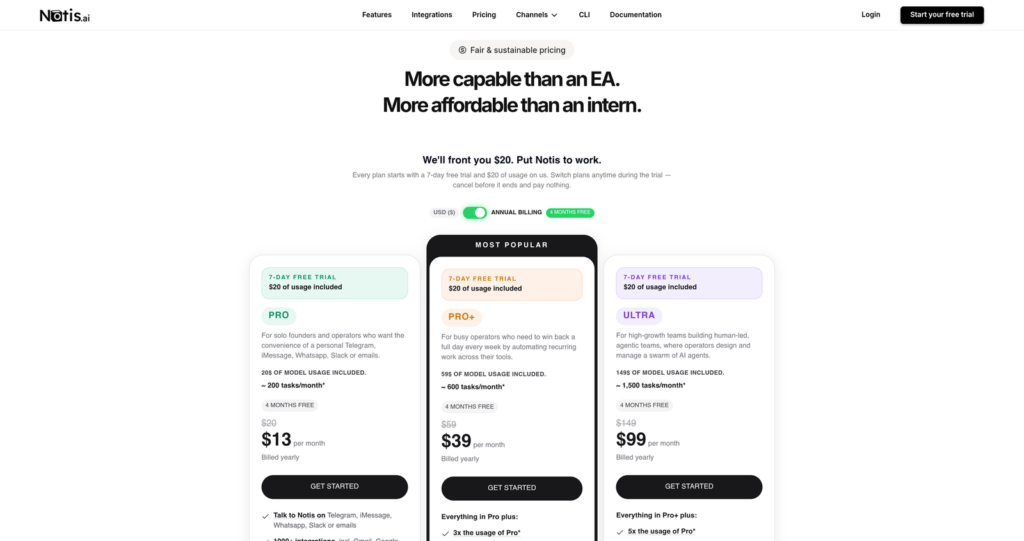
PlanMonthly PriceAnnual Price (Billed Annually)Usage cost allowance & Features Included
Pro$20.00/month$13.00/month ($156.00/year)$20/mo usage cap, 7-day free trial, WhatsApp/Telegram/iMessage, basic integrations
Pro Plus$59.00/month$39.00/month ($468.00/year)$59/mo usage cap, 7-day free trial, daily operating templates, multi-app workflows
Ultra$149.00/month$99.00/month ($1,188.00/year)$149/mo usage cap, 7-day free trial, premium tools & 1,400+ third-party APIs included

Source: Notis pricing structure.

FAQs

Q1: What is Notis AI?+

Notis is an AI productivity assistant (AI intern) that runs tasks across Notion, Gmail, Linear, and Dropbox when messaged via WhatsApp, iMessage, Telegram, or Slack.

Q2: How does Notis pricing work?+

Notis plans start with a 7-day free trial and $20 of credit. Paid plans include Pro ($20/mo or $13/mo billed annually), Pro Plus ($59/mo or $39/mo billed annually), and Ultra ($149/mo or $99/mo billed annually).

Q3: What is included in the Ultra plan?+

The Ultra plan adds access to 1,400+ third-party premium tools and APIs with no external subscription fees, drawing execution costs from your plan allowance.

Q4: Does Notis keep my context?+

Yes, Notis maintains chat memory and workspace settings, so you can delegate follow-up requests without repeating instructions.

Q5: Which messaging channels are supported?+

Notis supports WhatsApp, iMessage, Telegram, Slack, and email, alongside web and desktop companion applications.

Detailed Assessment & Score

Overall Rating
8.9 Very Good
Core Performance Metrics
Ease of Use 9.2/10
Features 8.8/10
AI Quality 8.9/10
Value 8.8/10
Key Facts & Details
Free Plan Available Yes
API Integration Support No
Official Mobile App No
Browser Extension Support No
Best Suited For
Delegating summaries, emails, and database updates via WhatsApp or Telegram Automating multi-app workflows without setting up complex Zapier recipes Accessing 1,400+ third-party tools and APIs without direct individual licensing
System Integrations
WhatsApp iMessage Telegram Slack Gmail Notion Google Calendar Dropbox Linear

User Ratings & Reviews

0
Based on 0 User Reviews
5 Star
(0)
4 Star
(0)
3 Star
(0)
2 Star
(0)
1 Star
(0)

Leave a Reply

Published: Updated:
Comparison Matrix
Key Features
Notis AI Icon Notis AI Active
shadcn/ui Icon shadcn/ui
v0 Icon v0
Zapier Icon Zapier
Review Score 8.9/10 9.8/10 9.6/10 9.5/10
Pricing Model Freemium / Monthly & Annual Subscription Free / Open Source Freemium / Usage-Based / Enterprise Freemium
Free Plan ✔ Yes ✔ Yes ✔ Yes ✔ Yes
Starting Cost Freemium Free Freemium Freemium
Details Page Active Page Compare Compare Compare

Similar Alternatives to Notis AI

shadcn/ui Logo

shadcn/ui

0 user reviews
9.8
Free / Open Source Free

shadcn/ui is an open-source component collection for building customizable React design systems with Tailwind CSS, Radix UI patterns, charts, blocks, and copyable source code.

v0 Logo

v0

0 user reviews
9.6
Freemium / Usage-Based / Enterprise Freemium

v0 by Vercel is an AI app builder for generating, editing, integrating, and deploying full-stack websites and applications from natural-language prompts.

Zapier Logo

Zapier

0 user reviews
9.5
Freemium Freemium

Zapier is a popular no-code automation platform that connects apps and automates workflows with simple triggers and actions.

Framer AI Logo

Framer AI

0 user reviews
9.4
Freemium Freemium

Framer AI helps users generate responsive website layouts, translate sites, use AI plugins, and launch modern no-code websites with hosting, CMS, SEO, analytics, and localization.

Together AI Logo

Together AI

0 user reviews
9.4
Usage-Based / Enterprise Premium

Together AI is an AI-native cloud for running, fine-tuning, evaluating, and deploying open models with serverless APIs, dedicated inference, and GPU clusters.

Cursor Logo

Cursor

1 user review
9.4
Free / Subscription / Team / Enterprise Freemium

Cursor is an AI coding agent and AI-native code editor for writing, editing, reviewing, and shipping software across desktop, CLI, cloud agents, automations, and team workflows.

N8N Automation Logo

N8N Automation

0 user reviews
9.4
Freemium Freemium

n8n is a flexible, open-source automation platform that lets you build powerful workflows between apps, APIs, and databases visually.

Make Automation Logo

Make Automation

0 user reviews
9.4
Freemium Freemium

Make is a visual no-code automation and integration platform that connects apps, builds workflows, and automates complex business processes.