About Framer AI
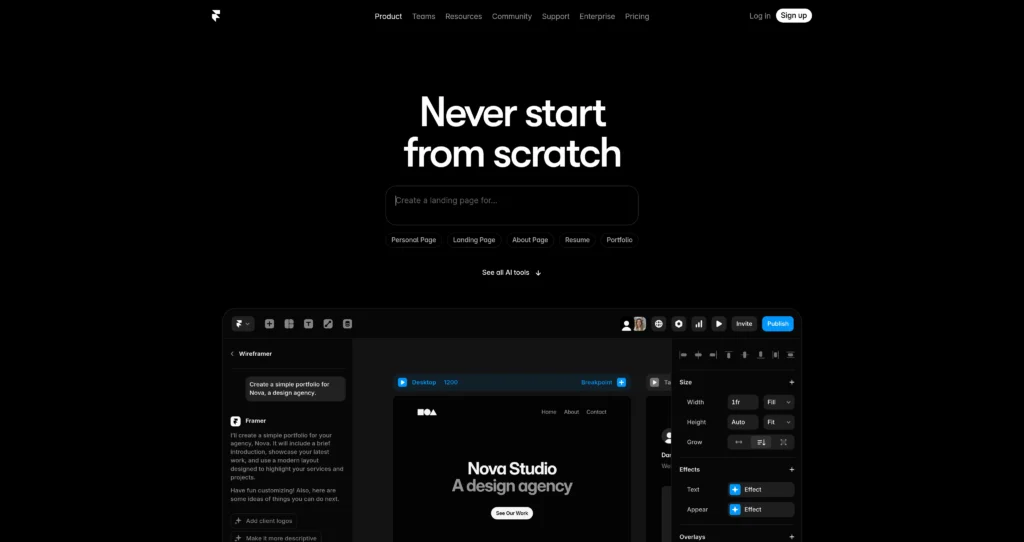
Framer AI is the AI-powered website creation layer inside Framer, a no-code site builder used for designing, publishing, and scaling modern websites. It helps users skip the blank canvas by generating layouts, sections, and starting points from prompts, then lets them customize everything visually inside Framer’s design editor.
The tool is useful for designers, founders, marketers, agencies, and teams that need polished landing pages, personal sites, portfolios, marketing pages, and CMS-powered websites without a traditional development workflow. Beyond AI layout generation, Framer also includes AI Translate, AI-powered design tools, plugins, CMS, SEO, analytics, hosting, localization, collaboration, and publishing features depending on the plan.
Key Features
AI website layout generation : Generate responsive website layouts and page sections from natural language prompts so you can start from a designed draft instead of a blank canvas.
Prompt-based refinement : Ask Framer for changes like adding sections, making copy more descriptive, or adjusting the page structure during early design exploration.
AI Translate : Translate an entire site into multiple languages with AI, reducing manual localization work and plugin dependency.
AI Plugins : Build or use AI plugins that connect with models from providers like OpenAI, Anthropic, and Gemini for image generation, rewriting text, alt text, and related workflows.
Visual no-code editor : Customize layouts, typography, effects, animations, breakpoints, and responsive behavior in a design-first interface.
Built-in publishing and hosting : Launch sites directly from Framer with fast hosting, SSL, custom domains on paid plans, and built-in SEO controls.
CMS and dynamic content : Manage blog posts, landing pages, directories, resources, and other structured content with Framer’s CMS.
Marketing stack features : Higher plans add features like staging, rollback, redirects, analytics, funnels, A/B testing add-ons, localization, and collaboration controls.
Pros
✔ Excellent for quickly creating polished website starting points from prompts.
✔ Strong design editor gives users much more control after AI generates the first draft.
✔ Good fit for landing pages, portfolios, startup sites, marketing pages, and content sites.
✔ Built-in hosting, SEO, CMS, analytics, localization, and publishing reduce tool switching.
✔ AI Translate and AI plugins make Framer useful beyond simple page generation.
✔ Free plan lets users explore design and AI tools before upgrading to publish on a custom domain.
✔ Collaboration features and paid editor seats support agency and team workflows.
Cons
✖ AI-generated pages are best treated as a starting point, not a finished brand strategy or conversion system.
✖ Custom domains require a paid website plan.
✖ Advanced CMS, staging, rollback, roles, permissions, redirects, and scale features are gated to higher plans.
✖ Teams may need design skill to make AI-generated sites feel unique and on-brand.
✖ Complex web apps or highly custom backend workflows still require dedicated development outside Framer.
Plans & Pricing
| Plan | Type | Price | Usage Limit | Inclusions |
|---|---|---|---|---|
| Free | Free | $0 | Free Framer project with platform limits | Explore Framer, design sites, try AI layouts, use a Framer subdomain/banner, and collaborate with limited workspace editors. Custom domain requires a paid plan. |
| Basic | Subscription | $10/month billed annually | 30 site pages, 1 CMS collection, 1,000 CMS items, 10 GB bandwidth | Free custom domain, connect your own domain, AI-powered design tools, fast secure hosting, and built-in SEO. Additional editors are $20/month. |
| Pro | Subscription | $30/month billed annually | 150 site pages, 10 CMS collections, 2,500 CMS items, 100 GB bandwidth | Everything in Basic plus staging and instant rollback, roles and permissions, relational CMS, site redirects, and add-ons for A/B testing and locales. Additional editors are $40/month. |
| Scale | Subscription | $100/month billed annually, plus usage | 300 site pages, 20 CMS collections, 10,000 CMS items, 200 GB bandwidth, with paid flexible limits | Everything in Pro plus custom locale regions, events and funnels, priority support, premium CDN, flexible limits, and advanced hosting add-on options. |
| Enterprise | Enterprise | Custom | Custom limits and annual billing | Designed for larger teams that need custom limits, dedicated support, and enterprise billing/support terms. |
Source: framer.com/pricing and framer.com/ai (verify on official website).
FAQs
Q1: What is Framer AI used for?
Framer AI is used to generate website layouts, starting pages, translated site versions, text/image workflows through AI plugins, and design starting points inside Framer’s no-code website builder.
Q2: Is Framer AI free?
You can start with Framer for free and try AI-powered design workflows. To connect a custom domain and unlock more site features, you need a paid Framer website plan.
Q3: Can Framer AI build a complete website automatically?
It can generate a strong starting point and page structure, but most professional sites still need human review for brand direction, copy, conversion strategy, accessibility, and final polish.
Q4: Does Framer support multilingual sites?
Yes. Framer includes AI Translate and paid localization add-ons, allowing teams to translate and manage multilingual websites depending on the plan and locale limits.
Q5: Who should use Framer AI?
Framer AI is best for designers, founders, marketers, agencies, and teams that want to design and launch modern marketing websites quickly while retaining visual design control.
Published on: May 13, 2026