Operations professionals building visual multi-step loopsDevelopers looking for advanced variables and JSON parsingStartups scaling customer flows and system tasks visually
System Integrations
SlackGmailNotionGoogle SheetsTrelloStripe
About Tool
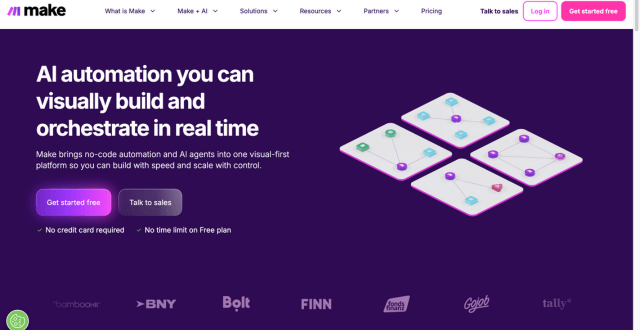
Make (formerly known as Integromat) is a no-code automation platform that lets users design, build, and manage automated workflows—called “scenarios”—without writing code. It provides a visual drag-and-drop builder where you connect apps, APIs, and data processes to automate repetitive tasks, data syncs, and multistep operations. Make is versatile enough for small teams and large organisations, offering advanced logic handling, branching, iterators, filters, and conditional paths to create both simple and highly sophisticated automations. Over time the platform has expanded its capabilities with AI agent integration, data transformation tools, and an extensive ecosystem of pre-built modules, making it a strong choice for business operations, marketing workflows, and cross-system data coordination.
Key Features
Visual Scenario Builder – Build automation flows visually using a drag-and-drop interface.
Extensive App Integrations – Connect with thousands of apps, databases, and APIs for seamless data flow.
Advanced Logic Controls – Use filters, routers, loops, and conditional logic to refine automation behaviour.
AI Capabilities & Agents – Add intelligent, goal-driven automation agents to handle complex decisions.
Real-Time Monitoring & Debugging – Watch your workflows execute and troubleshoot errors directly within the platform.
Data Transformation Tools – Manipulate and format data within workflows to ensure accurate deliveries.
HTTP & Webhook Support – Trigger scenarios from external systems or custom integrations.
Role-Based Access & Collaboration – Control team permissions and build workflows collaboratively for teams.
Pros
Powerful visual builder that reduces the need for coding
Supports complex, multi-branch workflows with precision
Strong integration breadth across business categories
Scales from simple automations to enterprise operations
AI and data transformation tools increase automation intelligence
Cons
Learning curve can be steeper than some beginner-focused tools
Automation credits (operations) can be consumed quickly in large workflows
Support experience varies in user reviews
Pricing
Pricing Type: Free + Paid Subscription Plans (based on credits/operations)
Make’s pricing is structured around monthly credits (operations) you can use to run automation steps within your workflows. The platform offers both free and paid plans, with annual billing typically providing cost benefits.
Plan
Type
Price (Approx)
Monthly Credits
Who It’s For
Free Plan
Free
$0
~1,000 credits
Casual users, testing automations
Core
Paid
~$9/month
~10,000 credits
Individuals & small businesses
Pro
Paid
~$16/month
~10,000+ credits
Growing teams needing advanced automation
Teams
Paid
~$29/month
~10,000+ credits
Collaborative work with roles & shared scenarios
Enterprise
Paid
Custom
Custom credits
Large organisations with high demands
Notes on Pricing: – Credits represent the number of operations your workflows can perform. – You can purchase additional credits if you exceed the monthly allocation. – Paid plan features typically include faster run intervals, advanced logs, team permissions, and priority execution.
FAQs
Q1: Is Make free to use? Yes, Make offers a free plan with a limited amount of monthly credits so you can explore and build basic automations.
Q2: What does “credits” mean in Make pricing? Credits are units used to run operations within your workflows. Each action in a scenario consumes credits, and plans include a set monthly allowance.
Q3: Can I build workflows without coding? Absolutely. Make’s visual interface is no-code, although advanced logic and custom API calls may be easier with some technical familiarity.
Q4: Who should use Make? Make is ideal for businesses and teams that need complex workflows, data integrations, and scalable automation across multiple apps.
Q5: Does Make support AI in workflows? Yes, Make has integrated AI agent capabilities that bring intelligent decision-making into automated scenarios, expanding beyond rule-based workflows.
SearchMyTool Verdict
Make (formerly Integromat) is an outstanding, cost-effective visual automator. Its mapping capabilities and loop structures make it perfect for complex paths.
v0 by Vercel is an AI app builder for generating, editing, integrating, and deploying full-stack websites and applications from natural-language prompts.
Framer AI helps users generate responsive website layouts, translate sites, use AI plugins, and launch modern no-code websites with hosting, CMS, SEO, analytics, and localization.
Together AI is an AI-native cloud for running, fine-tuning, evaluating, and deploying open models with serverless APIs, dedicated inference, and GPU clusters.
Cursor is an AI coding agent and AI-native code editor for writing, editing, reviewing, and shipping software across desktop, CLI, cloud agents, automations, and team workflows.
Riverside is an AI-powered recording, editing, live streaming, webinar, and podcast production platform for creating studio-quality audio and video content remotely.