Detailed Assessment & Score

Overall Rating
8.8 Very Good
Core Performance Metrics
Ease of Use 8.6/10
Features 9.0/10
AI Quality 8.7/10
Value 8.2/10
Key Facts & Details
Free Plan Available No
API Integration Support No
Official Mobile App Yes
Browser Extension Support No
Best Suited For
Busy professionals Service businesses Marketing agencies Startup teams Project managers Executives Teams needing AI scheduling and capacity planning
System Integrations
Google Calendar Outlook Calendar iCloud Calendar Gmail Outlook email Slack Microsoft Teams Zoom Google Meet Desktop apps iOS app Android app

About Motion

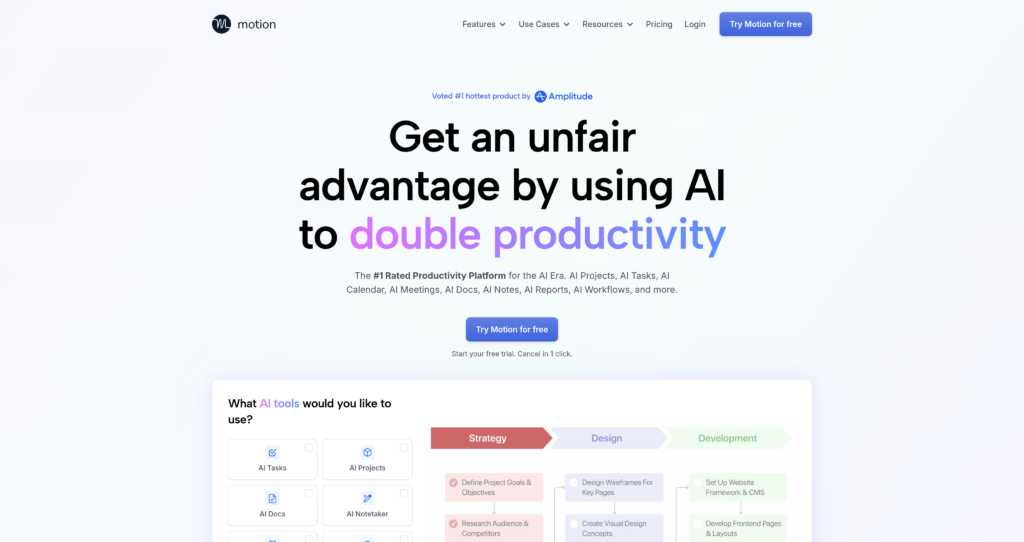
Motion is an AI productivity platform that combines task management, project management, calendar scheduling, meeting assistance, docs, dashboards, workflows, and team planning in one workspace. Its main promise is proactive planning: Motion takes your tasks, meetings, deadlines, dependencies, priorities, and calendar availability, then automatically builds and updates a schedule.

Motion is especially relevant for searches like AI calendar app, AI task planner, AI project management software, automatic scheduling app, AI productivity platform, AI meeting assistant, AI workflow builder, AI Gantt chart, and team capacity planning tool. It is built for individuals, executives, startup teams, service businesses, agencies, sales teams, consulting firms, real estate teams, construction companies, and operations teams that lose time manually planning work.

Unlike a normal to-do list, Motion continuously replans work when priorities, meetings, deadlines, or capacity change. It also includes AI projects and tasks, AI docs and notes, AI meeting notes, AI dashboards, AI workflows, calendar booking, mobile apps, desktop apps, and integrations. For related tools, browse productivity AI tools, automation workflow tools, and ClickUp.


Key Features

AI task planner : Automatically prioritizes tasks, schedules them into the calendar, and updates the plan when deadlines, priorities, or meetings change.

AI calendar : Combines work and personal calendars, prevents double booking, time-blocks tasks, and helps users know exactly what to work on next.

AI project manager : Generates project plans from descriptions or docs, creates tasks, assigns work, updates statuses, and flags delays.

AI meeting assistant : Supports scheduling, booking links, AI notes, summaries, transcripts, recordings, action items, and follow-up emails.

AI docs and notes : Create docs, wikis, notes, processes, and pages while turning messy notes into tasks or organized projects.

AI dashboards and reports : Track project progress, task load, team capacity, timelines, and business workflows in one view.

AI workflows : Automate repeatable projects and standard operating procedures so work moves through defined steps with less manual follow-up.

Apps and integrations : Motion lists iOS, Android, desktop apps, integrations, email task capture, calendar connections, meeting tools, and communication workflows.

Pros

✔ Strong automatic scheduling for people who struggle with manual planning and shifting priorities.

✔ Combines tasks, projects, calendar, meetings, docs, dashboards, and workflows in one AI productivity platform.

✔ Useful for service businesses and teams that need project visibility, capacity planning, and fewer status meetings.

✔ Mobile and desktop apps make it easier to keep the AI schedule available throughout the day.

✔ Business AI adds Gantt charts, time tracking, permissions, advanced dashboards, and team capacity planning.

Cons

✖ No permanent free plan is listed; Motion emphasizes a free trial and paid subscriptions.

✖ Users need to keep tasks, deadlines, priorities, and durations accurate for AI scheduling to work well.

✖ The AI planning style may feel too opinionated for people who prefer manual calendar control.

✖ Business features such as capacity planning, Gantt charts, advanced reports, time tracking, and permissions require the higher plan.

✖ Extra AI credit usage can add cost beyond included monthly credits.

Plans & Pricing

PlanTypePriceUsage LimitInclusions
Free TrialTrialFree trialTrial access; cancel anytimeTry Motion’s AI projects, tasks, calendar, meetings, docs, notes, reports, and workflows before choosing a paid plan.
Pro AISubscription$19/seat/month billed annually7,500 credits/seat/month; extra credits listed at 25 cents per 100 creditsAI Chat, AI Projects and Tasks, AI Calendar and Meetings, AI Docs/Wiki/Notes, AI Task Planner, AI Writer and Editor, unlimited storage, iOS, Android, desktop apps, and integrations.
Business AISubscription$29/seat/month billed annually15,000 credits/seat/month; extra credits listed at 19 cents per 100 creditsEverything in Pro AI plus team capacity planning, advanced dashboards and reports, timeline and Gantt charts, time tracking, permissions and access control, central billing, and priority support.

Source: Motion pricing. Verify current monthly pricing, annual discounts, included credits, extra-credit rates, feature availability, and team requirements on the official pricing page.

FAQs

Q1: What is Motion used for?+

Motion is used for AI task planning, automatic calendar scheduling, project management, meeting notes, docs, dashboards, workflow automation, team capacity planning, and productivity management.

Q2: Does Motion have a free plan?+

Motion advertises a free trial, but the official pricing page lists paid Pro AI and Business AI subscriptions rather than a permanent free plan.

Q3: How much does Motion cost?+

Motion lists Pro AI at $19/seat/month and Business AI at $29/seat/month when billed annually. Pricing and credits should be verified on the official page before subscribing.

Q4: Does Motion automatically schedule tasks?+

Yes. Motion’s AI task planner schedules tasks into the calendar based on priorities, deadlines, durations, dependencies, meetings, and available time.

Q5: Who should use Motion?+

Motion is best for busy professionals, executives, agencies, service businesses, startup teams, project managers, sales teams, and organizations that want AI to plan and update work automatically.

User Ratings & Reviews

0
Based on 0 User Reviews
5 Star
(0)
4 Star
(0)
3 Star
(0)
2 Star
(0)
1 Star
(0)

Leave a Reply

Comparison Matrix
Key Features
Motion Icon Motion Active
shadcn/ui Icon shadcn/ui
v0 Icon v0
Zapier Icon Zapier
Review Score 8.8/10 9.8/10 9.6/10 9.5/10
Pricing Model Free Trial / Subscription Free / Open Source Freemium / Usage-Based / Enterprise $19.99 /mo
Free Plan ✖ No ✔ Yes ✔ Yes ✖ No
Starting Cost Premium Free Freemium Freemium
Details Page Active Page Compare Compare Compare

Similar Alternatives to Motion

shadcn/ui Logo

shadcn/ui

0 user reviews
9.8
Free / Open Source Free

shadcn/ui is an open-source component collection for building customizable React design systems with Tailwind CSS, Radix UI patterns, charts, blocks, and copyable source code.

v0 Logo

v0

0 user reviews
9.6
Freemium / Usage-Based / Enterprise Freemium

v0 by Vercel is an AI app builder for generating, editing, integrating, and deploying full-stack websites and applications from natural-language prompts.

Zapier Logo

Zapier

0 user reviews
9.5
$19.99 /mo Freemium

Zapier is a popular no-code automation platform that connects apps and automates workflows with simple triggers and actions.

Framer AI Logo

Framer AI

0 user reviews
9.4
Freemium Freemium

Framer AI helps users generate responsive website layouts, translate sites, use AI plugins, and launch modern no-code websites with hosting, CMS, SEO, analytics, and localization.

Together AI Logo

Together AI

0 user reviews
9.4
Usage-Based / Enterprise Premium

Together AI is an AI-native cloud for running, fine-tuning, evaluating, and deploying open models with serverless APIs, dedicated inference, and GPU clusters.

Cursor Logo

Cursor

1 user review
9.4
Free / Subscription / Team / Enterprise Freemium

Cursor is an AI coding agent and AI-native code editor for writing, editing, reviewing, and shipping software across desktop, CLI, cloud agents, automations, and team workflows.

N8N  Automation Logo

N8N Automation

0 user reviews
9.4
Freemium Free

n8n is a flexible, open-source automation platform that lets you build powerful workflows between apps, APIs, and databases visually.

Make Automation Logo

Make Automation

0 user reviews
9.4
Free + Paid Subscription Freemium

Make is a visual no-code automation and integration platform that connects apps, builds workflows, and automates complex business processes.