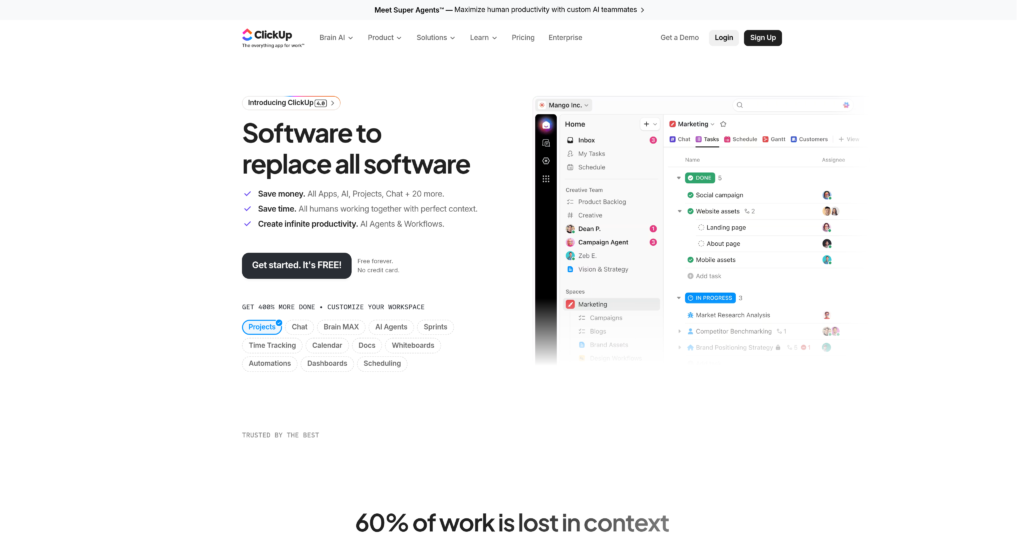
About ClickUp

ClickUp positions itself as the “one app to replace them all,” targeting teams tired of juggling disjointed productivity tools. It caters to everyone from solo freelancers to massive enterprise organizations. By combining task management, document collaboration, whiteboards, and goal tracking into a single workspace, it aims to eliminate constant context switching. With over 8 million users globally, the platform has clearly struck a nerve in the project management space. Its main differentiator is absolute customizability—you can mold the interface to fit agile sprints, CRM pipelines, or simple daily to-do lists, though this flexibility comes with a noticeably steep learning curve.

Under the hood, the platform operates on a strict hierarchy—Workspaces, Spaces, Folders, Lists, and Tasks—which keeps complex projects structurally organized. Recently, it introduced ClickUp Brain, a native AI assistant that connects your company’s tasks, docs, and team communications to provide instant answers and automate updates. Trusted by major brands like Samsung and IBM, the platform maintains strong reliability and SOC 2 compliance. However, its sheer density of features means it sometimes struggles with interface load times during heavy usage.

Key Features

Custom Task Hierarchy : The platform uses a rigid but scalable structure of Spaces, Folders, Lists, and Tasks to organize data. This allows large teams to break down massive company-wide initiatives into manageable daily assignments without losing sight of the big picture.

ClickUp Brain (AI) : A neural network-style AI assistant connects your entire workspace’s documentation, task histories, and chat logs. You can ask natural language questions about project statuses or auto-generate summaries instead of manually hunting through old threads.

Multiple Project Views : Users can toggle between over 15 distinct data visualizations, including Kanban boards, Gantt charts, and calendar formats. This flexibility ensures that developers can look at sprint boards while project managers view the exact same data as a timeline.

Native Docs and Wikis : The built-in document editor supports rich text formatting, collaborative real-time editing, and direct task embedding. Teams can draft product requirements or company wikis right next to the tasks they reference, eliminating the need for separate Google Docs.

Custom Automations : A visual builder allows administrators to set up “when this, then that” rules for repetitive actions. You save hours of busywork by automatically assigning tasks, changing statuses, or applying templates based on specific triggers.

Dashboards and Reporting : Customizable dashboard widgets pull real-time data from across your workspace to display workload capacity, time tracking, and sprint velocity. Managers get immediate visual insights into team performance and project bottlenecks without exporting data to spreadsheets.

Whiteboards : Digital canvas spaces integrate directly with your workflow, allowing teams to draw flowcharts, add sticky notes, and mind-map ideas. You can convert these visual brainstorming elements directly into actionable tasks with a single click.

Time Tracking : A native timer lets users log hours against specific tasks, complete with notes and billable tags. Freelancers and agencies can easily monitor project profitability and generate accurate timesheets for client billing.

Pros

✔ Replaces multiple subscriptions by combining project management, docs, and chat.

✔ Highly generous Free Forever plan is more than enough for solo users and small projects.

✔ Unmatched customizability lets you tailor workflows to any industry or methodology.

✔ ClickUp Brain provides genuinely useful, context-aware AI search across all tasks.

✔ Over 1,000 native integrations connect easily with tools like Slack, GitHub, and Figma.

✔ Strict hierarchy system keeps massive, multi-department projects structurally organized.

✔ Built-in time tracking eliminates the need for third-party extensions like Toggl.

Cons

✖ The sheer volume of features creates a notoriously steep learning curve for new users.

✖ The user interface often feels cluttered and overwhelming on smaller laptop screens.

✖ Occasional performance sluggishness and slow load times when navigating large workspaces.

✖ The mobile app lacks the fluidity and comprehensive feature set of the desktop version.

✖ Notification management is overly complex and defaults to sending too many alerts.

✖ ClickUp Brain (AI features) requires an additional paid add-on for all premium tiers.

✖ Setting up advanced permissions and guest access can be confusing for administrators.

Plans & Pricing

PlanTypePriceUsage LimitInclusions
Free ForeverFree$0100MB storage limitUnlimited tasks, Free plan members, Collaborative Docs, Whiteboards, Everything view, Kanban boards.
UnlimitedPaid$7/user/month (billed annually) or $10 monthlyUnlimited storageEverything in Free, plus Unlimited integrations, Unlimited Dashboards, Guests with permissions, Agile reporting.
BusinessPaid$12/user/month (billed annually) or $19 monthlyUnlimited storageEverything in Unlimited, plus Google SSO, Unlimited teams, Custom exporting, Advanced public sharing, Advanced automations.
EnterpriseCustomContact SalesUnlimited storageEverything in Business, plus White labeling, Advanced permissions, Enterprise API, MSA & HIPAA available.

FAQs

Q1: Is ClickUp actually free? +

Yes, the Free Forever plan is genuinely free and doesn’t expire. However, it restricts storage to 100MB and limits access to advanced features like custom exporting and complex automations. It works best for individuals or very small teams.

Q2: Does ClickUp have a steep learning curve? +

Yes, the platform’s greatest strength—its customizability—is also its biggest hurdle. Because you can configure it in hundreds of ways, new teams often struggle to establish a standardized workflow initially. Setting aside time for proper onboarding is highly recommended.

Q3: Is ClickUp Brain included in the standard plans? +

No, ClickUp Brain is an optional add-on that costs an additional fee per user, per month. You must be on a paid plan (Unlimited, Business, or Enterprise) to purchase and access these AI capabilities.

Q4: Can ClickUp replace Jira for software development? +

Many teams successfully use it as a Jira alternative. It offers sprint management, point estimation, GitHub integrations, and agile dashboards. However, hardcore engineering teams might miss some of Jira’s deep, developer-specific ecosystem integrations.

Q5: How does ClickUp handle data security? +

The platform is SOC 2 Type 2 compliant and encrypts data both in transit and at rest. Enterprise customers can also request HIPAA compliance and set up custom SAML single sign-on (SSO) for stricter access control.

0/5
from 0 reviews
★★★★★
(0)
★★★★
(0)
★★★
(0)
★★
(0)
(0)

Leave a Reply

Alternative AI Tools

KiloClaw

kiloclaw

0 user reviews
$4/ first month Renews at $9/month · 7-day free trial , Premium

KiloClaw offers developers an AI-driven approach to web scraping and unstructured data extraction. This review breaks down its capabilities, API performance, and whether it justifies the investment.

,

peach Ai

Try Peach Ai

0 user reviews
0$-499$ , Freemium

Peach AI is the native WhatsApp platform designed for inside sales teams. Deploy intelligent AI agents to qualify leads, resolve queries, and reduce churn effortlessly within the chat app.

,

DronaHQ

DronaHQ

0 user reviews
Trial , Free

DronaHQ is a low-code enterprise platform for building apps, deploying AI agents, and automating workflows with enterprise-grade security and integrations.

nanobot-icon.

Nanobot.club

0 user reviews
$2 - $50+/month , Freemium

Nanobot is an ultra-lightweight open-source AI assistant with just 4,000 lines of Python code, offering multi-platform chat integration and 11+ LLM providers with 99% less code than alternatives.

,