About GeniLoop

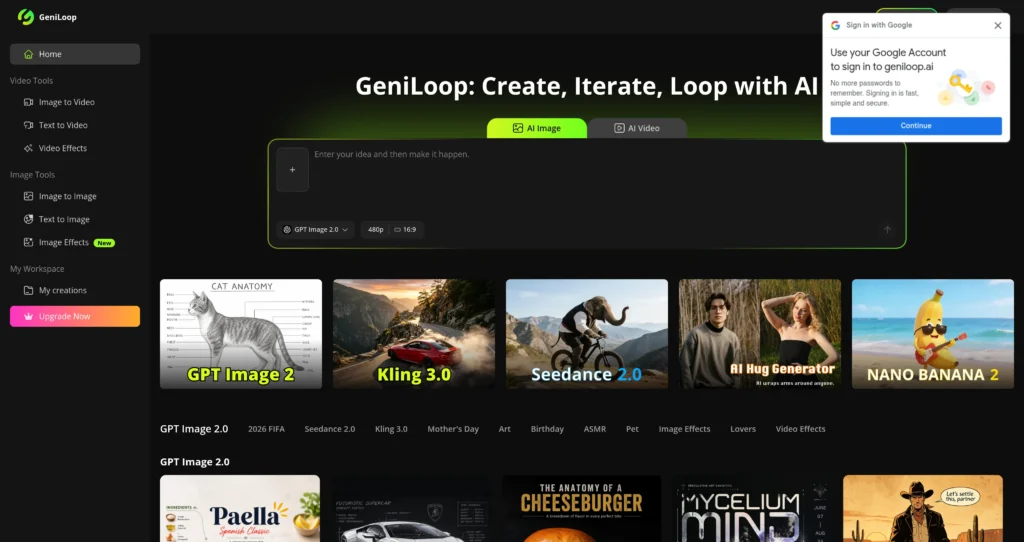
GeniLoop is an all-in-one AI video and image studio for creators, marketers, designers, agencies, and content teams. It brings together text-to-video, image-to-video, text-to-image, image-to-image, video effects, image effects, and multiple popular AI models in one browser-based workspace.

The platform is built around fast creative iteration: users can choose models, resolutions, aspect ratios, and effects, then generate visual assets for social content, ads, product visuals, storytelling, and experiments. GeniLoop uses a credit system, offers paid plans with watermark-free exports and commercial use, and also sells one-time credit packs for users who need extra generation capacity.

Key Features

AI video generation : Create videos from text prompts or still images using multiple video models and generation routes.

AI image generation : Generate images from prompts, transform existing images, and explore different visual styles for creative and marketing work.

Multiple AI models : Access a hub of models and routes including names shown on the official site such as Grok, Kling, Runway, FLUX, Sora, Vidu, Wan, Qwen, Hailuo, Seedance, Seedream, and Veo.

500+ effects : Use a large library of video and image effects to create stylized visuals, animations, transformations, and social-ready creative assets.

Resolution and aspect ratio controls : Pick common outputs like 480p, 720p, 1080p and formats such as 16:9, 9:16, 4:3, 3:4, and 1:1 depending on the workflow.

Private generations : The pricing FAQ says generations are private by default, which matters for brand assets, product concepts, and unpublished campaigns.

Watermark-free paid exports : Paid plans include watermark-free exports, making outputs more suitable for commercial and client-facing use.

Credit packs : Buy additional credits as one-time add-ons when subscription credits are not enough for a campaign or production sprint.

Pros

✔ Combines AI video, image generation, image editing, animation, and effects in one workspace.

✔ Good fit for social media creators, marketers, agencies, designers, and content teams.

✔ Supports many popular model families instead of locking users into one generator.

✔ Paid plans include watermark-free exports and commercial use rights.

✔ One-time credit packs help users handle occasional high-volume generation without changing subscriptions.

✔ Private-by-default generations are helpful for brand and client work.

✔ Yearly pricing offers a large discount compared with monthly pricing.

Cons

✖ Subscription credits expire at the end of each cycle and do not roll over.

✖ Output quality can vary by model, prompt quality, resolution, and generation settings.

✖ Heavy users may burn through credits quickly when creating longer videos or testing many variations.

✖ The large model/effect catalog may feel overwhelming for users who only need one simple workflow.

✖ AI-generated visuals should still be reviewed for brand safety, rights, platform policies, and factual accuracy before publishing.

Plans & Pricing

PlanTypePriceUsage LimitInclusions
StarterSubscription$7.99/month billed yearly1,650 credits/month; up to 110 videos or 1,236 imagesAccess to AI video and image models, 500+ effects, all AI tools, watermark-free exports, commercial use, and priority queue.
CreatorSubscription$25.99/month billed yearly5,600 credits/month; up to 373 videos or 700 imagesHigher monthly credits for consistent creation, with the same model access, effects, tools, watermark-free exports, commercial use, and priority queue.
ProSubscription$45.99/month billed yearly11,000 credits/month; up to 733 videos or 8,250 imagesDesigned for AI-powered projects and heavier creative workflows with expanded monthly credits.
BusinessSubscription$79.99/month billed yearly20,000 credits/month; up to 1,333 videos or 15,000 imagesFor agencies and small teams that need higher generation volume and commercial creative output.
Credit PacksOne-timeFrom $6.99500, 1,200, 3,500, 5,300, or 7,000 extra creditsExtra credits can be bought anytime, do not expire, and support watermark-free generation according to the pricing page.

Source: geniloop.ai/pricing (verify on official website).

FAQs

Q1: What is GeniLoop used for? +

GeniLoop is used to create AI videos, images, animations, effects, and visual assets for social media, ads, creative projects, and marketing campaigns.

Q2: How do GeniLoop credits work? +

Credits are consumed when generating images, videos, or animations. The number of credits used depends on the model, duration, resolution, and generation type.

Q3: Do subscription credits roll over? +

No. The official pricing FAQ says subscription credits expire at the end of each cycle and do not roll over. One-time credit packs, however, are described as never expiring.

Q4: Can I use GeniLoop outputs commercially? +

Paid plans list commercial use and watermark-free exports. Users should still review model terms, brand guidelines, and platform policies before using outputs in campaigns.

Q5: Are my generations private? +

The official pricing FAQ says generations are private by default and that GeniLoop does not share, sell, or use images, videos, or prompts for training without explicit permission.

0/5
from 0 reviews
★★★★★
(0)
★★★★
(0)
★★★
(0)
★★
(0)
(0)

Leave a Reply

Alternative AI Tools

craiyon

Craiyon

0 user reviews
Premium , Freemium

Craiyon is an AI-powered image generation tool that creates visual content from text prompts. It serves artists, students, and hobbyists.

Viggle

0 user reviews
Freemium / Subscription , Freemium

Viggle is an AI video and animation platform for animating characters, transferring motion, remixing footage, generating dance videos, and creating controllable motion content.

, ,

Capify

0 user reviews
Freemium / Subscription , Freemium

Capify is an AI lyric video maker for musicians that transcribes songs, syncs lyrics, lets users customize timing and visuals, and exports lyric videos for music promotion.

, ,

Magic Patterns

0 user reviews
Freemium / Subscription , Freemium

Magic Patterns is an AI product design and prototyping tool that helps teams generate UI screens, frontend components, React/Tailwind code, and clickable product mockups from prompts and references.

, , ,