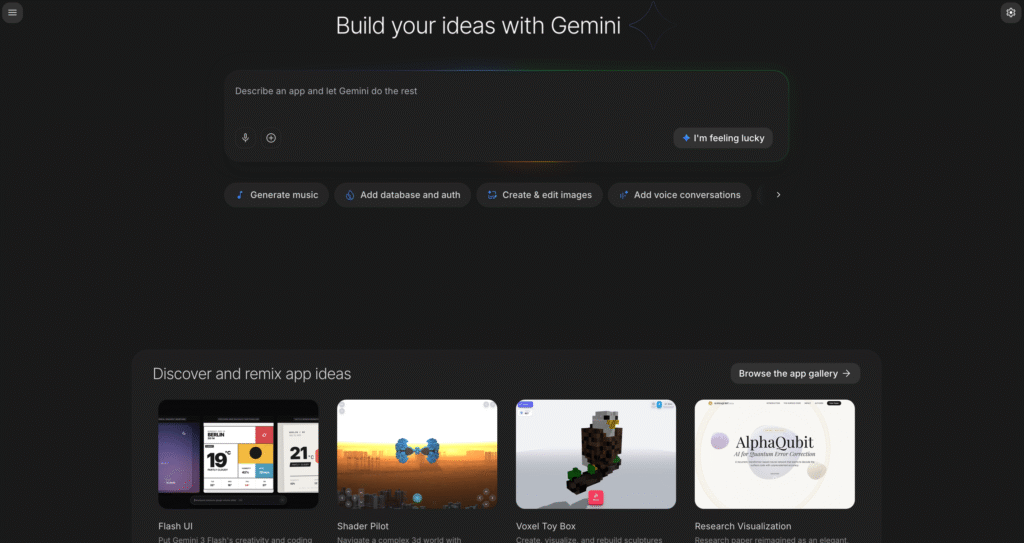
Google AI Studio
Google AI Studio is a browser-based workspace for prototyping with Gemini models, testing multimodal prompts, getting Gemini API keys, and moving experiments into developer apps.


Google AI Studio is a browser-based workspace for prototyping with Gemini models, testing multimodal prompts, getting Gemini API keys, and moving experiments into developer apps.

Google AI Studio is Google’s browser-based workspace for experimenting with Gemini models, testing prompts, working with multimodal inputs, and generating Gemini API keys. It is designed as a fast starting point for developers and product teams that want to validate AI features before moving them into a production app.
The platform connects closely with the Gemini API and Google Cloud ecosystem. Users can prototype in the AI Studio interface, explore prompt examples, test long-context and multimodal workflows, then move into API usage, Vertex AI, or compatible developer frameworks when they need production deployment.
Gemini model playground : Test Gemini models in a browser interface before adding them to an application.
API key access : Create Gemini API keys and start integrating Gemini into apps and workflows.
Multimodal prompting : Experiment with text, image, audio, video, document, and structured output use cases supported by Gemini.
Long context workflows : Explore large-context use cases for documents, research, code, and complex prompt chains.
Developer ecosystem : Works with the GenAI SDK, OpenAI-compatible API patterns, LangChain, LlamaIndex, Vercel AI SDK, and Google Cloud workflows.
Grounding options : Paid Gemini API usage can include Google Search and Google Maps grounding where supported.
Production path : Start free, then move to paid Gemini API tiers or enterprise deployment through Google Cloud and Vertex AI.
✔ Very fast way to start building with Gemini models.
✔ Free access is useful for learning, prompt testing, and early prototypes.
✔ Strong API and Google Cloud upgrade path for production teams.
✔ Supports modern multimodal AI workflows in one developer environment.
✔ Good ecosystem coverage through SDKs, API compatibility, and framework integrations.
✖ It is primarily a developer workspace, not a finished consumer productivity app.
✖ Production usage can become usage-based and requires billing controls.
✖ Some advanced model, grounding, throughput, privacy, and enterprise features depend on paid tiers.
✖ Teams still need engineering work to turn prototypes into reliable products.
| Plan | Type | Price | Usage Limit | Inclusions |
|---|---|---|---|---|
| Free | Free tier | Free | Limited model access and free token usage | Google AI Studio access, API experimentation, free input and output tokens on eligible models, and generous starting limits. |
| Paid Gemini API | Usage-based | Pay as you go by model and token usage | Higher rate limits and paid model access | Production-ready API usage, context caching, Batch API savings, advanced models, and data handling where content is not used to improve Google’s products. |
| Enterprise | Custom | Contact sales | Custom limits and deployment requirements | Dedicated support, advanced security and compliance, provisioned throughput, volume discounts, ML ops, model garden access, and Google Cloud enterprise options. |
Source: Gemini Developer API pricing. Verify current model prices, rate limits, grounding charges, and data-use terms on Google’s official pricing page.
Google AI Studio is used to prototype with Gemini models, test prompts, explore multimodal workflows, create Gemini API keys, and prepare AI features for developer applications.
Google AI Studio offers free access for getting started. Production usage through the Gemini API can move to paid, usage-based pricing depending on model, token usage, rate limits, and features.
Yes. Google AI Studio helps users get Gemini API keys and connect prototypes to Gemini API workflows.
It is best for developers, product teams, prompt engineers, students, and teams testing Gemini-powered AI features before building production applications.
AI Studio is mainly for prototyping. Production apps usually use the Gemini API, paid tiers, Vertex AI, or Google Cloud deployment options.
| Key Features | ||||
|---|---|---|---|---|
| Review Score | 9.1/10 | 9.8/10 | 9.6/10 | 9.6/10 |
| Pricing Model | Free / Usage-based API / Enterprise | Free / Open Source | $10/month or $100/year | Freemium / Usage-Based / Enterprise |
| Free Plan | ✔ Yes | ✔ Yes | ✖ No | ✔ Yes |
| Starting Cost | Freemium | Free | Freemium | Freemium |
| Details Page | Active Page | Compare | Compare | Compare |
shadcn/ui is an open-source component collection for building customizable React design systems with Tailwind CSS, Radix UI patterns, charts, blocks, and copyable source code.
GitHub Copilot is an AI coding assistant that suggests code, functions, and solutions directly within your IDE in real time.
v0 by Vercel is an AI app builder for generating, editing, integrating, and deploying full-stack websites and applications from natural-language prompts.
Windsurf is an AI-powered coding editor with Cascade agents, Tab autocomplete, and enterprise-ready collaboration tools, offering flexible plans from Free to Enterprise.
LangChain is a leading open-source orchestration framework designed to simplify the construction of applications powered by large language models.
Retool allows developers to build functional internal tools and workflows by connecting databases and APIs to drag-and-drop React components.
Cursor is an AI coding agent and AI-native code editor for writing, editing, reviewing, and shipping software across desktop, CLI, cloud agents, automations, and team workflows.
Together AI is an AI-native cloud for running, fine-tuning, evaluating, and deploying open models with serverless APIs, dedicated inference, and GPU clusters.