
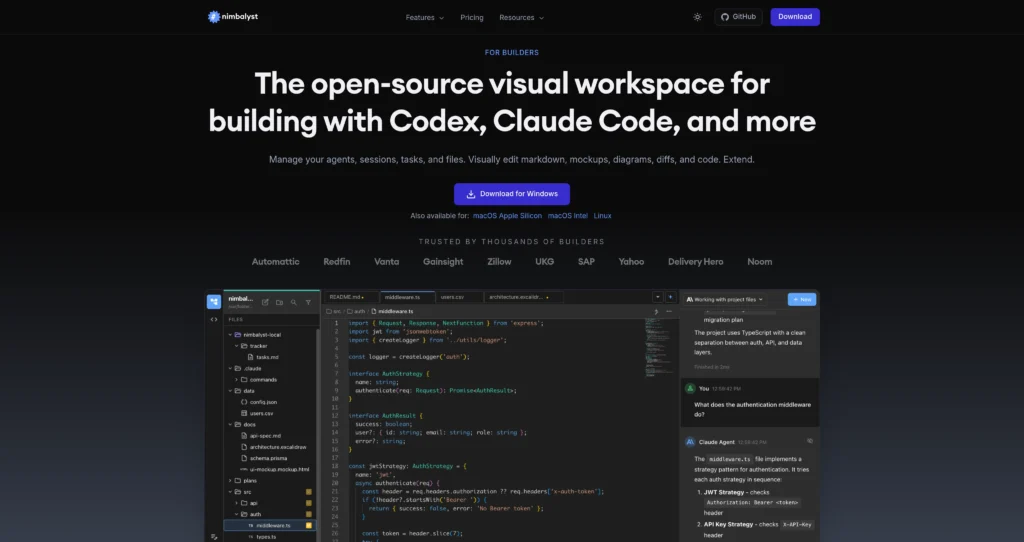
About Nimbalyst
Nimbalyst is an open-source visual workspace for builders who work with coding agents like Codex and Claude Code. Instead of managing agent chats, files, plans, diagrams, and git changes across separate tools, Nimbalyst brings them into one local-first desktop environment.
The platform is designed for agent-native development: you can run and resume sessions, review AI changes visually, edit markdown or code, diagram systems, track tasks, and connect tools through MCP. It is especially useful for developers, technical founders, and product teams who want more control and visibility when AI agents modify real project files.
Key Features
Agent session management : Run multiple Codex and Claude Code sessions, organize them, search history, resume past work, and branch sessions when a task needs a new direction.
Visual markdown editor : Write plans, specs, notes, and documentation in a WYSIWYG markdown editor while agents can read, edit, and propose changes.
Red/green AI diffs : Review AI edits as visible diffs before accepting, rejecting, or modifying them, which helps reduce accidental changes in important files.
Diagram and drawing tools : Create Mermaid diagrams and Excalidraw-style visuals for architecture, flows, mockups, and planning with AI-assisted editing.
Developer workspace : Use a Monaco code editor, integrated terminal, git diffs, branch management, worktrees, and AI-assisted commit messages without leaving the app.
Task and plan tracking : Track tasks, bugs, ideas, and decisions in markdown-backed plans that both humans and agents can read and update.
MCP and skills support : Connect agents to external services through Model Context Protocol and use slash commands or custom skills for repeatable workflows.
Local-first and open source : Content lives in standard local files, with open-source licensing for the desktop app and team collaboration layer.
Pros
✔ Strong fit for developers who use Codex, Claude Code, or multiple coding agents.
✔ Local-first file storage gives users more control over project data and history.
✔ Visual diff review makes agent edits easier to inspect before committing.
✔ Combines planning, documentation, diagrams, code editing, terminal, and git in one workspace.
✔ MCP support and custom commands make it flexible for advanced workflows.
✔ Free Individual plan includes the core workspace experience.
✔ Open-source model is attractive for teams that want transparency and extensibility.
Cons
✖ Best suited to technical users; non-developers may find the workflow more advanced than a simple AI chat app.
✖ AI features depend on your own Codex, Claude Code, or other provider access.
✖ Team pricing and collaboration details are still marked as coming soon.
✖ Teams with established IDE and project-management workflows may need time to adapt.
✖ Some provider integrations beyond Codex and Claude Code may be alpha or evolving.
Plans & Pricing
| Plan | Type | Price | Usage Limit | Inclusions |
|---|---|---|---|---|
| Individual | Free | $0 | No stated trial period or core feature limit | Visual editor and workspace, markdown editor, session manager, Codex and Claude Code integration, MCP support, extensions, file sharing, diagrams, mockups, code editor, terminal, git tools, commits, and worktrees. |
| Team | Coming soon | TBD / user / month | Not yet announced | Planned team collaboration features, including shared work, session handoff, task management, and workspace access controls. |
| AI provider access | Bring your own access | Provider billing applies | Depends on your Codex, Claude Code, or API subscription | Nimbalyst provides the workspace; model usage depends on the AI tools or subscriptions you connect. |
Source: nimbalyst.com/pricing (verify on official website).
FAQs
Q1: What is Nimbalyst used for?
Nimbalyst is used to manage AI coding workflows: planning, editing files, running agent sessions, reviewing changes, creating diagrams, using a terminal, and handling git work in one visual workspace.
Q2: Does Nimbalyst work with Codex and Claude Code?
Yes. Nimbalyst is built to work with Claude Code and Codex, and it also references additional providers such as OpenCode and GitHub Copilot as evolving integrations.
Q3: Is Nimbalyst free?
The Individual plan is listed as free at $0. Team collaboration pricing is marked as TBD, so check the official pricing page for the latest plan details.
Q4: Do I need my own AI subscription or API key?
Yes. Nimbalyst connects to your own Codex, Claude Code, or other supported provider access. The app provides the workspace and agent management layer.
Q5: Is Nimbalyst open source and local-first?
Yes. Nimbalyst says the local desktop app is MIT licensed, the team collaboration layer is AGPL licensed, and content is stored in local standard files.
Published on: May 12, 2026