About GanttPRO

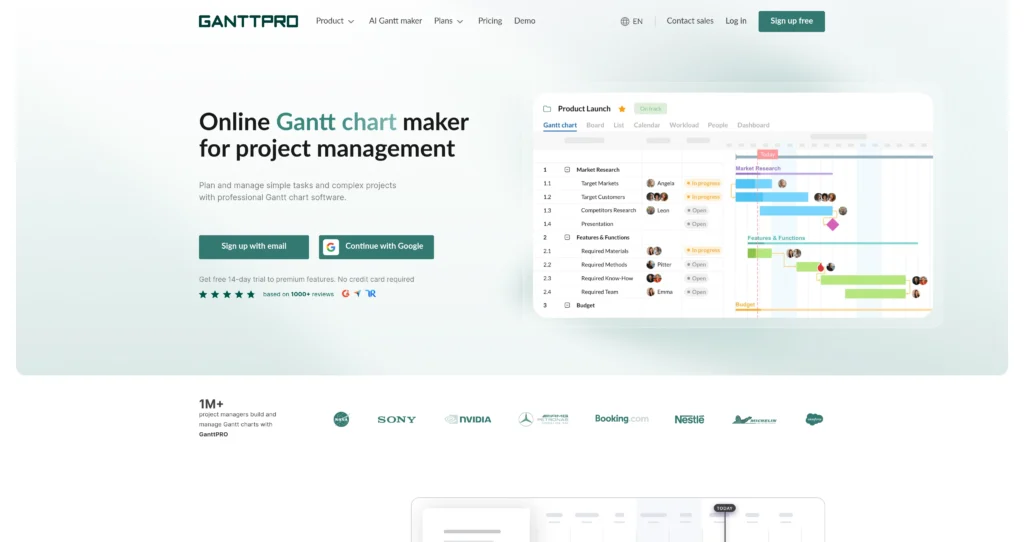
GanttPRO is online Gantt chart software built for planning, scheduling, and managing projects visually. It helps teams map tasks, dates, deadlines, milestones, dependencies, assignees, progress, and resources in a structured timeline view.

The platform is useful for project managers, operations teams, agencies, construction teams, software teams, and anyone who needs a clearer alternative to spreadsheets or overly complex enterprise project tools. Alongside Gantt charts, GanttPRO also includes board, list, dashboard, calendar, portfolio, workload, budgeting, time tracking, import/export, and collaboration features depending on the plan.


Key Features

Interactive Gantt charts : Build project timelines with tasks, subtasks, milestones, dependencies, deadlines, assignees, and progress tracking in one visual schedule.

Multiple project views : Switch between Gantt, board, list, dashboard, calendar, portfolio, and workload views so different teams can work in the format they prefer.

Dependencies and auto scheduling : Link tasks and automatically adjust schedules when dates shift, helping teams understand how one delay affects the wider plan.

Resource workload management : Plan who is working on what, spot overloaded team members, and balance workloads across projects.

Baselines and critical path : Compare planned vs. actual progress and identify the tasks that most directly affect project completion dates.

Team collaboration : Use comments, attachments, notifications, roles, rights, and shared project links to keep stakeholders aligned.

Budgeting and time tracking : Track estimates, logged time, costs, budgets, and reports on higher-tier plans for more complete project control.

Import, export, and integrations : Import from tools like Excel, MS Project, and Jira Cloud, export to formats such as PDF, PNG, XML, and Excel, and connect supported business tools.

Pros

✔ Strong visual timeline experience for complex projects with many dependencies.

✔ Easier to learn than many enterprise project management tools while still covering serious planning needs.

✔ Multiple views help teams collaborate without forcing everyone into the Gantt chart all day.

✔ Auto scheduling, baselines, deadlines, and critical path features help reduce planning mistakes.

✔ Workload, budget planning, and time tracking make it useful beyond basic task lists.

✔ 14-day free trial lets teams test premium features before paying.

✔ Good import/export options for teams moving from spreadsheets or MS Project-style workflows.

Cons

✖ No permanent free plan is highlighted on the pricing page; it is primarily trial plus paid subscriptions.

✖ Monthly billing and team-size rules can vary, so teams should verify current terms before buying.

✖ Advanced resource, budget, portfolio, and reporting tools are gated to higher plans.

✖ Teams that only need a simple checklist may find full Gantt planning more structured than necessary.

✖ Enterprise security and admin features require the Enterprise plan or custom sales discussion.

Plans & Pricing

PlanTypePriceUsage LimitInclusions
Free TrialTrial$0 for 14 daysTrial access to premium featuresNo credit card required; lets teams test GanttPRO before subscribing.
CoreSubscription$7/user/month billed annuallyPer-user pricingCore project management features including Gantt charts, project calendar, auto scheduling, and virtual resources.
AdvancedSubscription$10/user/month billed annuallyPer-user pricingEverything in Core plus overdue tasks, custom fields and filters, calendar exceptions, and custom project templates.
BusinessSubscription$17/user/month billed annuallyPer-user pricingEverything in Advanced plus workload management, portfolios and reports, budget planning, and time tracking.
EnterpriseEnterpriseCustom / promotional pricing may applyAvailable for larger teams; verify current minimumsEverything in Business plus SAML SSO, custom roles and rights, enterprise onboarding assistance, and priority support.

Source: ganttpro.com/pricing (verify on official website).

FAQs

Q1: What is GanttPRO best for? +

GanttPRO is best for teams that need visual project scheduling, dependencies, milestones, workload planning, and progress tracking in a Gantt chart-first workspace.

Q2: Does GanttPRO offer a free trial? +

Yes. GanttPRO offers a 14-day free trial to premium features, and the pricing page says no credit card is required.

Q3: Can GanttPRO replace spreadsheets for project planning? +

For many teams, yes. GanttPRO provides structured timelines, dependencies, workload, calendars, reports, and exports that are difficult to maintain manually in spreadsheets.

Q4: Does GanttPRO support resource and budget planning? +

Yes, but the most complete workload, portfolio, budget, and time tracking capabilities are associated with higher-tier plans such as Business and Enterprise.

Q5: Can I import or export project data? +

Yes. GanttPRO supports importing from sources such as Excel, MS Project, and Jira Cloud, and exporting project charts or data to formats like PNG, PDF, XML, and Excel.

0/5
from 0 reviews
★★★★★
(0)
★★★★
(0)
★★★
(0)
★★
(0)
(0)

Leave a Reply

Alternative AI Tools

nimbalyst

Nimbalyst

0 user reviews
Free (Team plan coming soon) , Free

Nimbalyst is an open-source visual workspace for building with Codex, Claude Code, and other coding agents, combining agent sessions, visual editors, local files, MCP, and git workflows.

, ,

gamma-app

Gamma

0 user reviews
0$ - 20$/month , Freemium

Gamma replaces legacy presentation software with an AI-driven engine that turns prompts into polished decks, docs, and sites. Find out if it’s the right tool for your next pitch.

taskade

Taskade

0 user reviews
Freemium , Freemium

An AI-powered workspace for tasks, notes, mind maps, and multi-agent workflows—built for teams and personal productivity.

,

Jigso

0 user reviews
Freemium , Freemium

A proactive AI work assistant that monitors your tools and surfaces risks and next-best actions in real time.

,