Detailed Assessment & Score

Overall Rating
8.8 Very Good
Core Performance Metrics
Ease of Use 8.9/10
Features 8.7/10
AI Quality 8.6/10
Value 8.9/10
Key Facts & Details
Free Plan Available No
API Integration Support No
Official Mobile App No
Browser Extension Support No
Best Suited For
Software teams checking pull requests for static code errors Developers creating and sharing custom smart code snippets Engineers checking logic structures for performance leaks
System Integrations
GitHub GitLab VS Code IntelliJ

What is Codiga?

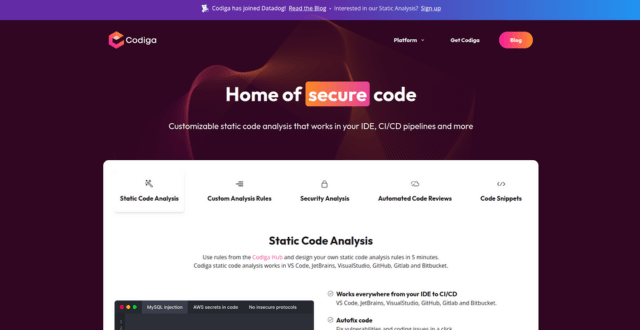
Codiga is a static code analysis and automated code review tool that integrates with IDEs and CI/CD pipelines to help developers catch issues early in the development process. It supports multiple programming languages and lets teams create custom rules to maintain coding standards. Codiga improves code quality by offering real-time feedback, security checks, and reusable code snippets—all while integrating seamlessly into GitHub, GitLab, Bitbucket, and VS Code.

Key Features

  • Static Code Analysis
    Scans code in real time or during CI to detect bugs, vulnerabilities, and bad practices across multiple languages.
  • Coding Assistant
    Provides intelligent recommendations as you code in your IDE, reducing the need for manual review.
  • Custom Rule Sets
    Teams can define and enforce specific coding standards using custom rules tailored to their workflow.
  • Code Snippets (Smart Recipes)
    Create, share, and reuse verified code snippets across teams to reduce redundancy and improve consistency.
  • IDE Integrations
    Works with VS Code, JetBrains IDEs, and popular editors for inline suggestions and quality feedback.
  • GitHub/GitLab/Bitbucket Integration
    Automatically reviews pull requests and suggests improvements before code is merged.
  • Security Scanning
    Identifies security vulnerabilities in real time based on OWASP and other standards.
  • Metrics & Dashboards
    Monitor project health, code quality scores, and compliance with coding guidelines.

Pros

  • Supports multiple languages (Python, JavaScript, TypeScript, Java, and more)
  • Real-time feedback during development and pull requests
  • Helps enforce team-wide coding standards
  • Built-in security and performance checks
  • Customizable rules and snippet libraries for large teams

Cons

  • Free tier limited in features for large teams
  • Focused on analysis and review—not full AI code generation
  • Requires setup and onboarding to define rules effectively
  • Interface may feel complex for new users
  • No support for advanced AI pair programming features

Pricing Model

  • Free Plan: Static analysis for one user, basic rules, and IDE support
  • Pro Plan: $14/month per user – Unlimited rules, private snippets, team management features
  • Enterprise Plan: Custom pricing – Includes SSO, advanced integrations, priority support, and tailored onboarding
    (Pricing based on monthly billing; annual billing available with discounts)

Conclusion

Codiga is a highly effective tool for developers and teams looking to automate code reviews, improve quality, and enforce best practices across multiple languages. Its real-time feedback, custom rules, and security scanning make it a reliable assistant during development and code review. While it doesn’t generate code like some AI tools, its focus on quality, consistency, and security makes it a strong choice for modern dev teams.


User Ratings & Reviews

0
Based on 0 User Reviews
5 Star
(0)
4 Star
(0)
3 Star
(0)
2 Star
(0)
1 Star
(0)

Leave a Reply

Comparison Matrix
Key Features
Codiga Icon Codiga Active
shadcn/ui Icon shadcn/ui
GitHub Copilot Icon GitHub Copilot
v0 Icon v0
Review Score 8.8/10 9.8/10 9.6/10 9.6/10
Pricing Model $14/month Free / Open Source $10/month or $100/year Freemium / Usage-Based / Enterprise
Free Plan ✖ No ✔ Yes ✖ No ✔ Yes
Starting Cost Freemium Free Freemium Freemium
Details Page Active Page Compare Compare Compare

Similar Alternatives to Codiga

shadcn/ui Logo

shadcn/ui

0 user reviews
9.8
Free / Open Source Free

shadcn/ui is an open-source component collection for building customizable React design systems with Tailwind CSS, Radix UI patterns, charts, blocks, and copyable source code.

GitHub Copilot Logo

GitHub Copilot

0 user reviews
9.6
$10/month or $100/year Freemium

GitHub Copilot is an AI coding assistant that suggests code, functions, and solutions directly within your IDE in real time.

v0 Logo

v0

0 user reviews
9.6
Freemium / Usage-Based / Enterprise Freemium

v0 by Vercel is an AI app builder for generating, editing, integrating, and deploying full-stack websites and applications from natural-language prompts.

Windsurf Logo

Windsurf

0 user reviews
9.5
($0–$200) Freemium

Windsurf is an AI-powered coding editor with Cascade agents, Tab autocomplete, and enterprise-ready collaboration tools, offering flexible plans from Free to Enterprise.

LangChain Logo

LangChain

0 user reviews
9.4
Freemium Freemium

LangChain is a leading open-source orchestration framework designed to simplify the construction of applications powered by large language models.

retool Logo

retool

0 user reviews
9.4
Free plan available, paid plans from $10/builder/month Freemium

Retool allows developers to build functional internal tools and workflows by connecting databases and APIs to drag-and-drop React components.

Cursor Logo

Cursor

1 user review
9.4
Free / Subscription / Team / Enterprise Freemium

Cursor is an AI coding agent and AI-native code editor for writing, editing, reviewing, and shipping software across desktop, CLI, cloud agents, automations, and team workflows.

Together AI Logo

Together AI

0 user reviews
9.4
Usage-Based / Enterprise Premium

Together AI is an AI-native cloud for running, fine-tuning, evaluating, and deploying open models with serverless APIs, dedicated inference, and GPU clusters.