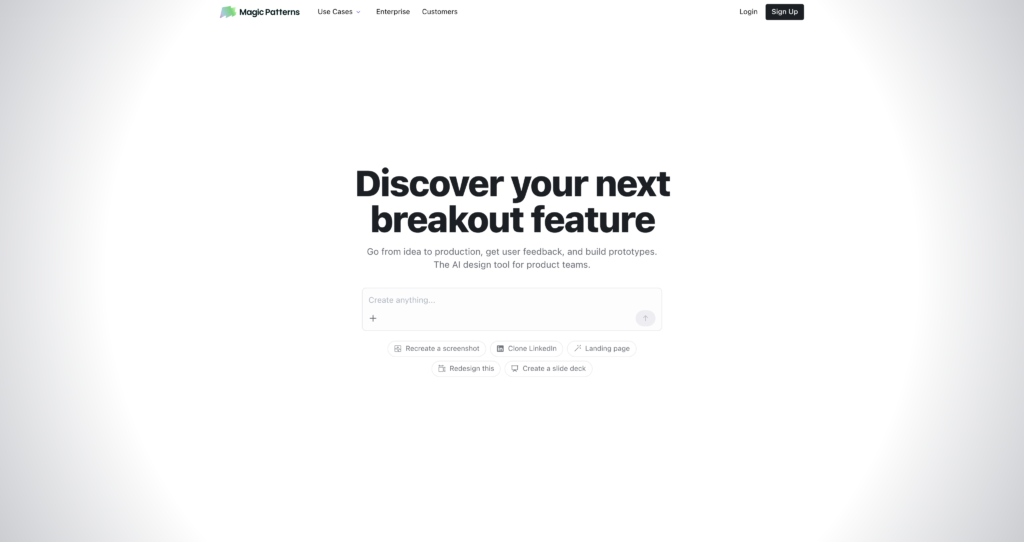
About Magic Patterns

Magic Patterns is an AI prototyping and product design platform for turning product ideas, prompts, screenshots, and references into polished UI screens, frontend components, and interactive mockups. It is especially useful for founders, product managers, designers, and engineers who want to move from a rough concept to a visual product direction quickly.

The tool fits naturally beside AI design tools, AI coding assistants, and website creation tools. Its strongest use case is rapid UI exploration: generate a layout, iterate with AI, edit the design, share it with teammates, and export or sync frontend-friendly work for implementation.

Key Features

AI UI generation : Create product screens, dashboards, landing pages, app interfaces, and component concepts from natural-language prompts.

Prompt-based iteration : Refine layouts, colors, content, states, sections, and components through conversational editing instead of starting over each time.

React and Tailwind output : Use generated UI as a practical starting point for frontend development, prototypes, and code handoff.

Reference-driven design : Work from screenshots, product ideas, visual references, or existing interface patterns to create more targeted outputs.

Team workspaces : Paid workspace plans support team collaboration, shared billing, design systems, GitHub sync, and workspace-level credits.

Design systems : Paid plans include support for design-system workflows so teams can keep generated interfaces closer to brand and product standards.

GitHub sync : Starter and higher plans list GitHub sync, helping teams connect AI-generated UI work with development workflows.

Credit-based usage : AI generation uses monthly credits, with higher paid plans offering more credits and on-demand usage options.

Pros

✔ Strong option for quickly exploring product UI ideas before committing design or engineering time.

✔ Useful for founders, product teams, designers, engineers, and agencies that need fast visual prototypes.

✔ Combines AI design generation with frontend-oriented output, making it more practical than static mockup tools alone.

✔ Free plan makes it possible to test the workflow before upgrading.

✔ Paid plans include design systems, GitHub sync, no watermark, and workspace billing features.

✔ Business and Enterprise tiers add features better suited to larger teams, including roles, reporting, and SSO.

Cons

✖ AI-generated interfaces still need product judgment, accessibility review, and code QA before production use.

✖ Credit usage can vary depending on task complexity, model choice, and number of design iterations.

✖ Per-seat pricing can become expensive for larger teams compared with lightweight design-only tools.

✖ Teams above 10 paid seats may need Business or Enterprise rather than the Starter plan.

✖ Best results usually require clear prompts, good references, and human refinement.

Plans & Pricing

PlanTypePriceUsage LimitInclusions
FreeFreeUS$0/seat/month250 monthly creditsLimited AI generation for testing Magic Patterns in a workspace.
StarterSubscriptionUS$20/seat/month, or US$17/seat/month annually1,000 monthly credits; up to 10 paid seatsOn-demand usage, design systems, no watermark, GitHub sync, Magic Patterns MCP, and centralized billing.
BusinessSubscriptionUS$100/seat/month, or US$85/seat/month annually5,000 monthly credits; 11+ paid seatsStarter features plus faster AI models, self-serve SSO, user roles and permissions, and usage reporting.
EnterpriseEnterpriseCustom pricingCustom creditsBusiness features plus shared credit pooling, SCIM and audit logs, technical account manager, and priority support.

Source: magicpatterns.com/pricing and Magic Patterns billing documentation (verify current prices, credit rules, and plan limits on the official website).

FAQs

Q1: What is Magic Patterns used for?+

Magic Patterns is used to generate UI screens, product prototypes, frontend components, and interface ideas from prompts, references, and product requirements.

Q2: Does Magic Patterns create code?+

Yes. Magic Patterns is designed around frontend-friendly output and can help teams move from AI-generated UI concepts toward React and Tailwind-style implementation work.

Q3: Does Magic Patterns have a free plan?+

Yes. Magic Patterns lists a Free plan with 250 monthly credits, making it possible to test AI generation before choosing a paid workspace plan.

Q4: How does Magic Patterns pricing work?+

Magic Patterns uses per-seat workspace pricing with monthly credits. Paid plans include Starter, Business, and Enterprise, and additional on-demand usage is available on paid plans.

Q5: Who should use Magic Patterns?+

Magic Patterns is best for product teams, founders, designers, engineers, agencies, and startup teams that need to prototype product interfaces quickly.

0/5
from 0 reviews
★★★★★
(0)
★★★★
(0)
★★★
(0)
★★
(0)
(0)

Leave a Reply

Alternative AI Tools

Viggle

0 user reviews
Freemium / Subscription , Freemium

Viggle is an AI video and animation platform for animating characters, transferring motion, remixing footage, generating dance videos, and creating controllable motion content.

, ,

Capify

0 user reviews
Freemium / Subscription , Freemium

Capify is an AI lyric video maker for musicians that transcribes songs, syncs lyrics, lets users customize timing and visuals, and exports lyric videos for music promotion.

, ,

MeetGeek

0 user reviews
Freemium / Subscription , Freemium

MeetGeek is an AI meeting assistant that records meetings, creates transcripts, generates summaries, extracts action items, and shares insights across team tools.

,

Kimi

0 user reviews
Freemium / Subscription , Freemium

Kimi is an AI assistant from Moonshot AI for chat, research, file analysis, coding help, agent workflows, long-context reasoning, and everyday productivity.

, ,