About dreamflow
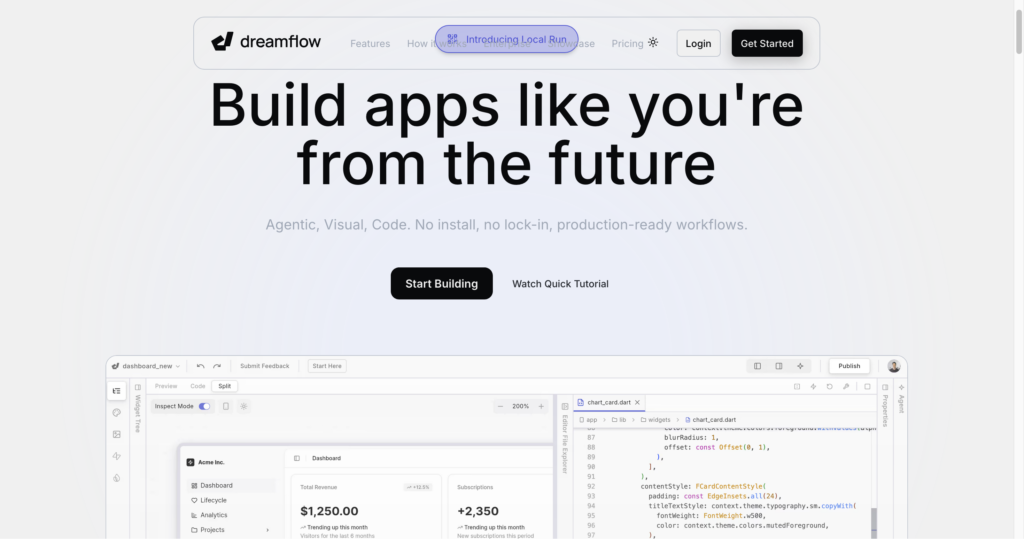
dreamflow Dreamflow is a comprehensive visual development platform designed to accelerate the creation of production-ready mobile applications. Targeted at developers, founders, and product teams, it integrates AI-assisted generation with a traditional visual canvas and raw code editing. The platform is built by the team behind FlutterFlow, leveraging their expertise in cross-platform mobile development to ensure apps are scalable and high-performing. It caters to users who need to bridge the gap between initial prototypes and fully functional, deployed applications. By utilizing natural language prompts, users can scaffold features and UI components quickly.
The architecture operates on a tri-surface synchronization model, where AI prompts, visual canvas interactions, and code edits are kept in real-time alignment. This allows developers to move fluidly between high-level conceptualization and granular code-level control without manual reconciliation of state. Unlike drag-and-drop builders that produce restrictive output, Dreamflow prioritizes Flutter, enabling full project exports and native mobile deployment. The system relies on context-aware AI models that understand design patterns and boilerplate structures to assist in writing logic. A limitation is the reliance on the cloud-based platform for its specific syncing mechanics, which may pose challenges for teams with strict air-gapped security requirements.
Key Features
Tri-Surface Editing : Seamlessly syncs AI prompts, visual canvas, and source code. This ensures that changes made in one view are reflected everywhere, eliminating manual consistency errors.
Context-Aware AI Generation : Uses intelligent models that understand mobile development best practices. It scaffolds features and logic patterns that align with standard architectural requirements.
Full-Stack Backend Integration : Includes out-of-the-box support for Firebase and Supabase. Users can connect their databases and authentication services without complex configuration.
Native App Deployment : Supports direct deployment to the Apple App Store and Google Play Store. This significantly reduces the time required to move from an idea to a live product.
Code Export : Provides the ability to export the full Flutter project. This offers users long-term flexibility by ensuring they are not locked into the platform permanently.
Local Run Support : Allows testing of applications on local simulators and real devices. This feature is critical for verifying performance and UI responsiveness before a full production launch.
Pros
✔ Seamless synchronization between visual and code interfaces.
✔ Native Flutter output provides high-performance mobile apps.
✔ Integrated backend support for popular services like Firebase.
✔ No vendor lock-in due to the ability to export full source code.
✔ Strong foundation built by the experienced FlutterFlow team.
✔ Accelerates the transition from prototyping to production.
Cons
✖ Steep learning curve for users unfamiliar with Flutter architecture.
✖ Credit-based system requires monitoring for heavy AI usage.
✖ Limited offline editing capabilities compared to native IDEs.
✖ Advanced features like Git version control are locked behind high-tier plans.
✖ Reliance on cloud connectivity for the tri-surface sync mechanism.
✖ Enterprise features require custom contact for pricing and implementation.
Plans & Pricing
| Plan | Type | Price | Usage Limit | Inclusions |
|---|---|---|---|---|
| Free ⚠️ | Monthly | $0/month | 10 AI credits (one-time) | Private projects with visual + code editing, managed backend integrations (Firebase, Supabase), 1-click web deployment. |
| Hobby | Monthly | $20/month | 100 credits/mo | Everything in Free, 1-click deployment to App Store/Play Store, full code export, local run support. |
| Pro | Monthly | $90/month | 500 credits/mo | Everything in Hobby, Git version control, priority access to premium models. |
| Enterprise | Custom | Contact Us | Unlimited | Dedicated support, advanced access control, BYO AI models, SLA, private cloud deployment. |
FAQs
Q1: Can I export my code from Dreamflow?
Yes, Dreamflow allows for full code export of your project. This ensures you maintain ownership of your Flutter codebase even if you leave the platform.
Q2: Does Dreamflow support backend integrations?
Yes, the platform includes native, out-of-the-box support for Firebase and Supabase. This simplifies the process of setting up databases and user authentication.
Q3: Is Dreamflow suitable for building professional, production-ready apps?
Yes, it is designed for production workflows and supports direct deployment to the Apple App Store and Google Play Store, making it appropriate for live applications.
Q4: What is the primary language used by Dreamflow?
Dreamflow generates applications using the Flutter framework, which utilizes the Dart programming language for cross-platform mobile development.
Q5: How do AI credits work in Dreamflow?
AI credits are consumed when using the platform’s AI-assisted generation features. Different plans offer varying monthly credit allotments to support your development velocity.
Published on: June 19, 2026