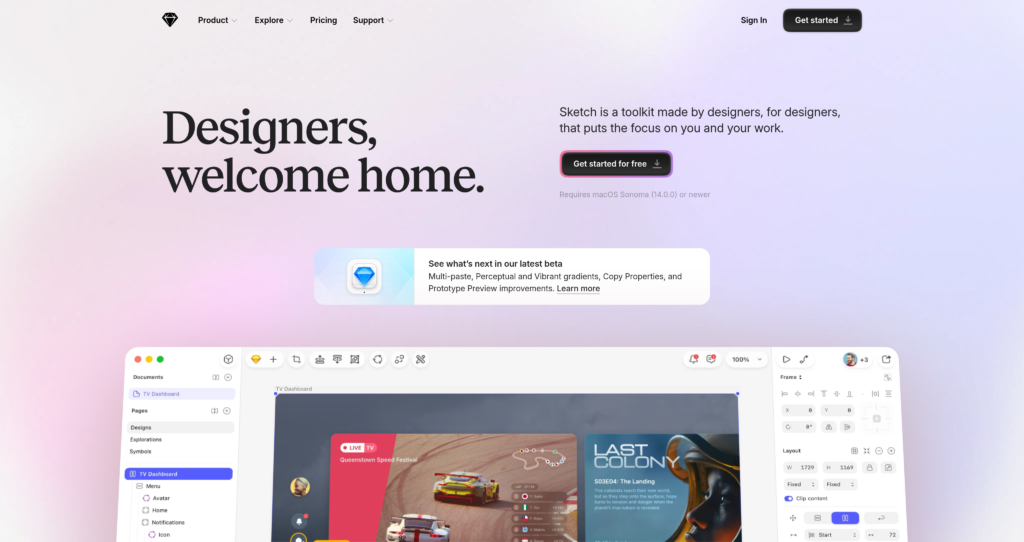
Sketch is a vector graphics editor and prototyping platform built natively for macOS, helping designers collaborate in real time and export handoff assets.

Pricing Model : Free 30-day trial, Pro plans from $12/editor/month, or $120 one-time license , Freemium

AI Categories:

sketch

About sketch

sketch Sketch is a professional vector graphics editor and design platform built specifically for macOS. It serves as a primary tool for UI/UX designers, product managers, and digital artists who build web and mobile interfaces. Users leverage its native desktop application to construct complex wireframes, scale layouts dynamically, and create reusable design systems. With integrated collaboration environments, teams can easily share ideas and coordinate across entire project cycles.

Under the hood, Sketch leverages Apple’s Cocoa framework and native rendering engines to deliver hardware-accelerated performance on macOS. This architecture ensures high-speed manipulation of vector assets and smooth canvas navigation even with massive design files. Real-time updates sync via a secure web app environment hosted on Amazon Web Services, allowing multi-user collaboration and developer handoff on any browser. However, because its desktop editing client is strictly native to macOS, Windows and Linux users are relegated to viewing and commenting within the web browser without editing privileges.

Key Features

Native macOS App : Engineered specifically for Mac systems to utilize hardware acceleration and support offline design work. This guarantees fast rendering speeds and allows users to continue working without an internet connection.

Real-Time Collaboration : Enables multiple editors to work simultaneously on the same design document within the native Mac app. Changes are synced instantly across contributors to streamline team brainstorming and workflow execution.

Developer Handoff Tools : Provides inspect and download capabilities for assets directly within the web application. Developers can measure distances, copy CSS styles, and export assets for free without needing an editor license.

Reusable Design Systems : Allows creation of flexible symbols, color variables, and text styles that update globally. This feature ensures visual consistency across extensive design projects and simplifies scaling.

Interactive Prototyping : Connects artboards with visual hotspots to create clickable, high-fidelity user flows. Designers can instantly preview and test interactions on the web or via the companion iOS app.

Version History and Control : Automatically tracks document versions in a timeline view within the web workspace. Teams can browse previous iterations, recover lost changes, and easily roll back to previous milestones.

iPhone and iPad Companion App : Mirror designs directly from your Mac to iOS mobile screens in real time. This allows designers to test mobile responsiveness and touch interactions under realistic hardware conditions.

Plugins and Integrations : Expands core design capabilities with a rich ecosystem of community-developed plugins and custom workflows. Users can connect to existing assets, automate tedious layout actions, and sync with third-party tools.

Pros

✔ Hardware-accelerated performance native to macOS architectures.

✔ Robust offline editing capability for designing without internet access.

✔ Unlimited free viewers and guest editors reducing collaboration costs.

✔ Comprehensive version history with secure rollbacks and draft comparisons.

✔ Flexible pricing options including a perpetual Mac-only license.

✔ Polished, intuitive user interface aligned with macOS design guidelines.

Cons

✖ No native editing software available for Windows or Linux operating systems.

✖ Web browser application is limited to viewing and commenting, not full editing.

✖ Perpetual Mac-only license lacks all web collaboration and cloud sync features.

✖ Workspaces and documents are permanently deleted 90 days after subscription cancellation.

✖ Does not offer a completely free tier besides the 30-day trial and education licenses.

✖ Third-party plugin dependencies can occasionally break during software updates.

Plans & Pricing

PlanTypePriceUsage LimitInclusions
Standard (30-day Trial) ⚠️Monthly or Yearly$12/mo1 Workspace, 50GB storage per EditorReal-time collaboration, unlimited documents, unlimited free viewers, document version history, free developer handoff.
ProfessionalYearly$24/mo1 Workspace, 50GB storage per EditorEverything in Standard, plus Single Sign-On (SSO), project archiving, and permissions groups.
EnterpriseYearly$44/moUnlimited Workspaces, Unlimited StorageEverything in Professional, plus SCIM provisioning, BYOK encryption, dedicated support, and custom reviews and terms.
Private CloudCustomContact for pricingUnlimited Workspaces, Unlimited StoragePrivate cloud environment, choice of hosting locations, SCIM provisioning, BYOK encryption, and custom setup.
Mac-only LicenseOne-time$120Local offline storage, includes 1 year of updatesNative Mac app, design, prototype and illustrate offline, work privately. Excludes real-time collaboration, web sharing, and iOS previewing.

FAQs

Q1: Can I use Sketch on a Windows computer? +

No, the native Sketch editor is strictly built for macOS. However, Windows users can use any standard web browser to view, inspect, comment on design files, and download assets for developer handoff.

Q2: What happens to my documents if I cancel my subscription? +

Upon cancellation, your Workspace enters a read-only state, allowing you to access and download your documents for up to 90 days. After 90 days, the documents and Workspace are permanently deleted from Sketch’s servers.

Q3: Can developers inspect Sketch documents for free? +

Yes, Sketch offers unlimited free Viewers who can inspect files, measure coordinates, and download assets through the web app without needing a paid Editor license.

Q4: Is there a completely free plan available? +

Sketch does not offer a permanently free tier for standard users, focusing instead on a fair, sustainable pricing model. They do offer a 30-day free trial, a free tier for qualifying students and educators, and a 50% discount for non-profit organizations.

Q5: What is the difference between the subscription and the Mac-only license? +

The subscription plans grant access to the real-time collaboration tools, cloud document syncing, version history, and developer handoff via the web app. The Mac-only license is a one-time purchase for local offline work only, lacking online collaboration or iOS previewing features.

0/5
from 0 reviews
★★★★★
(0)
★★★★
(0)
★★★
(0)
★★
(0)
(0)

Leave a Reply

Alternative AI Tools

canva

Canva

0 user reviews
Freemium / Subscription , Freemium

Canva is an online design and visual communication platform for creating presentations, social posts, videos, documents, websites, brand assets, and AI-powered marketing content.

, , , ,

ui-shadcn

shadcn/ui

0 user reviews
Free / Open Source , Free

shadcn/ui is an open-source component collection for building customizable React design systems with Tailwind CSS, Radix UI patterns, charts, blocks, and copyable source code.

, , ,

Designkit

0 user reviews
Freemium / Subscription , Freemium

Designkit is an AI e-commerce creative suite for generating product images, fashion models, product videos, backgrounds, edits, enhancements, and batch product visuals.

, , ,

genloop

GeniLoop

0 user reviews
Freemium / Subscription , Freemium

GeniLoop is an all-in-one AI video and image studio for creating videos, images, animations, and effects with multiple AI models, credit-based generation, and watermark-free paid exports.

, , ,