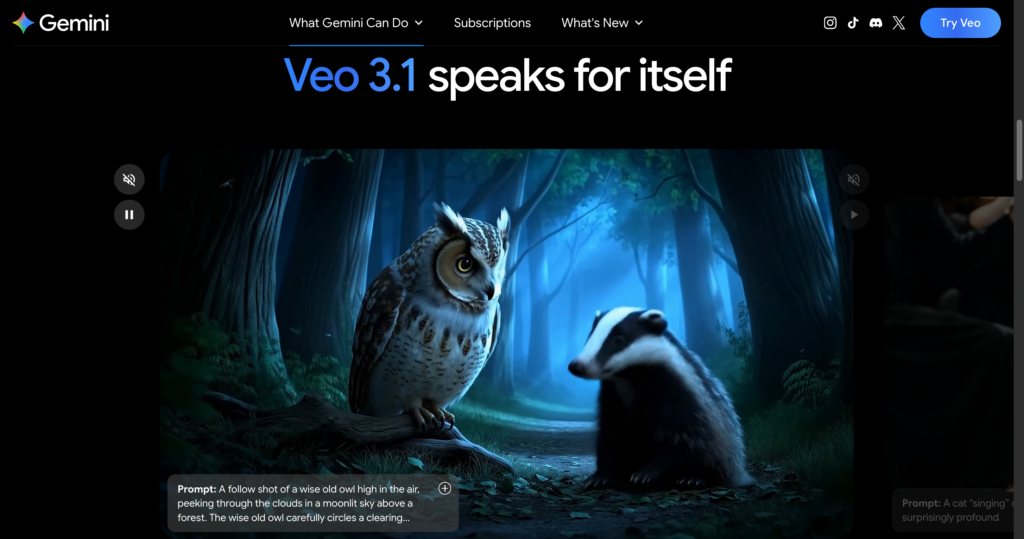
About Veo 3.1

Veo 3.1 is Google’s AI video generation model available through the Gemini app and related Google AI creative tools. It lets users describe a scene or upload an image, then generate short, high-quality videos with native audio, making it useful for creative exploration, social clips, storyboarding, product concepts, and visual brainstorming.

The tool is built for people who want to move from idea to motion quickly without traditional video production. Depending on plan and region, Gemini users can access Veo variants such as Veo 3.1 Lite/Fast through Google AI Plus or Pro, while Google AI Ultra gives the highest level of access to Veo 3.1 and related filmmaking tools like Flow.

Key Features

Text-to-video generation : Describe a scene in natural language and generate an 8-second AI video directly inside Gemini.

Image-to-video workflow : Upload a photo or reference image and animate it into a short video, depending on plan and regional availability.

Native audio generation : Veo 3.1 can generate video with sound, helping clips feel more complete than silent AI video outputs.

Creative style range : Explore cinematic, animated, realistic, meme, product, storytelling, and concept-visualization prompts.

Mobile Gemini access : The official FAQ says video generation works in the Gemini mobile app for eligible users.

Vertical video support : Some official regional pages note support for vertical video generation for mobile and social content.

Safety watermarks : Generated videos include a visible watermark and SynthID digital watermark to indicate AI-generated content.

Google AI ecosystem : Access is connected to Google AI subscriptions and can pair with Gemini, Flow, Whisk, and other Google creative tools depending on plan.

Pros

✔ Strong option for quick AI video ideation, storytelling, memes, prototypes, and social clips.

✔ Native audio generation makes outputs more useful than silent clips for many creative workflows.

✔ Integrated into Gemini, so eligible users can generate videos from the same assistant they already use.

✔ Image-to-video support helps turn still references into motion concepts.

✔ Watermarking and SynthID help identify AI-generated video content.

✔ Ultra plan provides the highest access to Veo 3.1 and related Flow filmmaking tools.

Cons

✖ Video generation requires an eligible paid Google AI plan in supported regions.

✖ Generated clips are short, so longer productions need editing, stitching, or tools like Flow.

✖ Availability, model variant, and limits vary by country, age, language, and subscription plan.

✖ Outputs may vary and still require human review for brand safety, rights, policy compliance, and factual accuracy.

✖ Visible watermarking may not suit every commercial or polished production workflow.

Plans & Pricing

PlanTypePriceUsage LimitInclusions
Free GeminiFree$0 / local equivalentNo full Veo video generation access listed for core free useGemini app access, image generation/editing, Deep Research, Gemini Live, Canvas, and other Gemini features depending on region.
Google AI PlusSubscriptionLocal pricing varies ⚠️Limited video generation access where availableMore access to Gemini features plus limited Veo 3.1 Lite-style video creation and higher creative/productivity limits in supported countries.
Google AI ProSubscriptionLocal pricing varies ⚠️Higher access than Plus; limits vary by regionAccess to advanced Gemini models and Veo 3.1 Lite/Fast video generation, plus higher access to Flow and other Google AI features.
Google AI UltraSubscriptionLocal pricing varies ⚠️Highest Veo access listed by GoogleHighest level of access to Veo 3.1, Flow filmmaking features, top Gemini capabilities, and premium Google AI limits where available.

Source: gemini.google/overview/video-generation and gemini.google/subscriptions (verify regional pricing on official website).

FAQs

Q1: What is Veo 3.1 used for?+

Veo 3.1 is used to generate short AI videos from text prompts or images for creative exploration, social clips, memes, storyboards, product ideas, and rapid visual brainstorming.

Q2: Is Veo 3.1 available inside Gemini?+

Yes. Google’s video generation page describes Veo 3.1 video generation inside Gemini for eligible users with supported Google AI plans.

Q3: Can Veo 3.1 generate videos with sound?+

Yes. The official page highlights native audio generation, so videos can include generated sound rather than being silent clips.

Q4: Which plan gives the highest Veo access?+

Google AI Ultra is described as providing the highest level of access to Veo 3.1, while Plus and Pro provide more limited video generation access depending on region.

Q5: Are Veo videos watermarked?+

Yes. Google says videos generated with Veo in Gemini include a visible watermark and SynthID digital watermark embedded in each frame.

0/5
from 0 reviews
★★★★★
(0)
★★★★
(0)
★★★
(0)
★★
(0)
(0)

Leave a Reply

Alternative AI Tools

remotion

Remotion

0 user reviews
Free / Commercial license , Freemium

Remotion is a React framework for creating real MP4 videos programmatically, parameterizing content, rendering server-side, and building custom video creation apps.

, , ,

Expo

0 user reviews
Freemium / Usage-based , Freemium

Expo is a full-stack React Native framework and cloud services platform for building, previewing, submitting, updating, monitoring, and deploying iOS, Android, and web apps.

, , ,

happenstance

Happenstance

0 user reviews
Freemium / Subscription , Freemium

Happenstance is an AI network search tool for finding people, warm introductions, candidates, investors, founders, customers, and contacts across personal and team networks.

, , ,

Designkit

0 user reviews
Freemium / Subscription , Freemium

Designkit is an AI e-commerce creative suite for generating product images, fashion models, product videos, backgrounds, edits, enhancements, and batch product visuals.

, , ,