ClipFinder

ClipFinder is an AI-powered video highlight tool that watches long-form streams and VODs from YouTube, Twitch, and Kick to automatically extract, score, and reframe viral clips for vertical platforms.

Pricing: Freemium / Monthly & Annual Subscription Starts with : $15/month
8.9 Score
ClipFinder
8.9 Score
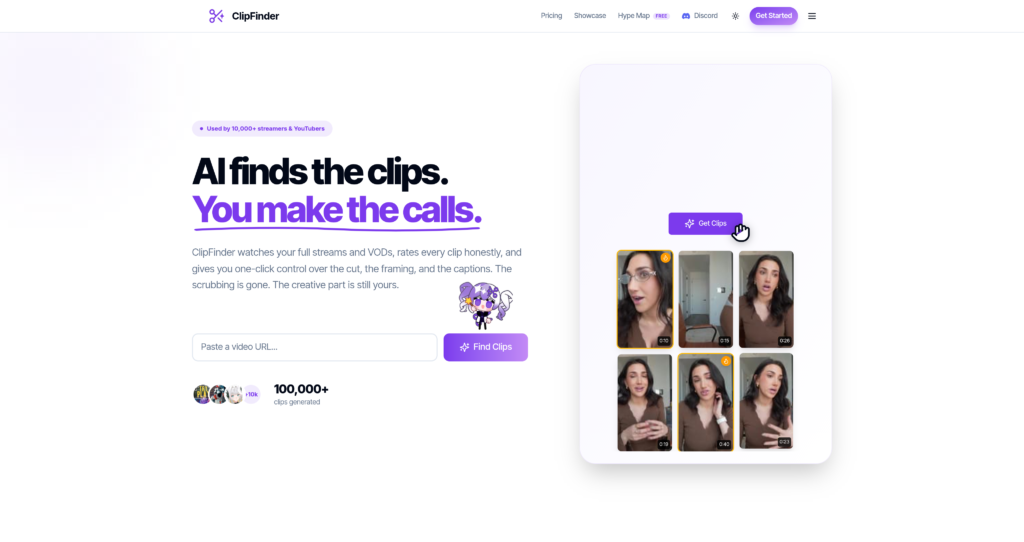
ClipFinder Mockup Screenshot

About ClipFinder

ClipFinder is an AI-powered video highlight extraction tool built for streamers, podcasters, and content creators. Instead of spending hours scrubbing through long video files or Twitch VODs, users can paste a link from YouTube, Twitch, or Kick. ClipFinder watches the entire video, gameplay, and reactions, analyzes the context to identify the most engaging or funny moments, and outputs batch clips within minutes.

The platform is designed to facilitate quick social media sharing. ClipFinder offers automated reframing to convert standard 16:9 widescreen footage into 9:16 portrait files optimized for YouTube Shorts, Instagram Reels, and TikTok. It also generates and burns in high-accuracy captions across more than 20 languages and links directly to social channels for one-click publishing.

To compare this platform with other video highlight tools, view the Invideo Review and the Pictory AI Review, or browse our list of verified highlight tools in the Video Generator Category.

Key Features

AI Highlight Detection : Automatically scans video gameplay, visuals, and speech patterns to locate the most viral and engaging stream moments.

Virality Scoring : Assigns an honest engagement and retention grade to each detected clip, sorting clips by their shareable potential.

Auto-Reframe (9:16) : Intelligently crops landscape 16:9 streams into vertical portrait video segments ready for Shorts, Reels, and TikTok.

Burned-In Captions : Generates dynamic, multi-colored captions with support for over 20 global languages using high-accuracy transcription.

In-Browser Trimming : Provides simple, lightweight video editing sliders to refine start and end points before exporting.

No Per-Video Fees : Offers a simple monthly or annual subscription model instead of charging users per video or per clip generation.

Direct Social Publishing : Connects and posts clips directly to YouTube and TikTok accounts straight from the dashboard.

Priority Processing : Processes VOD queues on high-performance nodes to deliver completed clip batches in minutes for premium plans.

Pros

✔ Unlimited video clipping on the Pro plan eliminates credit counting.

✔ Intelligent 9:16 cropping keeps gameplay action and speakers centered.

✔ Automatically grades video clips to identify high-retention segments.

✔ Generates highly accurate subtitles in over 20 major languages.

✔ Lifetime free tier allows creators to test the engine without a card.

✔ Directly publishes to social channels without manual download steps.

✔ Simple dashboard requires zero previous timeline editing experience.

Cons

✖ Free exports include a visible watermark on the clips.

✖ The Starter plan limits source videos to a maximum of 2 hours.

✖ Maximum video processing limits cap at 5 hours even on the Pro plan.

✖ Fast action or chaotic screens can occasionally disrupt auto-cropping focal points.

✖ High-resolution 4K source VODs are scaled down to 1080p outputs.

✖ Does not offer a standalone desktop application for offline editing.

✖ Support channels do not support real-time telephone assistance.

Plans & Pricing

PlanMonthly PriceAnnual Price (Billed Annually)Limits & Features Included
FreeFreeN/A1 free hour of video lifetime, watermark on exports, AI detection
Starter$15/monthN/A10 hours of video/month, up to 2-hour videos, no watermark, 1080p downloads
Pro$29/month$14.50/month ($174/year)Unlimited videos (up to 100 hrs/mo fair-use), up to 5-hour videos, Pro AI, 4 parallel runs

Source: ClipFinder pricing page.

FAQs

Q1: How does ClipFinder find the best moments in my streams?+

ClipFinder’s AI analyzes video visuals, player activity, and speech patterns rather than just raw volume levels, accurately detecting funny, wholesome, or action-packed clips.

Q2: What platforms are supported by ClipFinder?+

You can paste video URLs directly from YouTube, Twitch (including Twitch VODs), and Kick to extract highlights.

Q3: What are the limits of the Free plan?+

The Free tier gives you 1 hour of VOD analysis credits for lifetime testing. Exports created on the Free plan include a watermark.

Q4: Is there an unlimited plan?+

Yes, the Pro Plan ($29/month) offers unlimited video clipping under a fair-use guideline of up to 100 hours of video analysis per month.

Q5: Can I customize my captions in ClipFinder?+

Yes, you can generate and burn in styled captions with custom fonts, colors, and layout positioning across more than 20 languages.

Detailed Assessment & Score

Overall Rating
8.9 Very Good
Core Performance Metrics
Ease of Use 9.0/10
Features 8.8/10
AI Quality 8.9/10
Value 8.9/10
Key Facts & Details
Free Plan Available Yes
API Integration Support No
Official Mobile App No
Browser Extension Support No
Best Suited For
Extracting short highlights from long gaming streams and podcast VODs Reframing 16:9 videos into 9:16 vertical Shorts and TikToks Generating viral clips and automated multi-lingual captions
System Integrations
YouTube Twitch VODs Kick streams Discord

User Ratings & Reviews

0
Based on 0 User Reviews
5 Star
(0)
4 Star
(0)
3 Star
(0)
2 Star
(0)
1 Star
(0)

Leave a Reply

Published: Updated:
Comparison Matrix
Key Features
ClipFinder Icon ClipFinder Active
Otter Icon Otter
Guidde Icon Guidde
Glean Icon Glean
Review Score 8.9/10 9.3/10 8.8/10 8.7/10
Pricing Model Freemium / Monthly & Annual Subscription Freemium / Subscription Free / Subscription / Enterprise Enterprise / Custom
Free Plan ✔ Yes ✔ Yes ✔ Yes ✖ No
Starting Cost Freemium Freemium Freemium Premium
Details Page Active Page Compare Compare Compare

Similar Alternatives to ClipFinder

Otter Logo

Otter

0 user reviews
9.3
Freemium / Subscription Freemium

Otter is an AI meeting assistant that records, transcribes, summarizes, answers questions, creates workflows, syncs notes to CRMs, and captures action items from meetings.

Guidde Logo

Guidde

0 user reviews
8.8
Free / Subscription / Enterprise Freemium

Guidde is an AI video documentation platform for capturing workflows, creating how-to videos, generating AI voiceovers, exporting guides, and delivering in-app guidance.

Glean Logo

Glean

0 user reviews
8.7
Enterprise / Custom Premium

Glean is an enterprise Work AI platform for permission-aware search, assistants, agents, research, and workflow automation across company knowledge.

Superflows Logo

Superflows

0 user reviews
8.4
Free trial / Subscription Premium

Superflows helps SaaS companies launch AI assistants inside their products, connecting to APIs and docs so users can ask analytics questions, complete actions, and get product guidance.

Happenstance Logo

Happenstance

0 user reviews
8.0
Freemium / Subscription Freemium

Happenstance is an AI network search tool for finding people, warm introductions, candidates, investors, founders, customers, and contacts across personal and team networks.

Notis AI Logo

Notis AI

0 user reviews
8.9
Freemium / Monthly & Annual Subscription Freemium

Notis is your AI intern. Message it from WhatsApp, iMessage, Telegram, Slack, or email and it runs tasks and coordinates workflows across 1000+ connected tools.

AI QA Monkey Logo

AI QA Monkey

0 user reviews
8.8
Freemium / One-time Payment / Monthly Subscription Freemium

AI QA Monkey is an AI-powered website security scanner that runs over 100 automated vulnerability, file leak, SSL, and port checks, giving developers copy-paste fixes and compliance mapping.

BeatMV Logo

BeatMV

0 user reviews
8.9
Freemium / Monthly & Annual Subscription / Credit Packs Freemium

BeatMV is an AI music video generator that turns audio tracks or YouTube links into stylized videos, offering narrative storyboards, lyrics sync, and vocal removal features.