
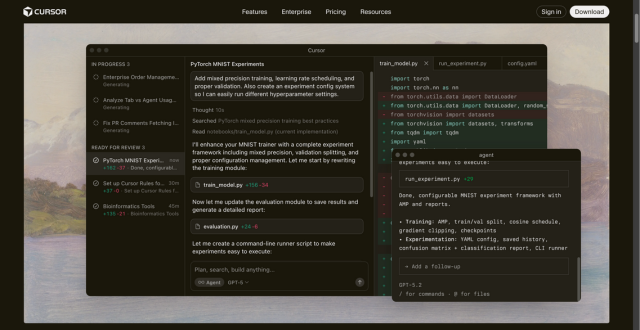
Cursor AI is a powerful fork of Visual Studio Code that integrates advanced AI models directly into your workspace. It understands your entire codebase to provide context-aware suggestions, automated refactoring, and real-time bug fixes.
What is Cursor AI?
Cursor AI is not just another coding assistant; it is a complete Integrated Development Environment (IDE) built for the age of AI. While tools like GitHub Copilot act as plugins, Cursor is a standalone editor. It indexes your entire project, allowing the AI to “see” every file, folder, and dependency. This deep integration enables the AI to answer complex questions about your project and perform multi-file edits simultaneously. Because it is built on VS Code, you can migrate all your extensions, themes, and keybindings in seconds. This makes the transition seamless for professional developers who want more power than a simple chat sidebar can provide.
Key Features:
- Composer (Cmd+I): Performs complex, multi-file edits at once based on a single natural language prompt.
- Agent Mode: An autonomous assistant that can execute terminal commands, create files, and fix bugs independently.
- Codebase Indexing: Scans your entire project to provide answers that respect your project’s unique logic and architecture.
- Smart Tab Autocomplete: Predicts multiple lines of code and suggests the next logical cursor position for faster navigation.
- Model Switching: Choose between top-tier models like GPT-4o, Claude 3.5 Sonnet, and Gemini 1.5 Pro to power your sessions.
- Native Browser Control: The AI can open a browser to test UI, capture console errors, and suggest CSS fixes.
Pros:
- Deep Context: Understands how different parts of your code interact across various files better than standard plugins.
- Familiar Interface: Works exactly like VS Code, eliminating any steep learning curve for most developers.
- Productivity Boost: Dramatically reduces time spent on boilerplate code, documentation, and repetitive refactoring.
- Privacy Mode: Offers local indexing and strict data privacy options where code is not stored for training.
Cons:
- Resource Heavy: It can consume more RAM and CPU than a standard text editor during project indexing.
- Subscription Complexity: The introduction of higher tiers (Pro+ and Ultra) can make cost management tricky for power users.
- Occasional Errors: Like all AI, it may sometimes suggest outdated libraries or logic that requires human verification.
Pricing:
- Hobby (Free): Includes 2,000 completions per month, 50 “slow” premium requests, and a 2-week Pro trial.
- Pro ($20/month): Unlimited completions, 500 “fast” premium requests, and unlimited “slow” requests.
- Pro+ ($60/month): Everything in Pro, plus 3x usage limits and background agent capabilities.
- Ultra ($200/month): A high-usage tier with a 20x multiplier on request quotas for power users.
- Business ($40/user/month): Adds centralized billing, admin dashboards, SSO, and organization-wide privacy controls.
Published on: January 12, 2026