About Tool
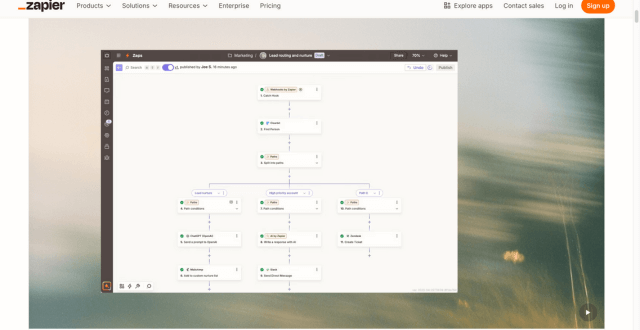
Zapier is a widely-used automation platform that enables users to connect hundreds of applications and services to automate repetitive tasks and streamline business processes. With an intuitive interface and support for multi-step workflows, Zapier lets you build “Zaps” — event-triggered automations that move data between tools without manual intervention. Designed for marketers, small businesses, and enterprise teams alike, Zapier supports conditional logic, filters, formatting tools, and built-in actions to create powerful automated sequences. Its ecosystem spans CRM platforms, email services, project tools, productivity apps, databases, and more, making Zapier a cornerstone of modern productivity stacks for teams looking to save time, reduce errors, and scale operations efficiently.
Key Features
- No-Code Workflow Builder – Build automations visually with a point-and-click interface, no developer skills required.
- App Integrations Across Categories – Connect hundreds of apps spanning CRM, marketing, sales, support, finance, and productivity.
- Multi-Step Zaps – Create automations with multiple triggers and actions to support complex workflows.
- Conditional Logic Filters – Add rules that control when and how a workflow runs based on data conditions.
- Built-In Actions & Utilities – Format text, extract data, perform calculations, and more within workflows.
- Instant & Scheduled Triggers – Trigger workflows in real time or on defined schedules to support timely automation.
- Team Collaboration Tools – Share workflows with team members, set permissions, and manage automation assets centrally.
- Robust Error Handling – Monitor workflow runs, view logs, and resolve errors quickly through built-in diagnostics.
Pros
- Extremely user-friendly for non-technical users
- Broadest app integration ecosystem in the automation space
- Scales from simple to advanced workflows
- Multi-step workflows increase automation flexibility
- Strong community and template library for starter automation ideas
Cons
- Tasks (actions) can accumulate quickly in complex automations
- Pricing can become expensive for high task volumes
- Conditional logic options are not as advanced as some alternatives
Pricing
Pricing Type: Free + Paid Subscription Plans
Zapier’s pricing is based on monthly task allowances and feature tiers. Higher plans unlock faster automation intervals, advanced features, and greater task capacity.
| Plan | Type | Price (Monthly) | Task Limit | Key Inclusions |
|---|---|---|---|---|
| Free | Free | $0 | 100 tasks | Basic automations, single-step Zaps |
| Starter | Paid | $19.99 | 750 tasks | Multi-step Zaps and filters |
| Professional | Paid | $49 | 2,000 tasks | Custom logic and unlimited Zaps |
| Team | Paid | $299 | 50,000 tasks | Shared workspace and collaboration |
| Company | Paid | $599 | 100,000 tasks | Advanced security and enterprise features |
Notes on Pricing:
– Task limits refer to the maximum number of actions your workflows can run per month.
– Higher-tier plans include features like paths (advanced logic), shared workspaces, and priority support.
FAQs
Q1: Does Zapier offer a free plan?
Yes, Zapier’s free plan allows you to test automations with up to 100 tasks per month and basic single-step workflows.
Q2: What is a “task” in Zapier?
A task is counted every time an action in your workflow runs, such as sending an email, creating a record, or updating data.
Q3: Can Zapier handle complex workflows?
Yes, with multi-step Zaps, filters, and paths, Zapier supports advanced automation flows.
Q4: Who should use Zapier?
Zapier is ideal for marketers, entrepreneurs, small businesses, and teams that need reliable automation without coding.
Q5: How fast do Zaps run?
Zapier checks for triggers at intervals depending on your plan; higher plans offer more frequent checks.
Published on: January 30, 2026