
Imagine staring at a blank page, your story idea stuck in your head while the words just won’t come. You know the feeling—writer’s block hits hard, turning hours into frustration. Tools like SudoWrite change that game by sparking ideas and helping you build worlds faster.
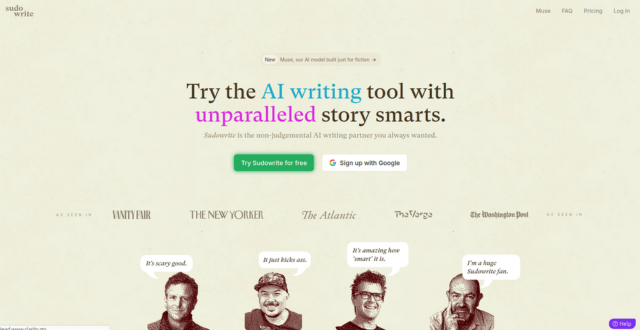
SudoWrite stands out as an AI-powered writing assistant built for fiction and creative work. It uses smart tech to support authors in crafting stories. This review covers what SudoWrite is, its main features, the good points, the downsides, and my final take on whether it fits your needs.
What is SudoWrite? An Overview
SudoWrite helps writers create stories with AI support. It focuses on fiction, using models like GPT to generate text and ideas. Unlike general tools, it targets creative tasks such as plotting novels or scripting scenes.
The platform started as a simple beta in 2021, created by authors who faced the same struggles. They wanted to make storytelling easier for everyone. Today, it offers robust features after updates and user feedback.
History and Development of SudoWrite
Two writers launched SudoWrite in 2021 to aid fellow creators. They built it on open AI tech, aiming to boost imagination without limits. Early versions focused on basic text generation, but growth came from community input.
In 2022, the team raised funds to expand tools. This led to better integration and new modes like visual planning. SudoWrite now serves thousands, sticking to its goal of making pro-level writing accessible.
Key updates include genre-specific aids, rolled out in 2023. These keep the tool fresh for users. The mission remains clear: empower stories, not replace the writer.
Target Users and Use Cases
SudoWrite suits novelists, screenwriters, and casual storytellers. If you write fantasy epics or short tales, it’s a match. Hobbyists find it great for quick practice sessions.
Use it to brainstorm plot twists during a late-night session. Or generate dialogue for characters in a script. For daily routines, start with a 500-word prompt to build momentum.
Screenwriters can outline acts with AI help. Novelists track arcs across chapters. Even bloggers dabble in fiction side projects here.
How SudoWrite Integrates with Writing Workflows
Getting started takes minutes—sign up and link your docs. It works well with Google Docs for easy export. Scrivener users paste outputs directly into projects.
Pricing starts free for trials, then $10 a month for basics. Higher tiers unlock unlimited use at $20 or more. Test it on a short story first to see the flow.
Beginners, pick one feature like brainstorming. Import your draft, let AI suggest changes, then refine. This builds comfort without overwhelm.
Key Features of SudoWrite
SudoWrite shines with tools tailored for story creation. Each one enhances your process, from spark to polish. Let’s break down the standouts.
These features use AI to mimic human creativity. You input prompts, and it delivers options. Customize as needed for your style.
The Brainstorm Tool for Idea Generation
This tool sparks fresh concepts fast. Enter a genre or theme, and it suggests plots, characters, or settings. For sci-fi, it might create alien worlds with unique rules.
Adjust tone to match—dark for thrillers, light for romance. Prompts like “a detective in 2050” yield detailed backstories. Refine by adding details; ask for three variations.
Tip: Start broad, then narrow. This avoids bland ideas and fits your vision.
Rewrite and Describe Modes for Refinement
Rewrite takes your draft and offers style tweaks. It fixes clunky sentences or shifts voice. A simple line like “He walked to the door” becomes “He strode toward the creaking door, heart pounding.”
Describe adds senses to scenes. Turn flat action into vivid moments—smells, sounds, touches. Use it on key paragraphs for immersion.
Iterate: Run multiple rewrites, pick the best. Sessions of 20 minutes yield big improvements. Always keep your core intent.
Canvas and Story Bible for Project Management
Canvas acts as a digital whiteboard for mapping plots. Drag elements like characters or events to visualize flow. It’s perfect for tangled novels.
Story Bible stores details for consistency—names, timelines, lore. Update as you go to avoid plot holes. No direct collab yet, but share exports easily.
Organize big projects: Outline chapters on Canvas, reference Bible during writes. This saves time on revisions.
Additional Tools: Autocomplete and Genre-Specific Aids
Autocomplete continues your sentences smoothly. Type a few lines, and it predicts the next. Great for flowing drafts without pauses.
Genre aids handle specifics, like magic rules in fantasy. Input basics, get balanced systems. Combine with autocomplete in Canvas for hybrid work.
Efficiency tip: Chain tools—brainstorm, autocomplete the scene, then rewrite. This speeds up chapters.
Pros of Using SudoWrite
SudoWrite boosts your writing in clear ways. Users on Product Hunt rave about its idea flow. It helps you write more without losing spark.
Enhanced Creativity and Speed
It crushes blocks, letting you draft thousands of words daily. One user finished a novel outline in days. You stay in the zone longer.
Tip: Limit to first drafts. This keeps your voice strong amid AI help.
User-Friendly Interface and Customization
The design feels simple, even for tech newbies. Sliders adjust AI creativity—low for subtle, high for wild. Feedback on G2 calls it intuitive.
Tweak outputs to fit your genre. This personalization makes it yours.
Cost-Effectiveness for Aspiring Authors
At $10 monthly, it’s cheaper than Jasper’s plans. The free tier tests core tools well. Track words produced; many see quick returns.
Compare: You get fiction focus without extras you won’t use. Ideal for budget writers.
Cons and Limitations of SudoWrite
No tool is perfect, and SudoWrite has hurdles. Reviews on Reddit point out output quirks. Balance these with smart use.
Potential for Generic or Inconsistent Output
AI text can sound cookie-cutter in deep plots. Complex emotions might miss nuance. It’s a helper, not a full author.
Tip: Edit every line heavy. Use as seeds, grow them yourself.
Privacy and Ethical Concerns
Inputs feed the model, per their policy. They share transparency on data. For published work, check originality to avoid issues.
SudoWrite states no selling of your stories. Still, review terms before deep dives.
Learning Curve and Subscription Dependencies
New users struggle with prompt crafting at first. Full power needs paid access. Tutorials help, but practice takes time.
Tip: Watch in-app guides early. Build skills on small pieces.
Final Thoughts and Recommendations
SudoWrite offers real value for creative minds. Here’s a quick wrap-up:
- Strong for ideas and drafts: It speeds up the tough parts.
- Best for fiction fans: Suits storytellers over reports.
- Watch the edits: AI aids, but your touch makes it shine.
- Try it free: See if it clicks for your workflow.
I recommend SudoWrite if you seek inspiration without full replacement. Start with the trial on a short project. AI like this shapes writing’s future—use it to amplify your voice, not silence it.
What story will you build next? Head to SudoWrite and find out.
Pricing Model
- Hobby & Student Plan: $19/month – 30,000 AI words/month, full access, no limits.
- Professional Plan: $29/month – 90,000 AI words/month, priority access to tools.
- Max Plan: $129/month – 300,000 AI words/month, designed for full-time writers.
- Annual billing options offer discounted rates.
Created on: June 26, 2025
Last updated: October 7, 2025