
About Tool
PicoClaw represents something genuinely remarkable in the world of personal AI assistants – it’s proof that sophisticated automation doesn’t require expensive hardware or cloud infrastructure. Developed by Sipeed and inspired by the original OpenClaw project, this lightweight marvel runs comfortably on devices that most people would consider obsolete. Think old Android phones running Termux, $10 RISC-V development boards, Raspberry Pi Zero units collecting dust, or even decade-old laptops that can barely handle modern web browsers. What makes this possible is a complete architectural rethink built entirely in the Go programming language, delivering performance that feels almost absurd when you consider the constraints.
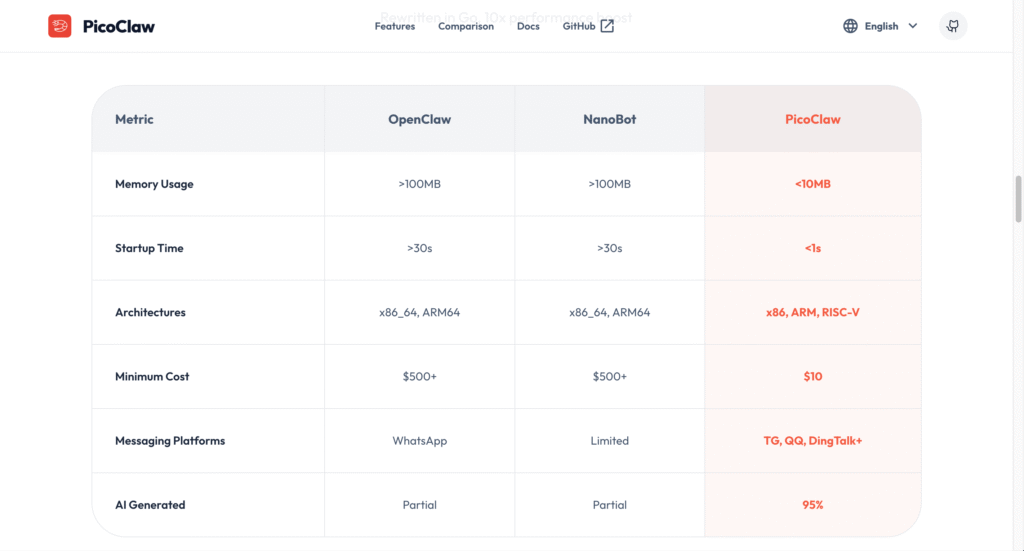
The numbers tell an interesting story. Where OpenClaw demands over 100MB of memory and takes 30+ seconds to start, PicoClaw boots in under a single second while using less than 10MB of RAM – that’s roughly equivalent to what a single browser tab consumes. This efficiency comes from being compiled into a standalone binary with zero runtime dependencies, meaning no Python interpreters, no Node.js environments, just pure executable code that runs the moment you launch it. Interestingly, about 95% of PicoClaw’s core functionality was actually generated by AI agents themselves through a self-bootstrapping process, with human developers primarily guiding the architecture and ensuring quality control.
You interact with PicoClaw through messaging platforms you already know – Telegram works particularly well with voice message transcription, Discord for community bots, QQ for Chinese users, DingTalk for workplace automation, and several others. The assistant maintains persistent memory across conversations, handles scheduled tasks through cron-style automation, searches the web for current information, executes code, manages files, and basically performs the same core functions as much heavier alternatives. It connects to major AI providers like OpenRouter (which gives access to nearly every model available), Anthropic’s Claude, OpenAI’s GPT models, DeepSeek, Groq, and Chinese providers like Zhipu AI. You can even switch models mid-conversation if you want different capabilities or pricing for different types of tasks.
The practical implications are fascinating. Developers use PicoClaw for server monitoring on cheap VPS instances, hobbyists run it on single-board computers for home automation, students deploy it on old phones as always-on personal assistants, and technically-minded folks appreciate having a powerful AI agent that doesn’t require dedicated expensive hardware sitting on their desk consuming electricity. The software itself costs absolutely nothing – it’s MIT licensed open source – though you’ll pay for whichever AI model API you connect it to, typically running $2-15 monthly depending on usage patterns. Setup requires genuine technical skills involving command-line interfaces, API configuration, and basic security understanding, making this firmly a tool for developers and technical enthusiasts rather than general consumers. But for anyone comfortable in that space, PicoClaw delivers impressive capabilities at a resource footprint that simply shouldn’t be possible.
Key Features
- Extreme Resource Efficiency – Operates in under 10MB of RAM with sub-second startup times, enabling deployment on hardware that costs less than lunch at a restaurant.
- Multi-Architecture Support – Ships as single self-contained binaries for RISC-V, ARM64, and x86 architectures, running identically across embedded boards, phones, Raspberry Pis, and regular computers.
- Multiple Messaging Platform Integration – Connect through Telegram (with voice transcription via Groq Whisper), Discord, QQ, DingTalk, Feishu, and other chat platforms using simple bot tokens.
- Flexible LLM Provider Support – Works with OpenRouter for broad model access, Anthropic Claude, OpenAI GPT, Google Gemini, DeepSeek, Groq, Zhipu AI, and any OpenAI-compatible endpoint.
- Persistent Memory and Context – Maintains conversation history and user preferences across sessions, eliminating repetitive context-setting in every interaction.
- Built-In Task Scheduling – Execute one-time reminders, recurring automation, and standard cron expressions for scheduled workflows without external tools.
- Web Search Integration – Query real-time information through DuckDuckGo (enabled by default) or Brave Search API for current data beyond model training cutoffs.
- AI-Bootstrapped Architecture – Core codebase generated through self-referential AI development with human oversight, demonstrating advanced automated software engineering.
Pros
- Completely free and open-source with MIT license and no hidden costs
- Runs on incredibly cheap hardware that would otherwise be discarded
- Lightning-fast startup and response times compared to heavier alternatives
- True privacy with local execution – no data leaves your infrastructure
- Active development community contributing features and improvements regularly
- Minimal power consumption suitable for always-on edge deployment
- Model-agnostic design lets you switch providers without code changes
Cons
- Requires substantial technical knowledge for initial setup and configuration
- Documentation assumes Linux familiarity and command-line comfort
- Still quite new with potential bugs and frequent breaking changes
- API costs for LLM providers still apply despite free software
- Limited graphical interface – primarily command-line interaction
- Not suitable for non-technical users despite accessible hardware requirements
- Smaller ecosystem of skills and extensions compared to established platforms
Pricing
Pricing Type: Free & Open-Source (API & Infrastructure Costs Apply)
PicoClaw’s software is completely free under MIT license with no subscription fees. However, running it involves costs for AI model access and optional hosting, with totals varying dramatically based on your specific setup and usage.
| Cost Component | Type | Estimated Price | Details |
|---|---|---|---|
| PicoClaw Software | Free | $0 | Fully open-source, no licensing fees, unlimited installations, complete code access for modification |
| Hardware Options | One-Time or Free | $0 – $50 | Old Android phone via Termux (free), Raspberry Pi Zero ($10-15), LicheeRV Nano RISC-V board ($10-15), NanoKVM ($30-50), existing laptop or desktop (free), cheap VPS server ($3-5/month) |
| LLM API Costs | Variable | $2 – $30/month | Light usage with efficient models ($2-8/month), moderate usage with GPT or Claude ($10-20/month), heavy automation workflows ($20-50/month), local models via Ollama (free but requires powerful hardware) |
| Typical Light User | Monthly | $2 – $10 | Running on existing hardware + minimal API usage with DeepSeek or Gemini free tier |
| Typical Moderate User | Monthly | $10 – $25 | VPS hosting + Claude Haiku or GPT-4o mini for regular automation and conversations |
| Developer/Power User | Monthly | $20 – $50 | Dedicated hardware + Claude Sonnet or GPT-4o for complex reasoning and heavy usage |
Notes on Pricing:
– The “free” refers exclusively to the software license. Budget appropriately for AI model API access based on your expected usage patterns.
– API costs vary enormously. A single complex task requiring extensive reasoning might consume $0.10-0.50 in tokens, while simple messages cost fractions of a cent.
– OpenRouter often provides the best value, giving access to multiple models at competitive rates with a single API key.
– Free tiers exist: Google AI Studio (Gemini) offers generous free quotas without credit cards, and DeepSeek provides extremely cheap models.
– Local model hosting via Ollama eliminates API costs entirely but requires significantly more powerful hardware with at least 8GB RAM, preferably 16GB+.
– Hardware investment can be zero if you repurpose existing devices – old phones, retired Raspberry Pis, or spare computers work fine.
– VPS hosting ($3-5/month from providers like Hetzner or Oracle Cloud Free Tier) offers 24/7 availability without keeping personal computers running constantly.
FAQs
Q1: Is PicoClaw actually free to use?
The software itself is 100% free and open-source under MIT license with no restrictions. However, you’ll pay for the AI model API it connects to (typically $2-30/month depending on usage) and optionally for hosting if you don’t use existing hardware. Total costs remain far lower than commercial AI assistant subscriptions.
Q2: How does PicoClaw compare to OpenClaw?
PicoClaw uses 99% less memory (under 10MB vs 100MB+), boots 400 times faster (1 second vs 8+ minutes), costs 98% less for hardware ($10 RISC-V vs $600 Mac Mini), but offers similar core functionality. The tradeoff is that PicoClaw has a smaller ecosystem of extensions and slightly less mature documentation.
Q3: Do I need coding experience to set up PicoClaw?
Yes, genuinely. You’ll work with command-line interfaces, configure API keys, manage file permissions, and troubleshoot potential issues. Basic Linux knowledge, comfort with terminals, and understanding of how APIs work are essential. This isn’t marketed accurately if claims suggest otherwise.
Q4: Can PicoClaw run on a Raspberry Pi or old phone?
Absolutely – this is actually PicoClaw’s primary advantage. It runs beautifully on Raspberry Pi Zero, old Android phones using Termux, cheap RISC-V boards like LicheeRV Nano, or basically any Linux device with a processor and minimal RAM. Even decade-old hardware works fine.
Q5: Which messaging platforms does PicoClaw support?
Telegram (recommended, includes voice message transcription), Discord, QQ, DingTalk, Feishu (Lark), and potentially others through the gateway system. Telegram integration is most polished and supports the most features including voice-to-text conversion through Groq’s Whisper API.
Published on: February 22, 2026