About Tool
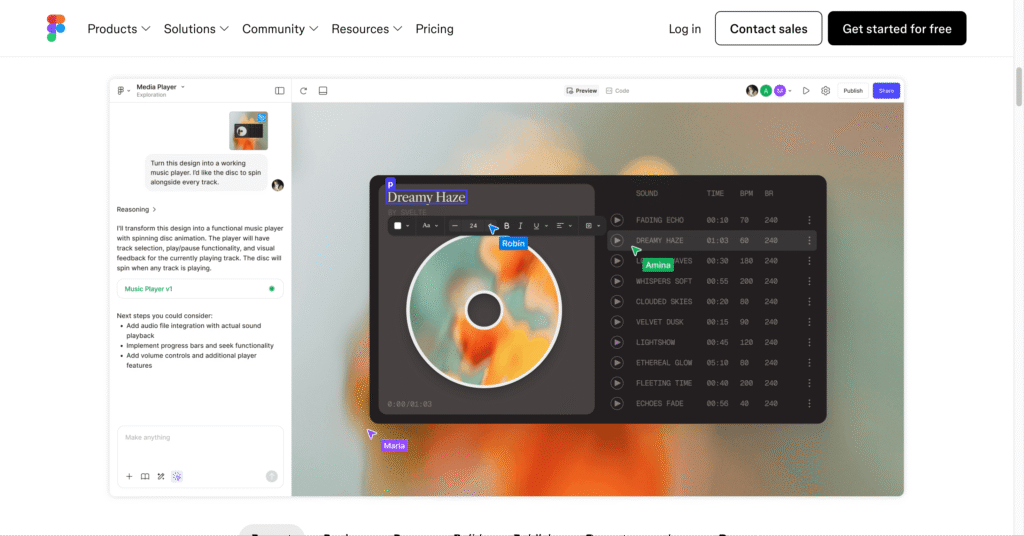
Figma transformed product design by moving everything to the cloud, and in 2026 its AI capabilities come not from Figma itself but from a thriving ecosystem of 100+ third-party plugins that turn this collaborative whiteboard into an intelligent design assistant. Rather than building AI internally, Figma opened its plugin API wide, letting developers create specialized tools that handle everything from generating entire wireframes from text prompts to flagging accessibility violations to converting finished designs into production React code. Popular plugins like UX Pilot generate high-fidelity screens from descriptions, Magician creates copy and illustrations inline, Builder.io converts layouts into framework-ready code, Stark audits for WCAG compliance, and Content Reel populates designs with realistic user data—all seamlessly integrated into the Figma workflow that 180+ million users already know.
Key Features
- AI Wireframe & UI Generation (UX Pilot, Relume, Uizard) – Generate complete screens, wireframes, and user flows from text prompts with editable Figma layers, accelerating concept-to-prototype workflows from days to minutes.
- Content & Copywriting AI (Magician, CopyDoc, Content Reel) – Automatically generate UI copy, fill text layers with realistic names and emails, create microcopy for buttons and labels, eliminating Lorem Ipsum placeholder text.
- Design-to-Code Export (Builder.io, Fronty, Locofy) – Convert Figma frames into production-ready code (React, Vue, HTML, Tailwind) with responsive behavior inference and component structure preservation for developer handoff.
- Accessibility Auditing (Stark, axe, A11y AI) – Automated WCAG 2.1/2.2 compliance checking including contrast ratios, touch target sizing, focus order, vision simulation, and alt text suggestions integrated into design workflow.
- AI Image & Asset Generation (Recraft, Pictographic, Unsplash) – Generate custom illustrations, icons, photos, and graphics directly within designs without switching to external tools like Midjourney or stock libraries.
- Color & Theme Assistants (Khroma, Design Lint) – AI-powered color palette generation learning your preferences, automated design system consistency checking, and intelligent theme suggestions based on brand guidelines.
- Auto-Naming & File Organization (Rename It) – Automatically names layers, frames, and components using AI pattern recognition, dramatically improving file organization and developer handoff clarity especially on large team projects.
- Attention Heatmaps (Attention Insight) – Simulates eye-tracking using AI trained on millions of real fixation points, predicting where users will focus before conducting actual usability testing.
Pros
- Plugins integrate into existing Figma workflow eliminating context-switching friction
- Massive ecosystem means specialized tools for virtually every design task
- Many powerful plugins remain completely free (axe, Iconify, Unsplash, Rename It)
- Real-time collaboration works seamlessly with AI-enhanced workflows for distributed teams
- Mix-and-match approach lets designers build custom AI toolchains matching exact needs
- Active development community ships new capabilities monthly as AI technology evolves
- Figma’s $749M revenue and market dominance ensures long-term platform stability
Cons
- Plugin quality varies dramatically requiring significant trial-and-error to find best tools
- Multiple paid plugin subscriptions accumulate quickly exceeding $50-100/monthly easily
- No native AI features means reliance on third-party developers for continued support
- Performance degrades noticeably when running multiple plugins simultaneously on large files
- Learning curve exists discovering which plugins solve which problems effectively
- Plugin permission model grants extensive file access raising data security concerns
- Updates sometimes break plugins requiring waiting for developer fixes
Pricing
Pricing Type: Platform Free + Individual Plugin Pricing
Figma itself operates freemium, while plugins range from free to $60+/month subscriptions or one-time purchases.
Figma Platform Base Pricing:
| Plan | Type | Price (Annual) | Price (Monthly) | Inclusions |
|---|---|---|---|---|
| Starter | Free | $0 | $0 | Unlimited personal files, 3 Figma files, 3 FigJam boards, unlimited collaborators, basic plugins |
| Professional | Paid | $144/editor ($12/mo) | $15/editor | Unlimited files, version history, team libraries, advanced prototyping, premium plugins access |
| Organization | Paid | $540/editor ($45/mo) | $55/editor | Everything in Professional, plus: design system analytics, org-wide libraries, SSO, advanced permissions |
Popular AI Plugin Pricing Examples:
- UX Pilot: Free beta (limited), Pro $29/month (unlimited generations)
- Magician: Free (20 uses/month), Pro $8/month (unlimited)
- Builder.io: Free tier, Pro $25/month per seat
- Stark: Free (basic), Pro $11/month per seat (full accessibility suite)
- Relume: Free (limited), Pro $38/month
- Content Reel: Free forever
- Iconify: Free forever
- axe: Free forever
FAQs
Q1: Does Figma have built-in AI features?
No, Figma itself doesn’t include native AI capabilities. All AI functionality comes from third-party plugins. However, Figma announced “Figma Make” (AI app builder) in February 2026 which may integrate AI more directly in the future.
Q2: Which Figma AI plugins are completely free?
Excellent free options include axe (accessibility), Iconify (icon library), Unsplash (photos), Content Reel (realistic user data), Rename It (auto-naming), and basic versions of Magician and UX Pilot. These provide substantial value without any payment.
Q3: How much does a complete Figma AI setup cost?
Figma Professional ($12-15/month) + UX Pilot Pro ($29) + Stark Pro ($11) + Magician Pro ($8) totals around $60-65/month for an individual designer with comprehensive AI capabilities. Teams multiply this per editor seat.
Q4: Are Figma AI plugins safe for client work?
Most reputable plugins are safe, but always review permission requests. Plugins can access your entire file contents and potentially upload data to external servers. Avoid unknown plugins on confidential client projects and prefer established developers with transparent privacy policies.
Q5: Can AI plugins replace actual designers?
No. Plugins accelerate workflows by automating repetitive tasks (generating wireframes, checking accessibility, exporting code) but can’t replicate strategic thinking, user empathy, brand intuition, or creative problem-solving. They’re productivity multipliers, not designer replacements.
Created on: March 19, 2026
Last updated: March 20, 2026