
The AI coding revolution has transformed software development, with AI-powered coding assistants becoming essential tools for developers worldwide. Two platforms dominate the conversation: GitHub Copilot and Claude Code. But which AI coding assistant truly delivers the best experience for modern developers? This comprehensive comparison examines features, performance, pricing, and real-world use cases to help you choose the right AI programming tool.
Understanding AI Coding Assistants
AI coding assistants leverage large language models (LLMs) and machine learning to provide intelligent code suggestions, automated code generation, and real-time programming assistance. These tools integrate directly into your development environment, offering context-aware code completion, bug detection, and even full feature implementation.
The rise of AI pair programming has shifted from simple autocomplete to sophisticated code generation systems that understand project context, write tests, refactor code, and debug complex issues autonomously.
GitHub Copilot: The Industry Pioneer
What is GitHub Copilot?
GitHub Copilot is Microsoft’s AI-powered code completion tool, launched in 2021 and powered by OpenAI’s Codex model. As the first mainstream AI coding assistant, Copilot pioneered the concept of AI pair programming and quickly became the industry standard.
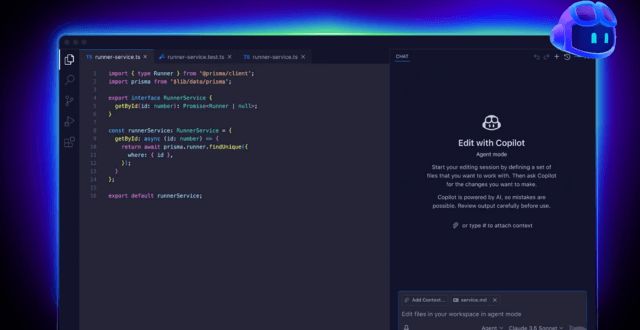
Key Features of GitHub Copilot
Inline Code Suggestions: Copilot provides real-time code completion as you type, offering context-aware suggestions based on your current file and coding patterns.
Multi-Language Support: Supports virtually all programming languages including Python, JavaScript, TypeScript, Ruby, Go, C++, Java, and dozens more.
IDE Integration: Native support for Visual Studio Code, Visual Studio, JetBrains IDEs, and Neovim with seamless integration.
Code Comments to Code: Write natural language comments describing what you want, and Copilot generates the corresponding code implementation.
GitHub Copilot Chat: Conversational AI interface within your IDE for asking programming questions, debugging help, and code explanations.
Copilot for Business: Enterprise features including organization-wide policy management, license management, and privacy controls.
GitHub Copilot Pricing
- Individual Plan: $10/month or $100/year
- Business Plan: $19/user/month
- Enterprise Plan: $39/user/month
- Free for Students and Open Source Maintainers
Strengths of GitHub Copilot
- Mature Ecosystem: Years of development and refinement
- Extensive Language Support: Works with virtually any programming language
- IDE Integration: Deep integration with popular development environments
- Large User Base: Massive community and extensive documentation
- Fast Code Completion: Near-instantaneous suggestions for most code patterns
Limitations of GitHub Copilot
- Context Window Limitations: Limited understanding of large codebases
- Accuracy Varies: Quality of suggestions depends heavily on code popularity
- Privacy Concerns: Code sent to Microsoft/OpenAI servers
- Subscription Cost: Monthly fees can add up for independent developers
- Generic Solutions: May suggest common patterns rather than project-specific implementations
Claude Code: The Autonomous Developer
What is Claude Code?
Claude Code (also known as Claude Codex) is Anthropic’s AI-powered coding tool that takes a fundamentally different approach. Rather than just suggesting code completions, Claude Code acts as an autonomous coding agent capable of understanding entire projects, executing multi-step tasks, and iterating on solutions independently.

Key Features of Claude Code
Autonomous Code Generation: Claude Code can understand complex requirements and implement entire features without constant supervision.
Full Project Context: Analyzes entire codebases to provide contextually relevant solutions that match your project’s architecture and coding standards.
Multi-Step Problem Solving: Breaks down complex tasks into steps, implements solutions, tests them, and iterates based on results.
Terminal Integration: Executes commands, runs tests, and interacts with your development environment directly.
Code Review and Refactoring: Analyzes existing code for improvements, suggests refactoring, and implements changes systematically.
Bug Detection and Fixing: Identifies bugs through static analysis and runtime testing, then proposes and implements fixes.
Natural Language Interface: Communicate in plain English to describe what you need, from simple functions to complex system architectures.
Long-Form Reasoning: Claude’s extended context window (200K+ tokens) means it can work with massive codebases and maintain context throughout lengthy development sessions.
Claude Code Pricing
Claude Code is available through:
- Claude Pro: $20/month (includes Claude API access with higher rate limits)
- Claude API: Pay-per-use pricing starting at $3 per million tokens for Claude Sonnet
- OpenClaw Integration: Self-hosted solution using your own Claude API key
Strengths of Claude Code
- Autonomous Execution: Can complete multi-step tasks without constant intervention
- Superior Context Understanding: Massive context window handles entire project architectures
- Code Quality: Generates well-structured, maintainable code with proper documentation
- Testing Integration: Automatically writes and runs tests for generated code
- Self-Correction: Iterates on solutions when tests fail or errors occur
- Privacy Options: Can be self-hosted for complete data control
Limitations of Claude Code
- Newer Platform: Less mature than Copilot with smaller community
- Setup Complexity: Requires more configuration than Copilot’s plug-and-play approach
- API Costs: Heavy usage can become expensive on pay-per-use model
- Learning Curve: More powerful but requires understanding of agentic workflows
- IDE Integration: Not as deeply integrated into IDEs as Copilot
Head-to-Head Comparison
Code Completion Speed
GitHub Copilot: ⭐⭐⭐⭐⭐
- Near-instantaneous inline suggestions
- Optimized for real-time autocomplete
- Minimal latency in supported IDEs
Claude Code: ⭐⭐⭐⭐
- Slightly slower for simple completions
- Optimized for thoughtful, complex solutions
- Trades speed for accuracy and context
Winner: GitHub Copilot for rapid autocomplete
Code Quality and Accuracy
GitHub Copilot: ⭐⭐⭐⭐
- Excellent for common patterns and boilerplate
- Quality varies with language popularity
- May suggest outdated or insecure patterns
Claude Code: ⭐⭐⭐⭐⭐
- Superior code quality with better architecture
- Understands modern best practices
- More consistent across different scenarios
Winner: Claude Code for overall quality
Context Understanding
GitHub Copilot: ⭐⭐⭐
- Limited to current file and nearby files
- Struggles with large codebase understanding
- Good for local context, weak for project-wide patterns
Claude Code: ⭐⭐⭐⭐⭐
- Analyzes entire project structure
- Maintains context across thousands of files
- Understands architectural patterns and dependencies
Winner: Claude Code decisively
Autonomous Capabilities
GitHub Copilot: ⭐⭐⭐
- Primarily reactive (responds to your typing)
- Copilot Chat adds some proactive features
- Limited multi-step task execution
Claude Code: ⭐⭐⭐⭐⭐
- Fully autonomous agent capabilities
- Can execute complex multi-file changes
- Self-corrects and iterates on solutions
Winner: Claude Code by a wide margin
Language and Framework Support
GitHub Copilot: ⭐⭐⭐⭐⭐
- Comprehensive language support
- Excellent framework knowledge
- Strong performance across all major languages
Claude Code: ⭐⭐⭐⭐
- Excellent for popular languages
- Strong framework understanding
- May be less optimized for obscure languages
Winner: GitHub Copilot for breadth
Testing and Debugging
GitHub Copilot: ⭐⭐⭐
- Suggests test cases when prompted
- Basic debugging assistance
- Limited autonomous testing
Claude Code: ⭐⭐⭐⭐⭐
- Automatically writes comprehensive tests
- Runs tests and fixes failures autonomously
- Advanced debugging with iterative problem-solving
Winner: Claude Code for test automation
Developer Experience and Integration
GitHub Copilot: ⭐⭐⭐⭐⭐
- Seamless IDE integration
- Familiar interface for most developers
- Minimal learning curve
Claude Code: ⭐⭐⭐⭐
- Command-line and chat interfaces
- Steeper learning curve
- More flexible but less polished
Winner: GitHub Copilot for ease of use
Privacy and Data Security
GitHub Copilot: ⭐⭐⭐
- Code sent to Microsoft/OpenAI servers
- Business tier offers some privacy controls
- Enterprise options for sensitive codebases
Claude Code: ⭐⭐⭐⭐⭐
- Can be self-hosted completely
- API calls can be monitored and controlled
- Better options for privacy-conscious teams
Winner: Claude Code for privacy control
Cost Effectiveness
GitHub Copilot: ⭐⭐⭐⭐
- Predictable monthly subscription
- Free for students and OSS maintainers
- Good value for heavy daily use
Claude Code: ⭐⭐⭐⭐
- Pay-per-use can be economical for light use
- Potentially expensive for heavy usage
- Self-hosted options reduce API costs
Winner: Tie – depends on usage patterns
Real-World Use Cases
When to Choose GitHub Copilot
Best For:
- Fast-paced development: When you need instant code completion
- Junior developers: Learning programming patterns and syntax
- Routine coding tasks: Boilerplate code and common implementations
- Small to medium projects: Projects that fit within limited context windows
- Team standardization: When your organization already uses GitHub ecosystem
- Budget predictability: Fixed monthly costs regardless of usage
Ideal Scenarios:
- Writing standard CRUD operations
- Implementing common algorithms and data structures
- Frontend development with popular frameworks (React, Vue, Angular)
- API integration with well-documented services
- Quick prototyping and MVPs
When to Choose Claude Code
Best For:
- Complex refactoring: Large-scale codebase improvements
- Feature implementation: Building complete features from specifications
- Legacy code modernization: Understanding and updating old codebases
- Autonomous development: Tasks that require multiple steps and iterations
- High-quality requirements: When code quality matters more than speed
- Privacy-sensitive projects: When data security is paramount
Ideal Scenarios:
- Microservices architecture development
- Complex business logic implementation
- Database schema design and migration
- Performance optimization across multiple files
- Security vulnerability remediation
- Technical debt reduction
Hybrid Approach: Using Both Tools
Many professional developers are adopting a hybrid AI coding strategy, leveraging the strengths of both platforms:
- Use GitHub Copilot for: Daily autocomplete, quick snippets, routine tasks
- Use Claude Code for: Complex features, refactoring, architectural decisions
- Combine with traditional development: Code review, testing, and manual optimization
This approach maximizes productivity while maintaining code quality and allows developers to choose the right tool for each specific task.
The Verdict: Which AI Coding Assistant Wins?
The answer depends on your specific needs:
Choose GitHub Copilot if you:
- Want instant, inline code suggestions
- Need broad language support
- Prefer tight IDE integration
- Value ease of setup and use
- Have a predictable budget
Choose Claude Code if you:
- Need autonomous, multi-step task execution
- Work with large, complex codebases
- Prioritize code quality over speed
- Require advanced context understanding
- Value privacy and self-hosting options
The Real Winner: Developers
The competition between GitHub Copilot and Claude Code pushes both platforms to improve continuously. The real winner is the developer community, which now has access to powerful AI coding assistants that significantly boost productivity, reduce repetitive work, and enable focus on creative problem-solving.
Future of AI Coding Assistants
The AI coding assistant market is evolving rapidly:
Emerging Trends:
- Multi-model agents: Tools that combine multiple AI models for different tasks
- IDE-native AI: Deeper integration with development environments
- Team collaboration features: AI assistants that understand team workflows
- Custom model training: Fine-tuned AI on your organization’s codebase
- Real-time pair programming: More interactive and conversational AI assistants
Both GitHub Copilot and Claude Code are likely to converge on features over time, with Copilot adding more autonomous capabilities and Claude Code improving IDE integration.
Getting Started with AI Coding Assistants
For GitHub Copilot:
- Install GitHub Copilot extension in VS Code or your preferred IDE
- Sign up for free trial or subscription
- Start typing code and accept suggestions with Tab
- Use Copilot Chat for questions and explanations
- Customize settings for your workflow
For Claude Code:
- Sign up for Claude Pro or get API access
- Install Claude Code CLI or integrate with OpenClaw
- Initialize your project context
- Describe tasks in natural language
- Review and iterate on generated code
Conclusion
GitHub Copilot excels as an inline coding assistant for developers who want fast, accurate autocomplete integrated seamlessly into their IDE. It’s perfect for daily development tasks, learning, and rapid prototyping.
Claude Code shines as an autonomous development agent for complex, multi-step projects requiring deep codebase understanding. It’s ideal for refactoring, feature implementation, and high-quality code generation.
The best choice isn’t either-or—it’s understanding when to use each tool. Consider starting with GitHub Copilot for its ease of use, then exploring Claude Code as your projects grow in complexity and your AI development skills advance.
Both platforms represent the cutting edge of AI-powered development, and both will continue evolving. The future of software development isn’t about replacing developers with AI—it’s about empowering developers with AI tools that amplify their capabilities and free them to focus on innovation and creative problem-solving.
What’s your experience with AI coding assistants? Have you tried both GitHub Copilot and Claude Code? Share your thoughts in the comments below.
Frequently Asked Questions
Q: Can I use GitHub Copilot and Claude Code together? A: Yes, many developers use both. Copilot for inline completions and Claude Code for complex tasks creates a powerful combination.
Q: Is GitHub Copilot better for beginners? A: Generally yes, due to its simpler interface and instant feedback. However, Claude Code’s explanatory capabilities can be valuable for learning.
Q: Which tool is better for enterprise use? A: GitHub Copilot offers more mature enterprise features, but Claude Code provides better privacy options for sensitive codebases.
Q: Do these tools replace human developers? A: No, they augment developer capabilities. Human oversight, creativity, and decision-making remain essential.
Q: What programming languages are best supported? A: Both support major languages (Python, JavaScript, TypeScript, Java, C++, Go). Copilot has broader coverage of niche languages.
Q: Can these tools introduce security vulnerabilities? A: Both can suggest insecure code patterns. Always review generated code and run security audits on production systems.
Q: How much can AI coding assistants improve productivity? A: Studies show 40-55% faster task completion for appropriate use cases, though results vary by task complexity and developer experience.