About Tool
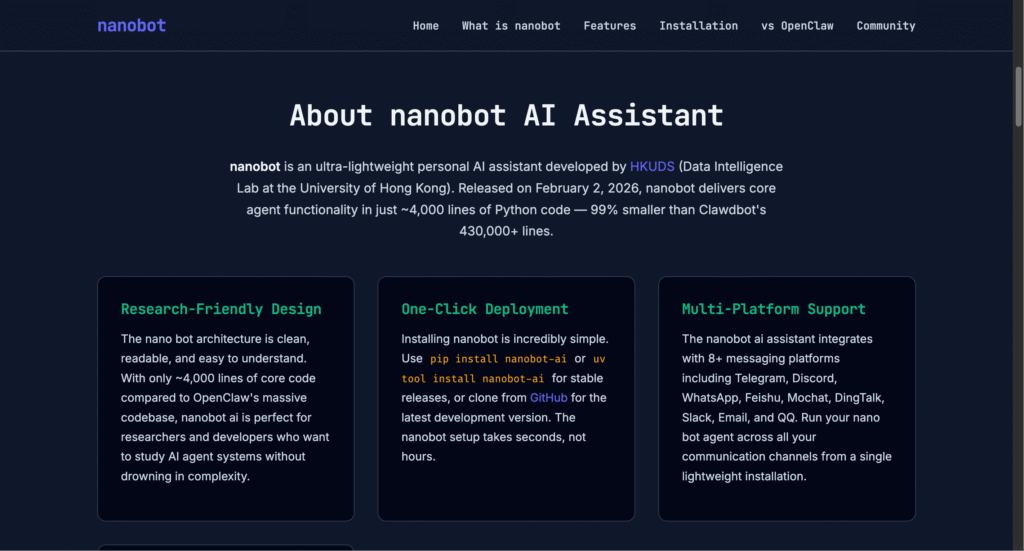
Nanobot emerged from the University of Hong Kong’s Data Intelligence Lab in early February 2026 as something genuinely different in the personal AI assistant landscape. While projects like OpenClaw pioneered the concept of autonomous AI agents with system access, they accumulated massive codebases exceeding 430,000 lines that became increasingly difficult for researchers and developers to understand, modify, or extend. Nanobot took the opposite approach – stripping everything down to absolute essentials and rebuilding from scratch in pure Python with obsessive focus on minimalism and clarity. The result is a production-ready AI assistant contained in roughly 4,000 lines of readable code that delivers 95% of the functionality users actually need while being dramatically easier to deploy, customize, and understand. The project exploded in popularity almost immediately, collecting over 22,000 GitHub stars within its first few weeks and attracting contributions from hundreds of developers worldwide. What makes nanobot particularly clever is its architecture – despite the tiny codebase, it supports 11+ major LLM providers including OpenRouter for broad model access, Anthropic Claude, OpenAI GPT, DeepSeek, Google Gemini, and even local models through vLLM for complete privacy. It connects to 8+ messaging platforms including Telegram with voice transcription, Discord, WhatsApp, Slack, DingTalk, Feishu, QQ, and email, handling everything through a unified gateway system that maintains consistent behavior across channels. The assistant includes persistent memory stored in markdown files, cron-based task scheduling for automation, web search integration, file operations, shell command execution, and extensible tool systems – basically everything you’d expect from much heavier alternatives but implemented with ruthless efficiency.
Key Features
- Ultra-Minimal Codebase – Delivers complete AI agent functionality in approximately 4,000 lines of Python code, making it 99% smaller than comparable systems and dramatically easier to understand, audit, and modify for research or production use.
- Multi-Platform Gateway Architecture – Connects to Telegram, Discord, WhatsApp, Slack, DingTalk, Feishu, QQ, and Email through unified gateway system, enabling consistent AI assistant access across all your communication channels simultaneously.
- Extensive LLM Provider Support – Works with 11+ providers including OpenRouter (global access to 200+ models), Anthropic Claude, OpenAI GPT, DeepSeek, Google Gemini, Zhipu AI, Groq, Moonshot, and local models via vLLM with simple 2-step process for adding new providers.
- Persistent Memory System – Maintains long-term memory in MEMORY.md file plus daily conversation notes, creating genuinely personalized assistance that remembers your preferences, context, and workflows across all interactions.
- Cron-Based Task Automation – Schedule recurring tasks, automated reminders, and proactive workflows using standard cron expressions or simple interval-based timing for 24/7 autonomous operation.
- Voice Message Transcription – Automatic speech-to-text conversion for Telegram voice messages using Groq’s free Whisper API, enabling hands-free interaction with your assistant.
- Extensible Tool System – Built-in capabilities for file operations, shell commands, web browsing, and meta-tools that can generate custom Python functions on-demand to solve specific problems.
- MCP Server Integration – Compatible with Model Context Protocol servers, allowing you to connect external tools and services using the same configuration format as Claude Desktop and Cursor.
Pros
- Completely free and open-source under MIT license with no restrictions
- Dramatically smaller codebase makes learning and customization realistic
- Research-friendly design perfect for studying AI agent architecture
- Lightning-fast startup times under 1 second vs 8+ seconds for heavier frameworks
- Minimal memory footprint around 100MB enables multiple instances easily
- Active community with rapid feature additions and bug fixes
- One-command installation gets you running in under 2 minutes
- Provider Registry system makes adding new LLM providers trivial
Cons
- Requires genuine technical skills including command-line comfort and JSON configuration
- Documentation assumes Python and Linux familiarity that beginners lack
- Very new project with potential for breaking changes as it evolves rapidly
- API costs for LLM providers still apply despite free software
- Smaller ecosystem of pre-built tools compared to mature alternatives
- Some advanced features from heavier frameworks intentionally excluded for simplicity
- Security configuration requires careful attention to prevent unauthorized access
Pricing
Pricing Type: Free & Open-Source (LLM API & Infrastructure Costs Apply)
Nanobot software is completely free under MIT license. However, running nanobot involves costs for LLM API access and optional infrastructure, with totals varying dramatically based on your usage patterns and deployment choices.
| Cost Component | Type | Estimated Price | Details |
|---|---|---|---|
| Nanobot Software | Free | $0 | Fully open-source under MIT license, no usage limits, unlimited installations, complete code access for modification and redistribution |
| LLM API Costs | Variable | $2 – $50+/month | Light usage with efficient models like DeepSeek or Gemini Flash ($2-8/month), moderate usage with Claude Haiku or GPT-4o-mini ($10-25/month), heavy usage with top-tier models ($25-100+/month) |
| Infrastructure Hosting | Variable | $0 – $30/month | Local deployment on existing hardware (free), cheap VPS like Hetzner or Oracle Free Tier ($0-5/month), standard cloud hosting ($10-30/month for reliable 24/7 operation) |
| Voice Transcription | Free | $0 | Groq provides free Whisper API access for Telegram voice message transcription without additional costs or rate limits for reasonable usage |
| Web Search | Optional | $0 – $5/month | DuckDuckGo search enabled by default (free), Brave Search API optional for enhanced results (free tier available, paid tiers $5+/month for high volume) |
| Typical Light User | Monthly | $2 – $15 | Running on existing hardware or free VPS + minimal API usage with affordable models like DeepSeek or Gemini |
| Typical Moderate User | Monthly | $15 – $40 | VPS hosting ($5/month) + regular usage with Claude Haiku or GPT-4o-mini for daily automation and conversations |
| Developer/Power User | Monthly | $30 – $80 | Reliable cloud hosting + Claude Sonnet or GPT-4 for complex reasoning tasks and extensive automation workflows |
Notes on Pricing:
– The “free” aspect refers exclusively to nanobot software license. Budget appropriately for LLM API access based on expected conversation volume and model choices.
– API costs are the primary expense and vary enormously. Simple questions cost fractions of a cent, while complex reasoning tasks with long context windows might cost $0.05-0.20 per interaction.
– OpenRouter often provides best value, offering access to 200+ models at competitive rates with transparent per-model pricing and a single API key.
– Free tier options exist: Google AI Studio (Gemini) offers generous free quotas, DeepSeek provides extremely cheap rates, Groq offers free fast inference for certain models.
– Local model hosting via vLLM eliminates API costs entirely but requires powerful hardware with minimum 16GB RAM (preferably 32GB) and ideally a GPU for acceptable performance.
– Infrastructure costs can be zero if running on existing personal computers, though dedicated hosting provides more reliable 24/7 operation.
– Using prompt caching and efficient prompt design can reduce API costs by 50-70% in production deployments.
– nanobot’s lightweight design means multiple instances can run on a single $5/month VPS, enabling cost-effective multi-bot deployments.
FAQs
Q1: Is nanobot completely free to use?
Yes, the nanobot software is 100% free and open-source under MIT license with no usage restrictions or subscription fees. However, you’ll pay for LLM API access (typically $2-50/month depending on usage) and optional hosting infrastructure. Total costs remain far lower than commercial AI assistant subscriptions.
Q2: How does nanobot compare to OpenClaw?
Nanobot was inspired by OpenClaw but focuses on extreme simplicity. OpenClaw has 430,000+ lines of code and uses ~1GB RAM with 8+ minute cold starts. Nanobot delivers core functionality in 4,000 lines with ~100MB RAM and sub-second startup times. The tradeoff is nanobot has fewer advanced features but is dramatically easier to understand and modify.
Q3: Do I need programming experience to use nanobot?
Genuinely yes. You need comfort with command-line interfaces, basic Python package management, JSON configuration files, and fundamental Linux concepts. Setup involves installing packages via pip, editing config files, obtaining API keys, and running terminal commands. Non-technical users will struggle significantly with installation and troubleshooting.
Q4: Which messaging platforms does nanobot support?
Nanobot works with Telegram (recommended, includes voice transcription), Discord, WhatsApp, Slack, DingTalk, Feishu, QQ, and Email. Telegram integration is most polished and includes automatic voice message transcription via Groq’s Whisper API. You can run multiple platforms simultaneously from a single nanobot instance.
Q5: Can nanobot run completely offline with local models?
Yes, using vLLM to run local models like Llama or Mistral eliminates API costs entirely. You’ll still need internet for initial installation and platform integrations, but the core agent logic can operate with local LLM inference. This requires powerful hardware with minimum 16GB RAM, preferably 32GB with GPU for acceptable performance.
Created on: February 22, 2026
Last updated: March 10, 2026